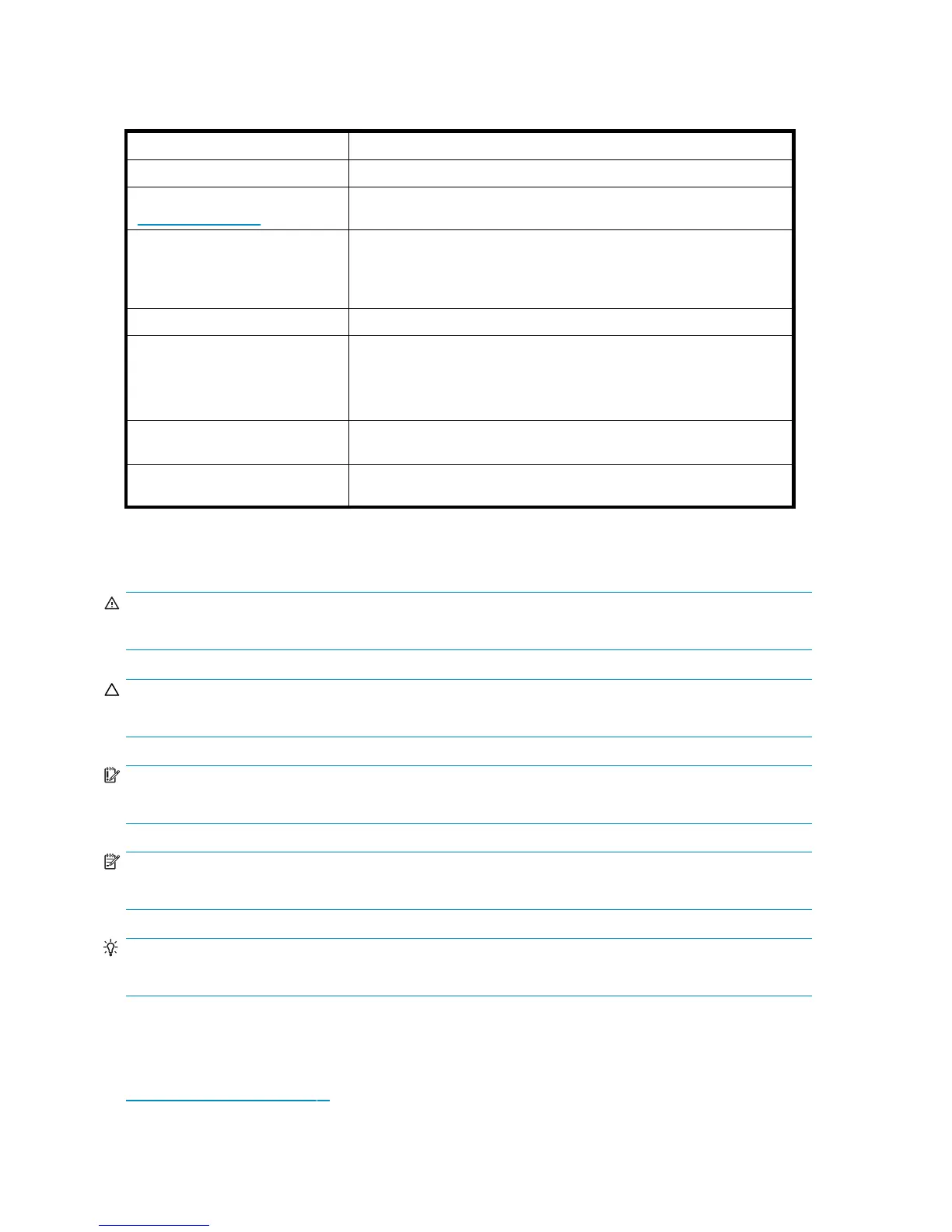
Document conventions and symbols
Table 1 Document conventions
Convention
Element
Blue text
Cross-reference links and e-mail addresses
Medium blue, underlined text
(h
ttp://www.hp.com)
Web site addresses
Bold font
• Key names
• Text typed into a GUI element, such as into a box
• GUI elements that are clicked or selected, such as menu and list
items, buttons, and check boxes
Italic font
Text emphasis
Monospace font
• File and directory names
• System output
• Code
• Text typed at the command line
Monospace, italic font
• Code variables
• Command-line variables
Monospace, bold font
Emphasis of file and directory names, system output, code, and text
typed at the command lin e
Text symbols
WARNING!
Indicates that failure to follow directions could result in bodily harm or death.
CAUTION:
Indicates that failure to follow directions could result in damage to equipment or data.
IMPORTANT:
Provides clarifying information or specific instructions.
NOTE:
Provides additional information.
TIP:
Provides helpful hints and shortcuts.
HP technical support
Telep hone numbers for worldwide technical support are listed on the HP support web site:
h
ttp://www.hp.com/support/.
12
About this guide










 To Next Page