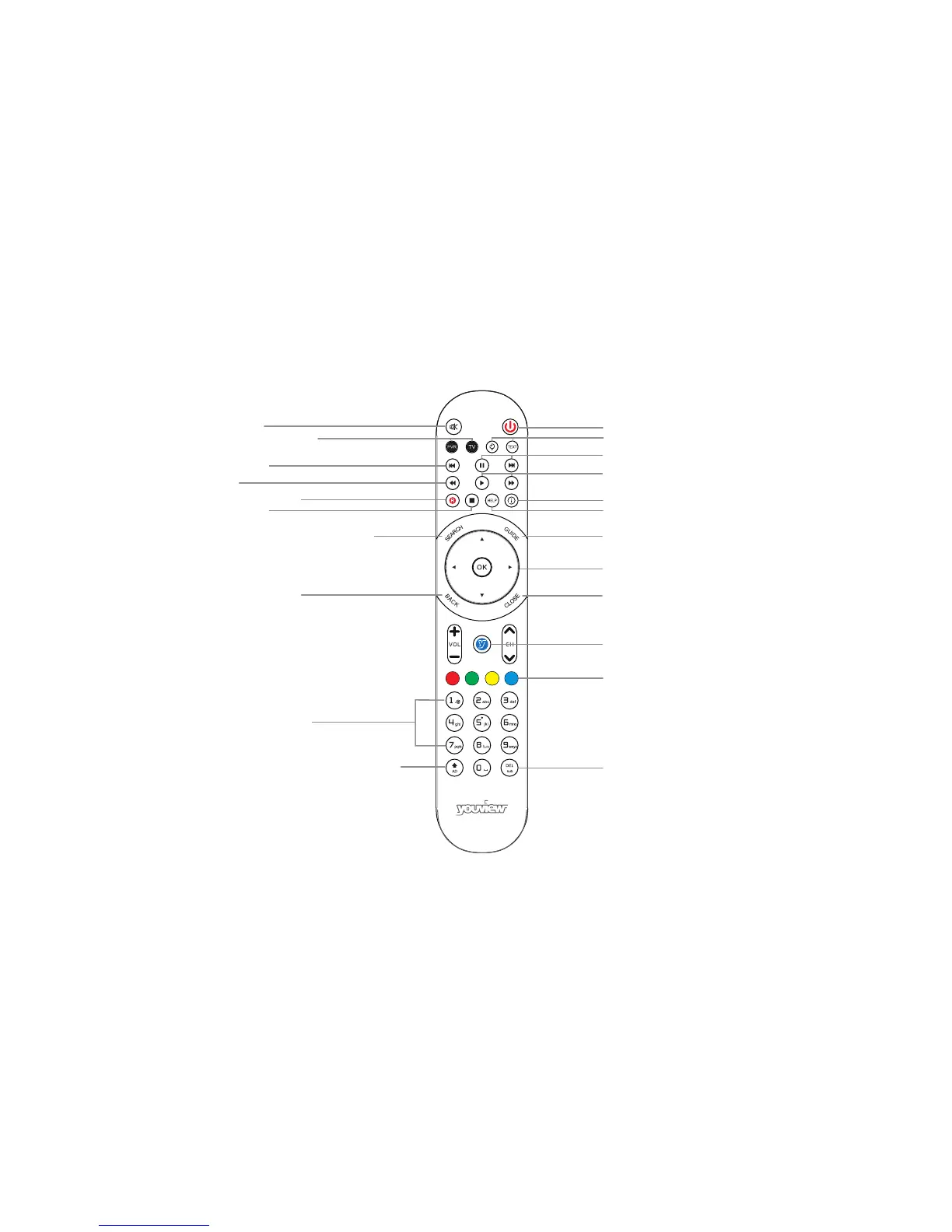
Stop playback
Dual key: Turns Audio Description on/off.
Shift - Changes to upper case characters in Search
Search for On Demand and Catch Up
and live TV programmes across YouView
Record a programme
Rewind
Skip backward
Control YouView Box/TV*
Back – jump back to
a previous page/step
Mute button
Enter channel numbers
Dual key: Deletes recordings in MyView and text
in Search. Also turns subtitles on/off.
Colour keys - follow onscreen prompts
Opens the main menu
Play/Fast forward
Standby
Pause/Skip forward
Zoom/Text
Displays more information on a programme
Opens the YouView Guide
Close/Exit the application
Arrow keys to navigate through YouView
menus and players
Help
Your Remote Control
*To programme your universal remote control to operate your TV please visit http://consumer.huawei.com/en/. Enter DN371T in the website search box and press Enter.
3


 To Next Page