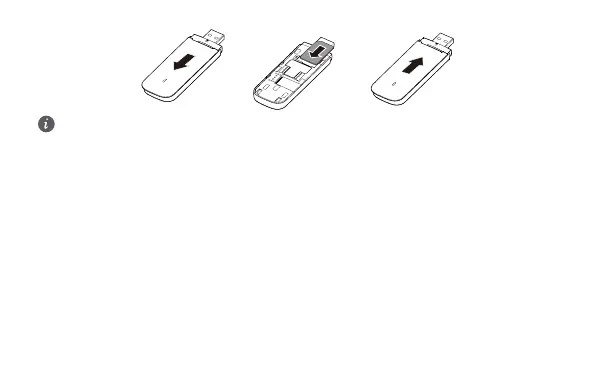
• Ensure that the beveled edge of the SIM card is properly aligned with that of the SIM card
slot.
• Do not remove the SIM card when the card is in use. Otherwise, the card as well as your
USB Stick may get damaged and the data stored on the card may be corrupted.
Cómo actualizar el dispositivo USB
Conecte el dispositivo USB a un ordenador con el sistema operativo Windows, inicie sesión en la
página de gestión web para comprobar si hay una versión más reciente y realice la actualización en
línea.
1 Inserte el dispositivo USB en uno de los puertos USB del ordenador. El ordenador identicará el
hardware nuevo e iniciará la instalación automáticamente.
2 Cuando la instalación haya nalizado, la página de gestión web del dispositivo USB aparecerá en
la pantalla, y el dispositivo se conectará a la red automáticamente.
3 En la página de gestión web, compruebe si hay una actualización nueva disponible de la versión.
De ser así, realice la actualización en línea según las indicaciones que aparezcan en la pantalla.
78



 To Next Page