TP482000B V300R002C03 Telecom Power
(TP482000B-N20B1, TP482000B-N20B2,
TP481200B-N20B1, and TP481200B-N20B2)
User Manual
Copyright © Huawei Technologies Co., Ltd.
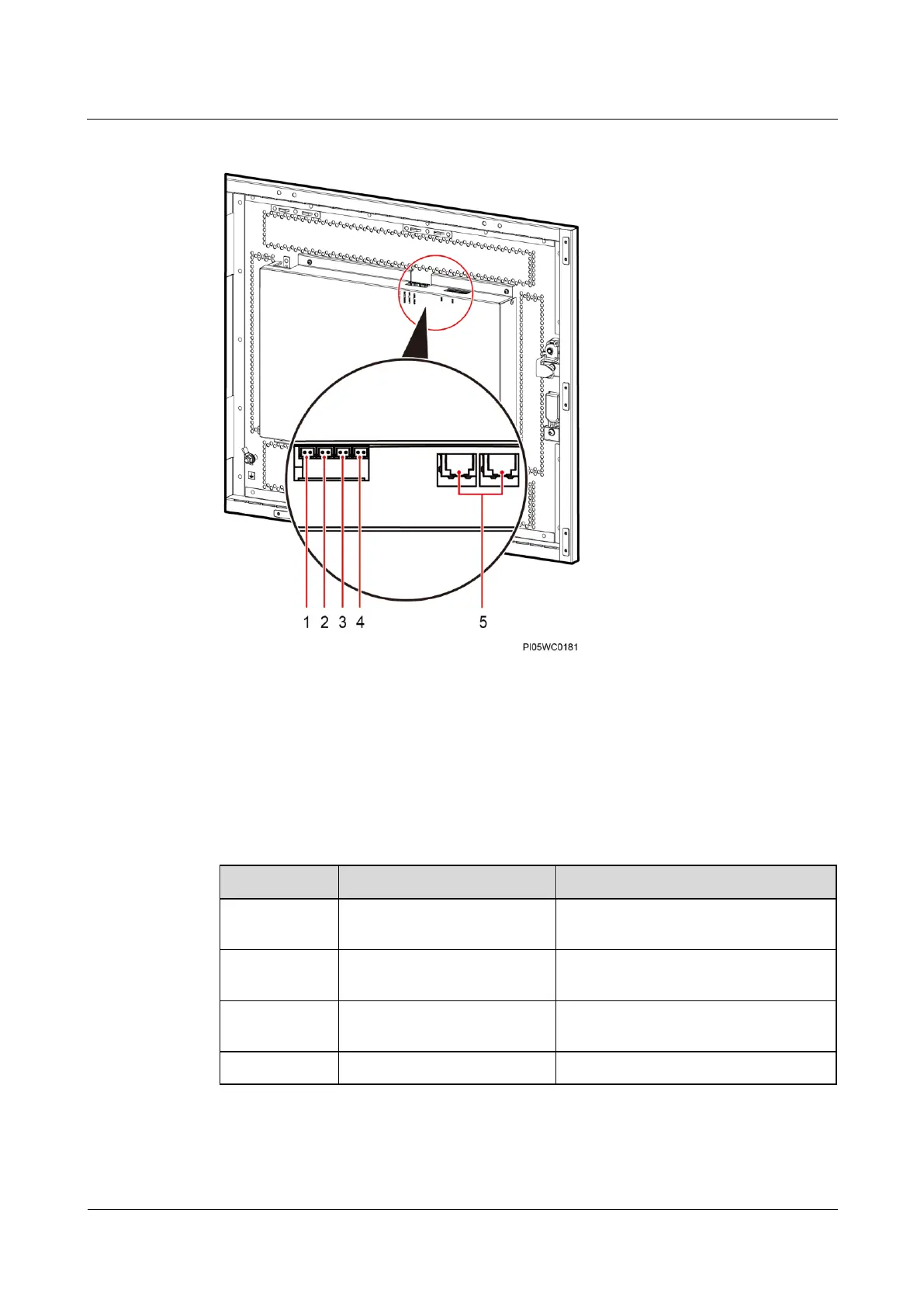
Figure 5-10 Ports on the power distribution monitoring unit (combined cabinet)
(1) Battery temperature
sensor port BAT_TEMP3
(reserved)
(2) Battery temperature
sensor port BAT_TEMP2
(reserved)
(3) Battery temperature
sensor port BAT_TEMP1
(reserved)
(4) Ambient temperature
sensor port AMBI_TEMP
Table 5-12 Communications port description
Connects inter-cabinet
communications cables.
Connects to a host or NMS.
YDN protocol or Huawei master/slave
protocol
Connects to an intelligent
communications device.







 To Next Page