TP482000B V300R002C03 Telecom Power
(TP482000B-N20B1, TP482000B-N20B2,
TP481200B-N20B1, and TP481200B-N20B2)
User Manual
Copyright © Huawei Technologies Co., Ltd.
Buttons
Table 5-11 Buttons on the power distribution monitoring unit
Returns to the upper-level menu.
Enters the main menu from the standby screen.
Enters a submenu from the main menu.
Enters the standby screen from any screen, or enters the
active alarm screen from the standby screen.
Ports
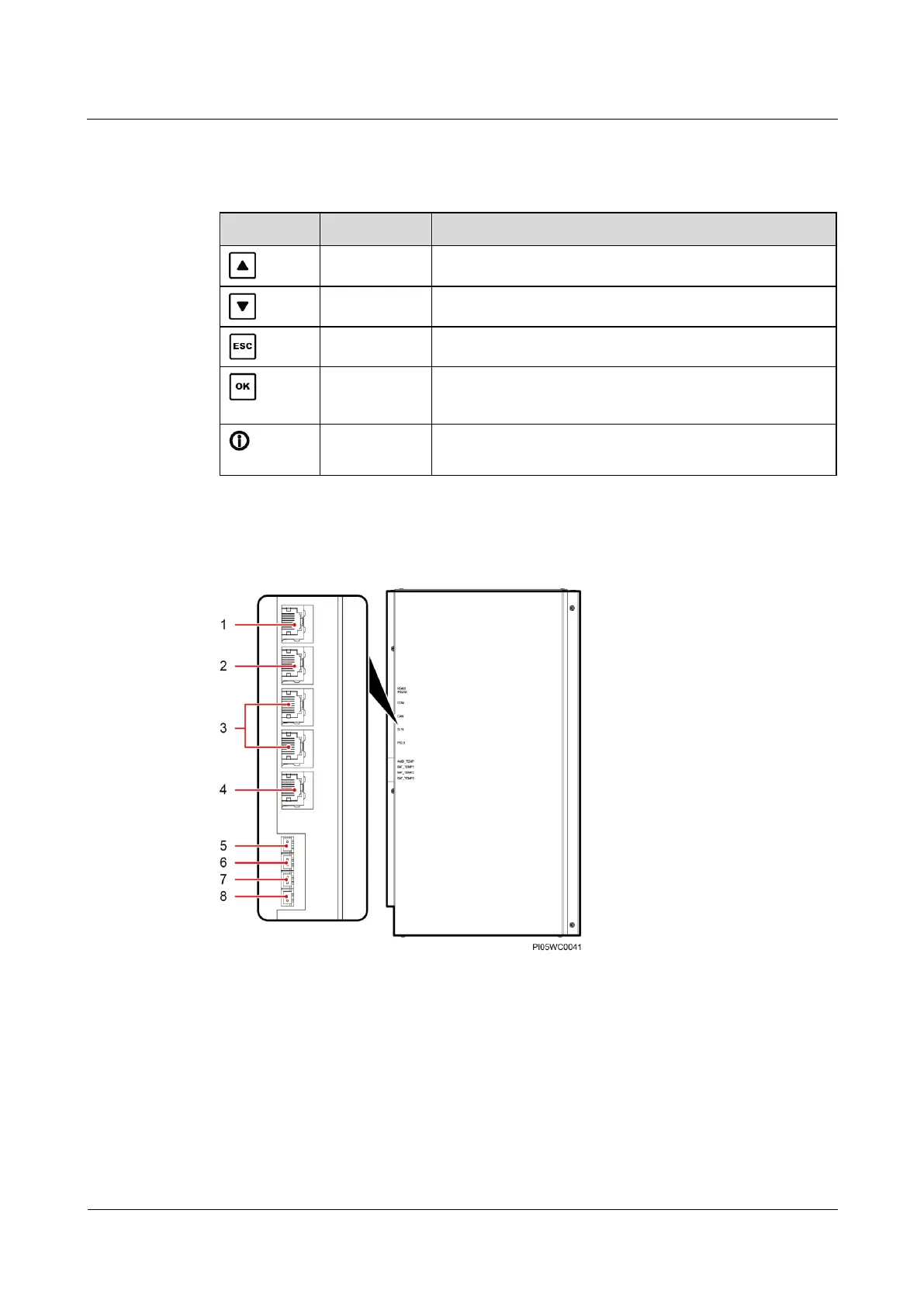
Figure 5-9 Ports on the power distribution monitoring unit (AC or DC cabinet)
(5) Ambient temperature
sensor port AMBI_TEMP
(6) Battery temperature
sensor port BAT_TEMP1
(reserved)
(7) Battery temperature
sensor port BAT_TEMP2
(reserved)
(8) Battery temperature
sensor port BAT_TEMP3
(reserved)







 To Next Page