TP482000B V300R002C03 Telecom Power
(TP482000B-N20B1, TP482000B-N20B2,
TP481200B-N20B1, and TP481200B-N20B2)
User Manual
Copyright © Huawei Technologies Co., Ltd.
Context
To replace the button board, you do not need to disconnect the AC input to the power system.
Procedure
Step 1 Connect the ground cable for the ESD wrist strap, and put on the ESD wrist strap and ESD
gloves.
Step 2 Record the positions of cables connected to RJ45 ports on the power distribution monitoring
unit, and disconnect the cables from the ports.
Step 3 Remove the cover from the power distribution monitoring unit, as shown in Figure 1.
Step 4 Record the positions of cables connected to the button board, and disconnect the cables.
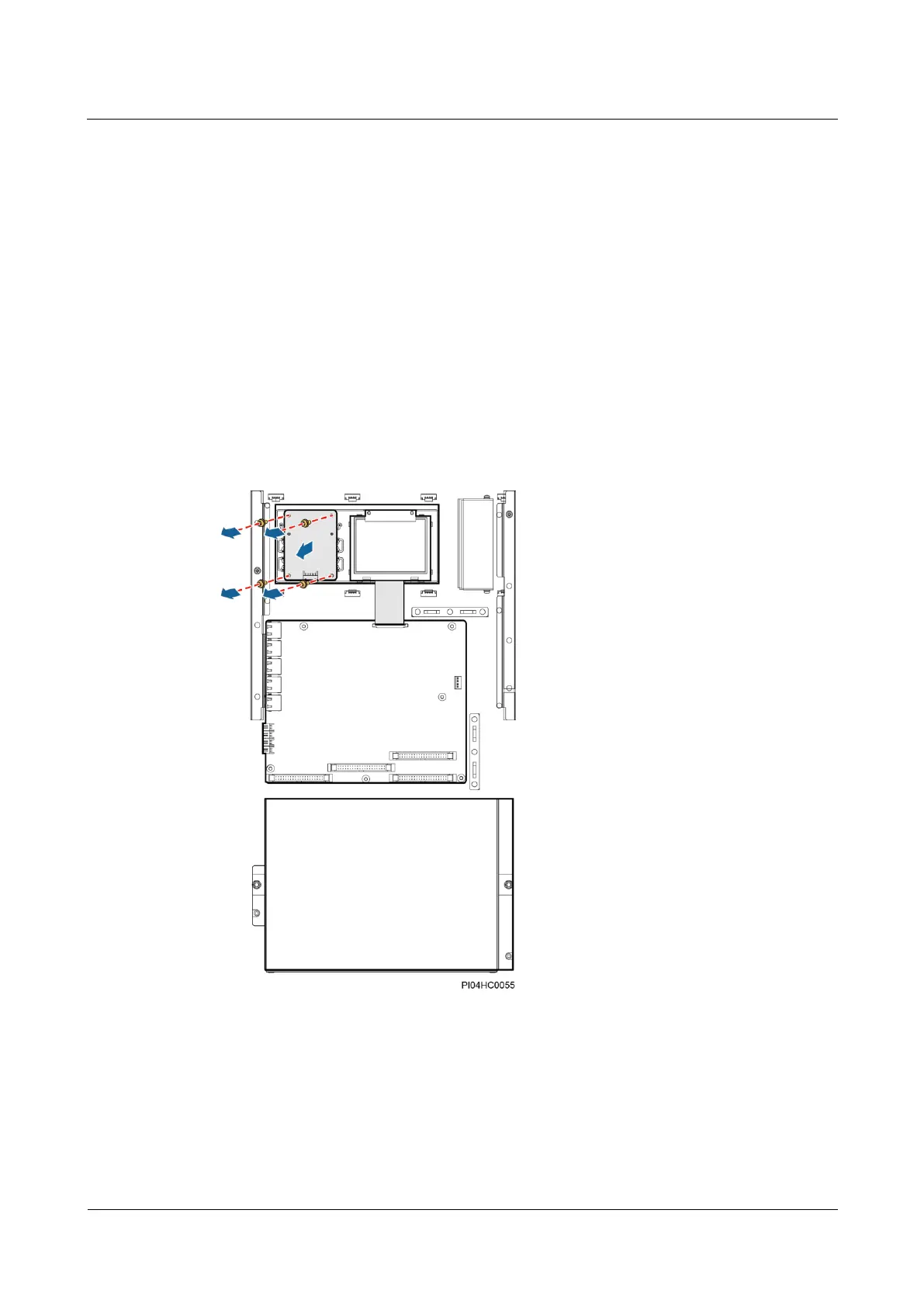
Step 5 Unscrew and remove the button board, as shown in Figure 7-19.
Figure 7-19 Removing a button board
Step 6 Place the new button board in position and tighten the screws.
Step 7 Reconnect the cables to the button board based on the recorded information.
Step 8 Place the cover on the power distribution monitoring unit, and tighten the screws.
Step 9 Reconnect the cables to the RJ45 ports on the power distribution monitoring unit based on the
recorded information.







 To Next Page