11 Power On and Confirm Connections
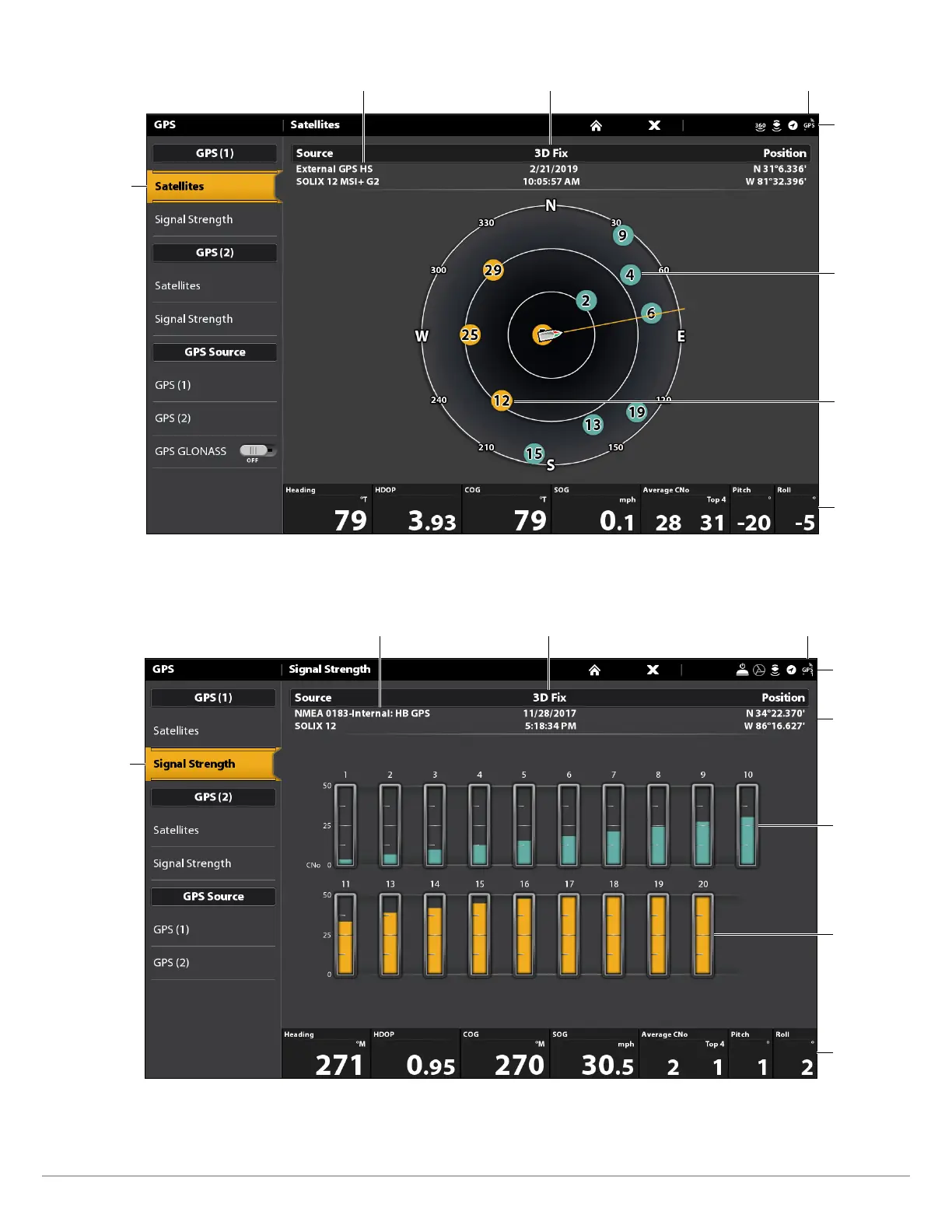
GPS (1) Satellite Sky Chart
satellites
communicating
to GPS (1)
selected GPS source fix type
GPS status icon
(detected and active)
status bar
used
satellite
(yellow)
monitored
satellite
(teal)
digital
readouts
4. Under GPS (1) or GPS (2), select Signal Strength.
Signal Strength (GPS 1/GPS 2): displays vertical bar graphs indicating the satellite
signal strengths with the respecting CNO (Carrier-to-Noise) value (0 to 60).
Signal Strength (bar graph)
satellites signal
strength GPS (1)
selected GPS source fix type
GPS status icon
(detected and active)
status bar
monitored
satellite
(teal) and
strength
level
used satellite
(yellow) and
strength level
digital
readouts
boat
position
(latitude/
longitude)






 To Next Page