✆
01268 205 121
| www.hydraev.co.uk | sales@hydraev.co.uk
23
1
6
7
12
2
5
8
11
3
4
9
10
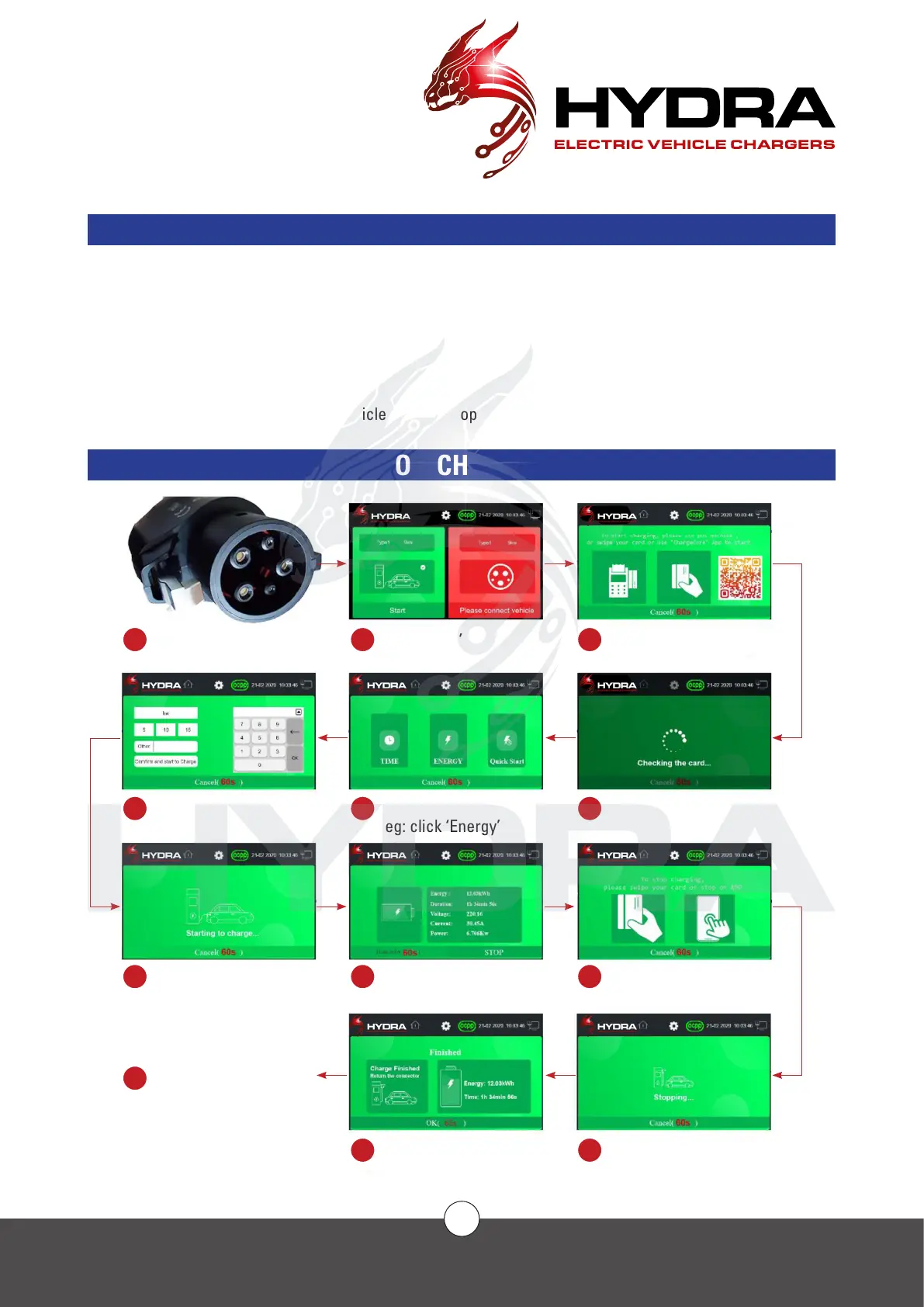
Plug in
Energy mode
Start to charge
Return the plug
Click ‘Start’
Charge Mode
eg: click ‘Energy’
Charging. Click
‘STOP’ to stop charge
Charge nished
Payment Method
eg: Card
Checking the Card
Stop Method
Stopping
COMMISSIONING
CHARGING OPERATION
Charging can be carried out in two ways: card-free charging (code scanning, app) and card charging (IC card,
POS machine) (optional).
Click on the Charger information to obtain the charger output capacity and operating status information. Note
that the charger cannot charge a vehicle if there is an alert showing on the charger. Charges are required after
troubleshooting against the fault identication or fault code.
In the charging mode interface, you can choose to charge automatically, by time, by charge, by amount and by
percentage.
When the set value is reached or the vehicle issues a stop command, the charger stops charging automatically.
CHARGING OPERATION FLOWCHART



 To Next Page