✆
01268 205 121
| www.hydraev.co.uk | sales@hydraev.co.uk
32
APPENDIX
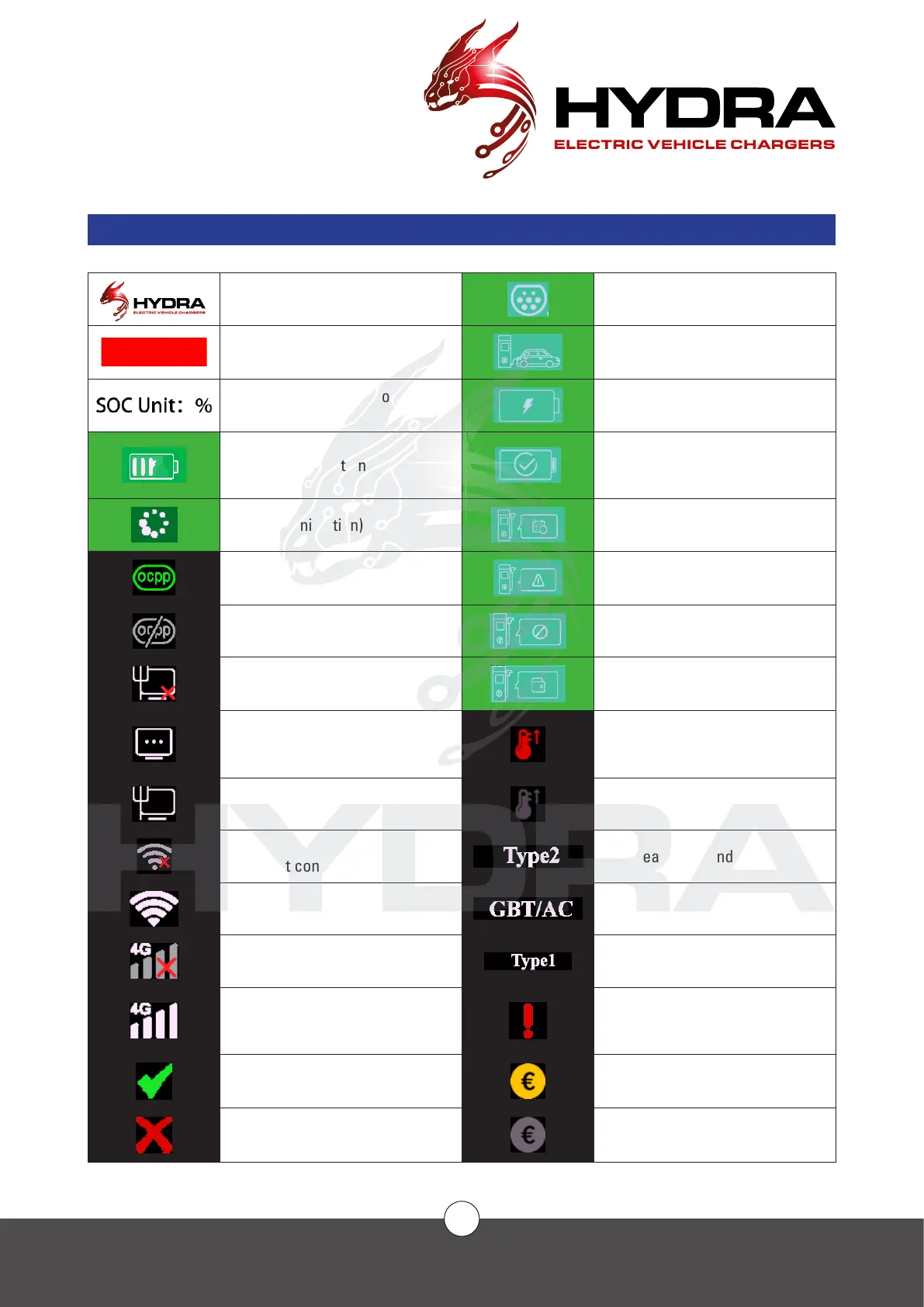
SCREEN ICON KEY
Logo The connector is not inserted
Power on Progress bar Plugged in
Charging mode selection: SoC,
% per unit
Charged
Charging (animation) Charge completed
Loading (animation) Charging has been booked
OCPP connected Fault during charging
OCPP connected Charging outlet not available
Wired network
not connected
Billing charged upon charging
Wired network
connection
The screen is being heated
due to ultra-low ambient
temperature
Wired network connected The screen is not being heated
Wi-Fi not connected
European AC standard
Wi-Fi connected Chinese AC standard
4G not connected U.S. AC standard
4G connected
Error, go to the administrator
interface to see the fault
No fault
Enable operation mode to
save each charging record
Issue detected
Enable operating mode, no
charging records



 To Next Page