P/N 42-9450 8/08 Copyright 2008 Hydrotherm
Page 25 KN INSTALLATION AND OPERATION INSTRUCTIONS
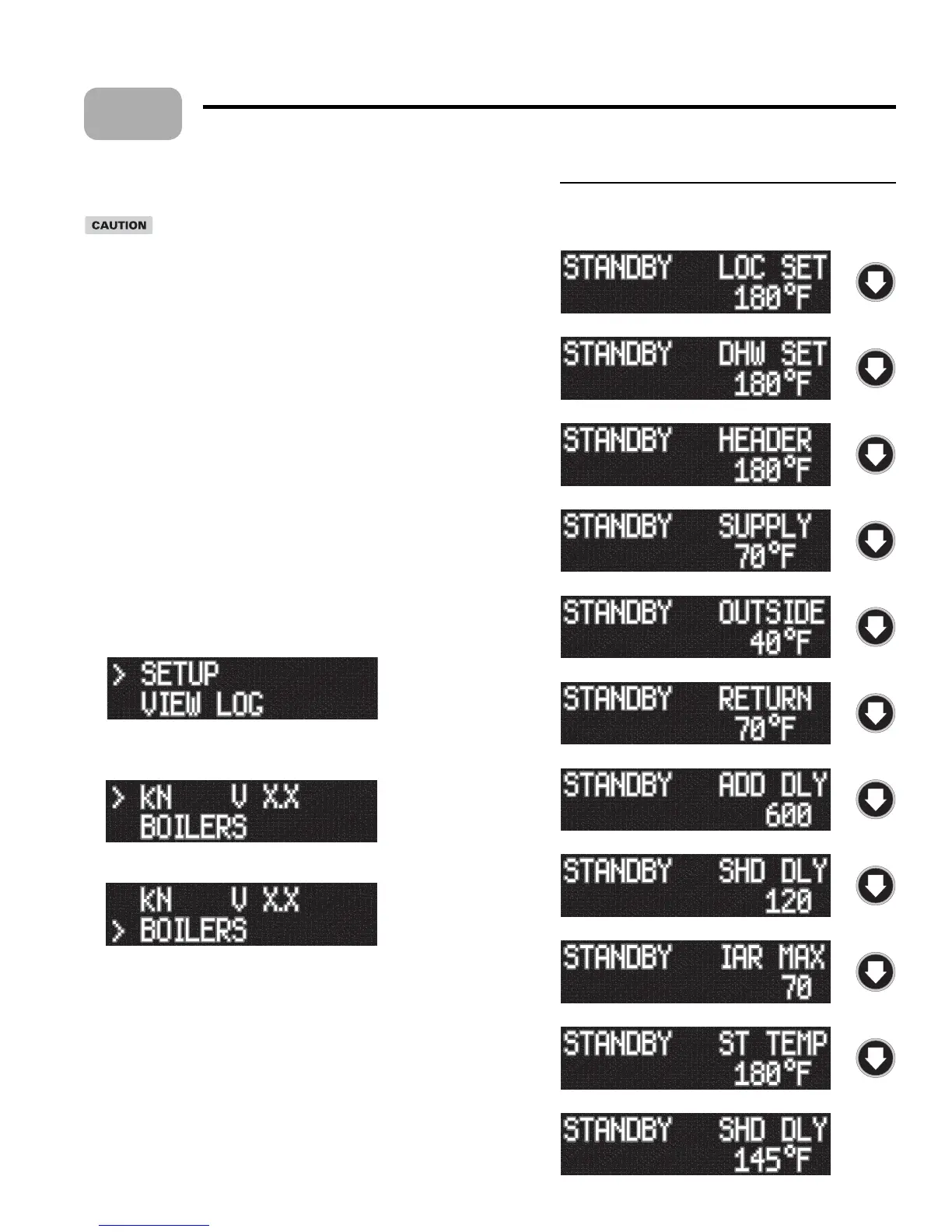
Figure 22 Heat Net display during Standby (no call
for heat) — pressing the DOWN key on the
keypad changes the display as shown
Control setup
8
Before control setup
Before beginning the Heat Net control setup, remove the wires
connected to the HEAT DEMAND and DHW DEMAND terminals
on the electrical connection board (see Figure 21). ese must be
removed to prevent a call for heat during the setup process.
Close the manual gas valve before proceeding to prevent any possibility
of the boiler ring during setup.
The Heat Net control display
Starting the display
Check all wiring to make sure it is complete and all wires are securely connected.
Verify that the HEAT DEMAND and DHW DEMAND wires are removed.
Turn on power to the boiler and then turn the boiler on/o switch ON.
e control will beep at least twice and the display will show the rst STANDBY
display in Figure 22. Note that pushing the DOWN bu on on the keypad will
change the right side of the display as shown, providing information on various
setpoints and parameters.
e display, LOC SET, means the setpoint temperature. Figure 22 shows the
factory default values.
Accessing setup menus
With the display in STANDBY, press and hold the BACK key for 5 seconds.
e display will change to:
3. Press the SELECT key to select setup. (Note that pressing the DOWN key would
change the selection to VIEW LOG.)
4. e display will now show the rst options in the setup menus:
5. Press the DOWN key to access additional menu options. Pressing the DOWN
bu on once will change the display to:
6. e cursor moves to the second line, indicating this option could now be selected
with the SELECT key.
7. Continuing to press the DOWN key will access these menu options:
BOILERS
SETPOINTS
INDOOR AIR
PUMP OPTIONS
NIGHT SETBACK
OPTIONS
LOG/RUNTIME
AUX FUNCTIONS
SYSTEM CLOCK
ADVANCED SETUP
1.
2.
3.
4.
5.
1.
2.
•
•
•
•
•
•
•
•
•
•



 To Next Page