7.5 Hydraulic Seal Housing
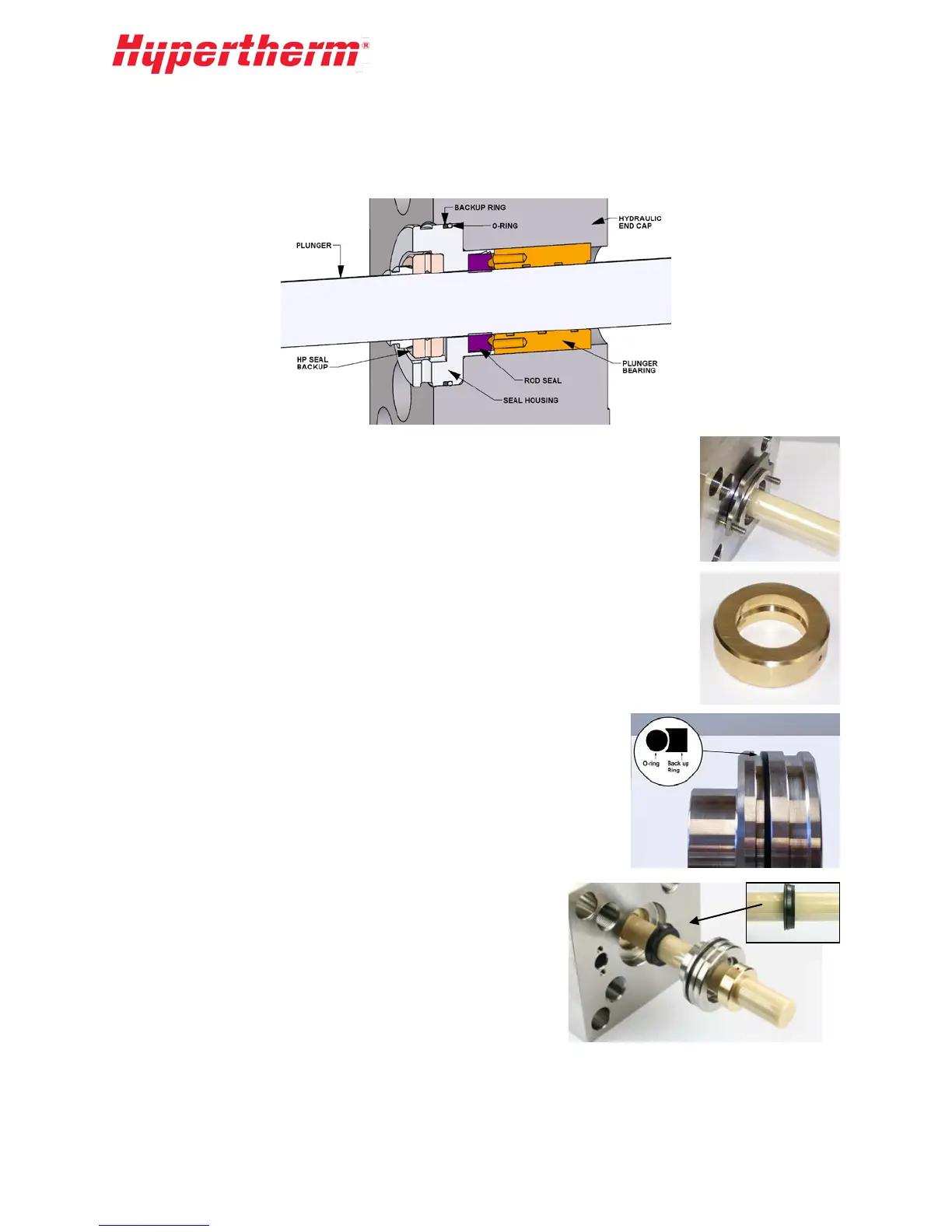
Removing the hydraulic seal housing provides access to the rod seal. If oil is observed in the seal area
during HP seal replacement, the rod seal should be replaced.
1. With the HP cylinder removed, slide the seal housing removal tool over the
e
xposed seal-housing diameter and into the groove.
2. Use an Allen wrench to turn the two screws on the tool. Start with one tur
n
t
o each screw to pull the seal housing evenly out of the hydraulic end cap.
3. Inspect the condition of the HP seal backup and flip or replace as
n
ecessary. Check for any inner diameter corner chipping or a loose fit on
the plunger.
4. Remove the old seal from the seal housing.
5. Replace the O-ring and backup ring on the OD of the seal housing
.
P
osition the O-ring on the rod seal side of the groove and backup on the
backup side of the groove. Note the position of the groove on the backup
ring.
6. Apply HP lubricant to the outside of the O-ring and to the ID of
the rod seal.
7. Apply a light coat of hydraulic fluid to the ceramic plunger a
nd
s
lide the Rod Seal over the end of the plunger. Note the
orientation of the rod seal during installation.
8. Push and rotate the seal housing and rod seal over the plunger
end until it is up against the end cap as far as it will go.
44


 To Next Page