The Hypervolt requires two types of connections; one for supplying electricity and one for sending CT information (Load Management, Solar Input etc.). A third
ethernet (hardwire) is sometimes required if the primary Wi-Fi connection is not available or too weak. Hypervolt can supply HyperConnect cable (12) which
can be used to do all three connections in one neat, easier and cheaper solution. We highly recommend the use of HyperConnect cable. We do not recommend
the use of NYY-J cables as these can put additional pressure on the terminal blocks.
Select the size of your incoming cable depending on your protective device rating (see next page), installation method and voltage drop. If HyperConnect cable
is not being used a Cat5 cable can be used for the second connection. Cables should in general come in via. the bottom gland positions however a single rear
entry is available (10) which can be drilled out using a hole-saw (25mm max.). A second hole can be made for Band 1 cables (10A). All holes should be suitably
sealed to prevent water ingress. The warranty is voided if the IP rating of the unit is not maintained or installations are not compliant with BS7671.
STEP 4 (At the Hypervolt)
Connect the electrical supply cable to the terminals (1) and tighten to 2Nm. We recommend
using ferrules on stranded cables. Do not use powered screwdrivers on the terminals.
Tighten the CTS Gand provided to hold the incoming cable in place. If you are using an SWA
cable then the CTS gland should be replaced for an SWA Gland (Not Provided).
STEP 5 (At the Hypervolt)
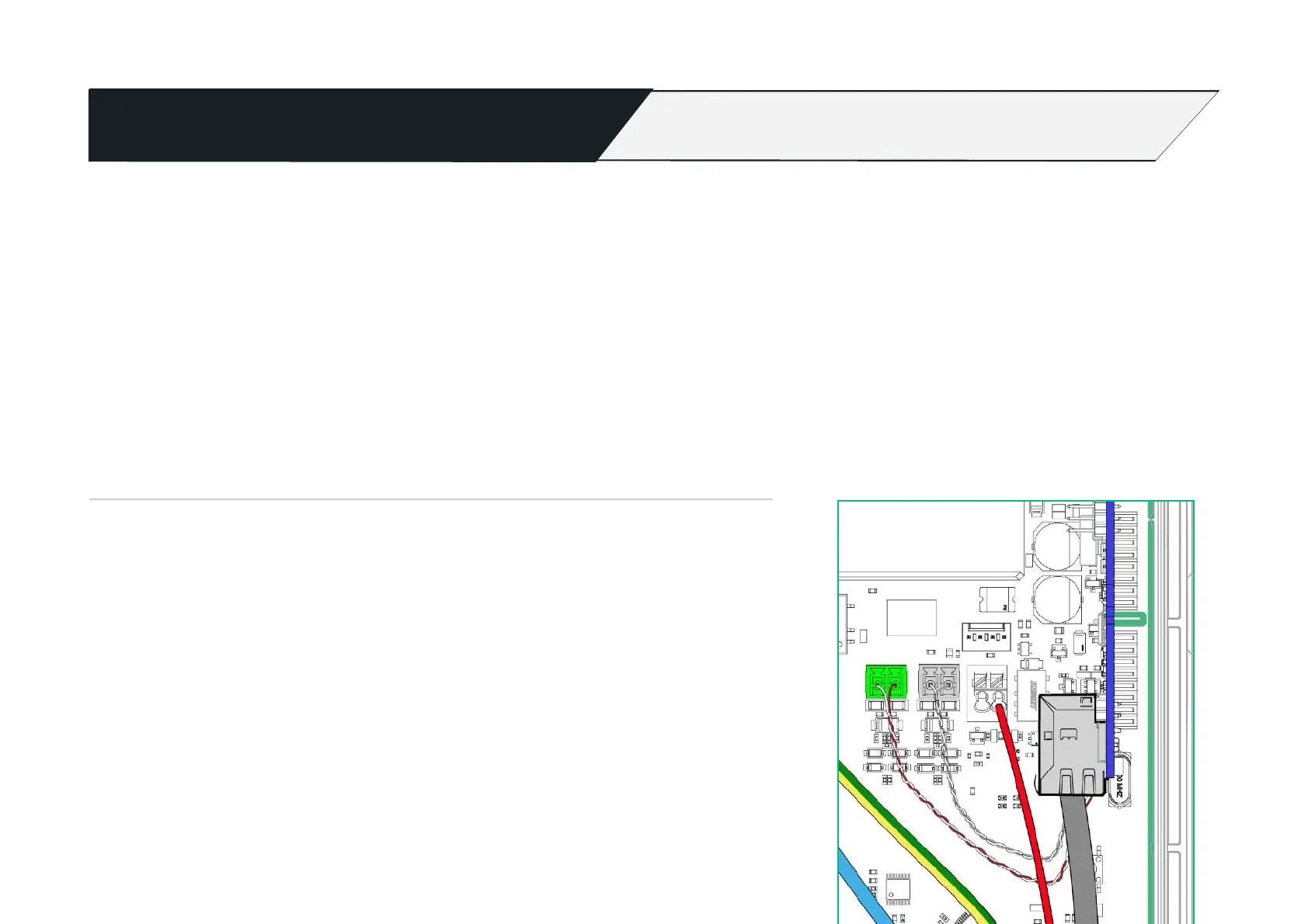
Connect the CT clamp supplied to the green CT plug (4), you can use a/the Cat5 (brown or blue
pair) cable to extend the connection but always end up with the white wire in the left of the
plug and the black wire in the right (as per colour coding). Use the left plug socket only. Right
plug socket for future secondary monitoring.
If you need hardwired internet you can use the remaining Orange and Green pairs terminated
using the T-568B colours in an RJ45 plug which can then be inserted in the RJ45 socket (5).
Be sure the method you use to supply electricity to the Hypervolt is compliant with The BS7671 Wiring Regulations, particular attention should be given to
section 722. Remember external RCD’s must be as a minimum Type “A”, individual and double pole (Including RCBO’s). SPD’s should be fitted with consideration
given to wether a type 1 or type 2 device would be more suitable


 To Next Page