EasyManua.ls Logo

HYPERVOLT Home 3.0 - App Settings and Configuration

HYPERVOLT Home 3.0
30 pages
Print Icon
To Next Page IconTo Next Page
To Previous Page IconTo Previous Page
Loading...
21
App Settings
Using your Charger
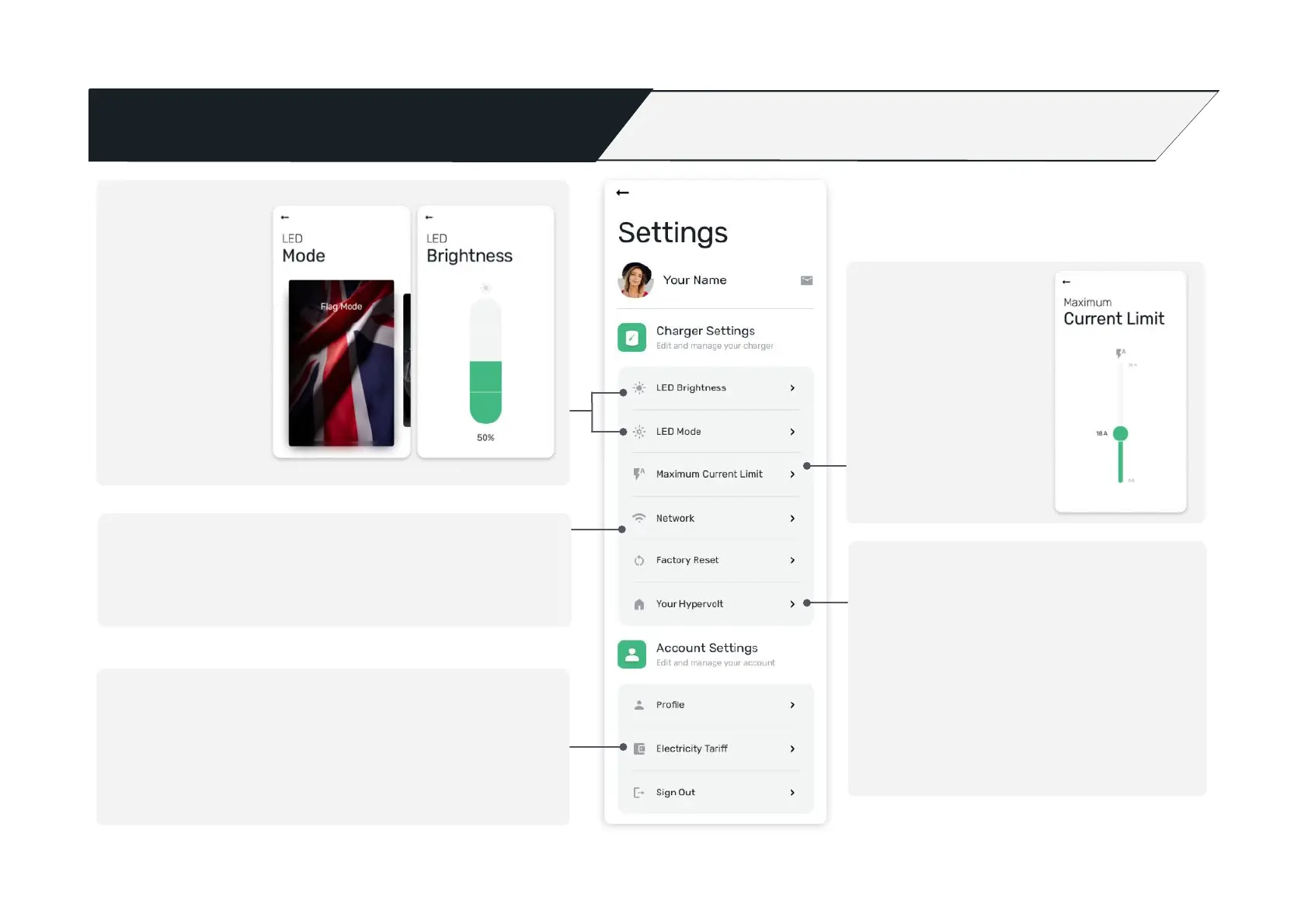
Changing your network
If you need to adjust the Wi- connection your charger is linked to,
can do so here.
Setup your energy tariffs
Here you can set the prices your energy supplier charges you Day/
Night to enable the app to accurately calculate the cost per charge.
LED Modes and
LED Brightness
Here you can
congure your LEDs
from a selection of
colour sequences /
seasonal modes as
well as adjust how
bright the LEDs
appear on the
charger.
Key information about your charger
Under ‘Your Hypervolt’ you can view unique
information related to your charger, this is
especially useful when you need help with support
and being able to un-adopt the charger.
You can also adjust settings for ‘Default Schedule’
and ‘Random Start’. (More information can be
found on page 25 for these).

Set Current Limit
Here you can adjust the
amount of current
being delivered from
your charger. This is
useful if you just want
to trickle charge.

Other manuals for HYPERVOLT Home 3.0