© Copyright 2019 HYPERVSN. All rights reserved 19
2. Press the remote control’s “On” button. The rays on the rotor will start spinning.
Attention. Make sure to point the remote control towards the remote control’s sensor on the Device.
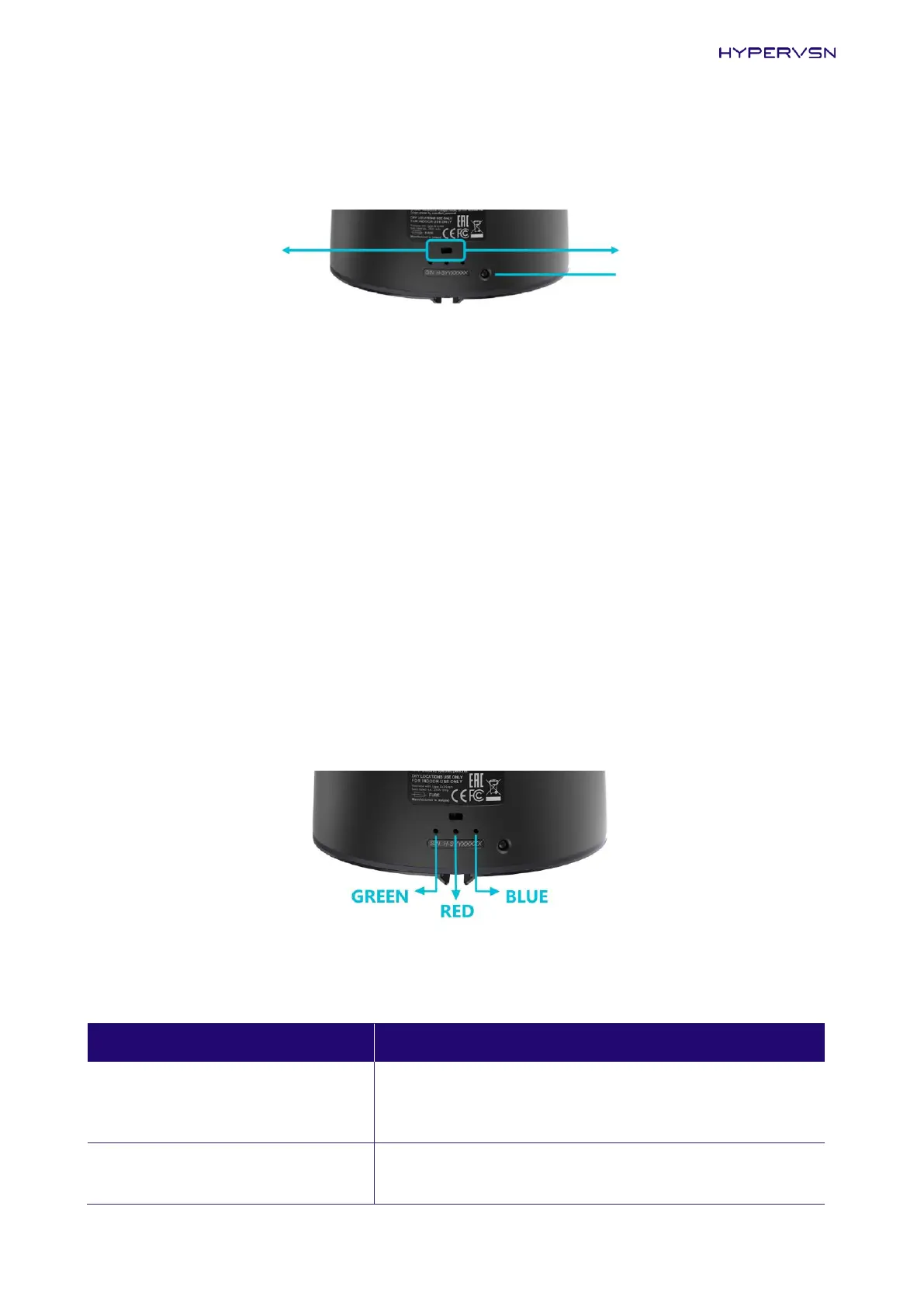
WITH THE WITHOUT THE
REMOTE CONTROL REMOTE CONTROL
REMOTE CONTROL
SENSOR
Picture 16. Switch and remote control sensor
Turning on the Device not equipped with the remote control
1. Put the mode switch on the stator into the clockwise (right) position (Picture 16).
2. Connect the Device to the power mains. The rays will start spinning immediately.
Turning off the Device
Press the remote control’s “Off” button (for models with the remote control), disconnect the Device from
the power mains.
7.3 STATUS INDICATORS OF THE DEVICE
The Device status can be determined based on the activity of the three indicators on the base of the stator.
Picture 17. Device status indicators
Table 5. Indicators description
The Device is either not powered or the Device is in a normal
working mode (displaying user content (if any) or messages
uploaded by default).


 To Next Page