6
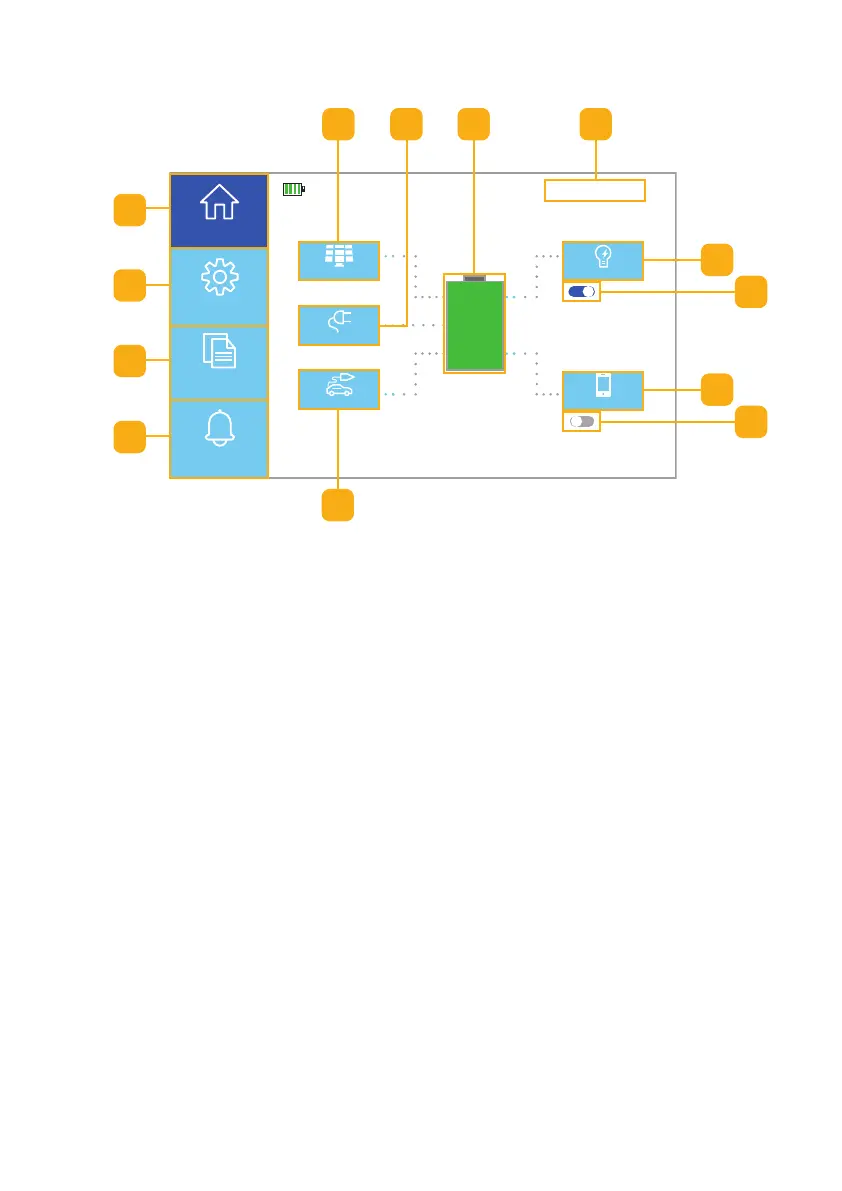
4.4 Homepage UI Touchscreen
120VAC
PV
12VDC
AC Load
DC Load
11/15/XXXX 15:15
2560 W 2560 W
2500 W
120 W 330 W
AC ON
DC OFF
100%
Home
Settings
Information
Alerts
a. Homepage Button: Press to return to the Homepage UI touchscreen
b. Setting Screens Button: Press to access the Settings screens
c. Information Screens Button: Press to access the Information screens
d. Alert Screen Button: Press to access the current Alert screen
e. PV (solar) Button: Press to access the PV Input information screen
f. AC Button: Press to access the AC Input information screen
g. Battery Button: Press to access the Battery information screen
h. Date & Time: Displays current Date and Time
i. AC Load Button: Press to access the AC Output information screen
j. AC Output On/OFF Switch: Toogle to turn AC Output ON or OFF
k. DC Load Button: Press to access the DC Output information screen
l. DC Output ON/OFF Switch: Toggle to turn DC Output ON or OFF
m. DC Button: Press to access the DC Charge information screen
Fig. 4.4 • Homepage UI touchscreen features
a
b
c
d
e h
m
j
g
k
l
f
i



 To Next Page