30
6.2 Touchscreens
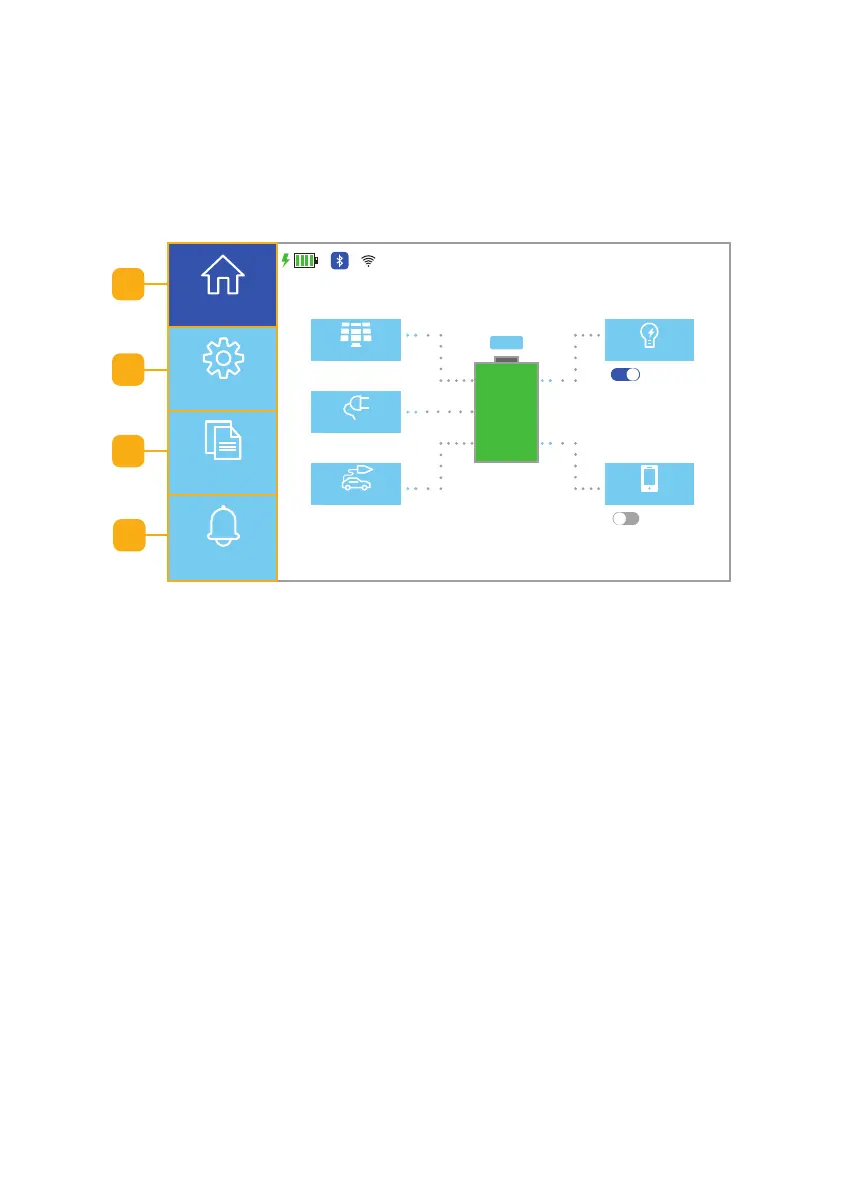
The touchscreens provide information or settings for operation. The Home,
Data, and Warnings touchscreens provide information on the operation of the
unit. The Settings touchscreens are used to customize the unit’s settings
(Fig. 6.5). The following sections will explain each touchscreen. Note: See
Section 8 for Error Codes.
a. Home Touchscreens: Select to see real-time information on the AC input,
AC output, DC input, DC output, PV (solar) input, and the battery status.
b. Settings Touchscreens: Select to set the settings for the Working Mode,
Energy Saver, Unattended Mode, Parallel Mode, Language, Display
Settings, and WiFi.
c. Information Touchscreens: Select to see information about the product,
the power generated by the dierent sources, and view the alert history.
d. Alerts Touchscreen: Select to see the current error code and time.
120VAC
PV
12VDC
AC Load
DC Load
11/15/XXXX 15:15
2560 W 2560 W
2500 W
120 W 330 W
AC ON
DC OFF
100%
ECO
Home
Settings
Information
Alerts
a
b
c
Fig. 6.5 Homepage UI screen
d



 To Next Page