7
120VAC
PV
Home
Settings
Data
Warnings
12VDC
AC Load
DC Load
11/15/XXXX 15:15
2560 W 2560 W
2500 W
120 W 330 W
AC ON
DC OFF
100%
ECO
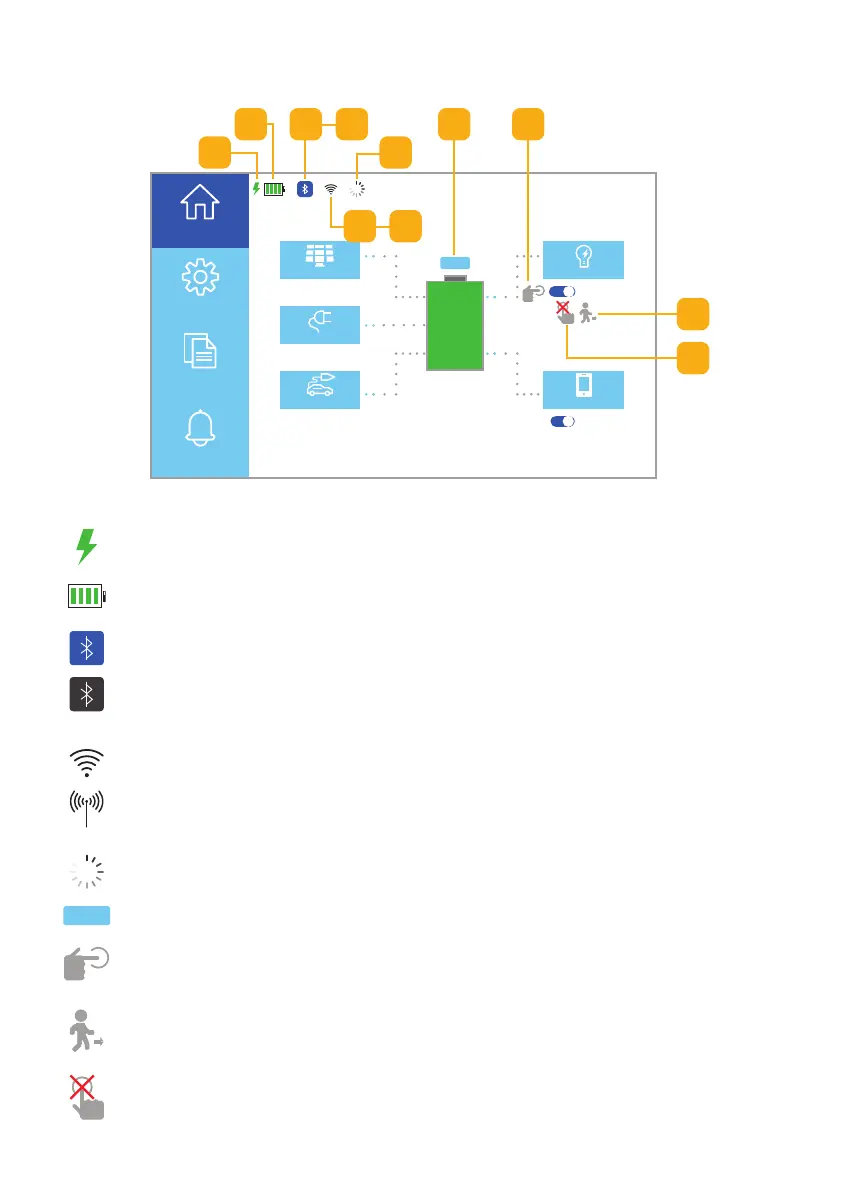
Fig. 4.5 • Homepage UI touchscreen icons
h
e
c d
f
g
i
a. AC/DC Status: The unit is charging.
c. Bluetooth Indicator (connected): The unit is connected to Bluetooth.
d. Bluetooth Indicator (not connected): The unit is not connected
to Bluetooth.
e. WiFi Status (connected): The unit is connected to a WiFi network.
f. WiFi Status (ready to connect): The WiFi settings have been reset
and the device is ready to connect to a WiFi network.
g. WiFi Status (connecting): The unit is connecting to Bluetooth.
h. Energy Saver Mode Status: Energy saver mode is on.
i. Inverter Status (disconnected): The inverter is disconnected, click to
power on the inverter.
k. Inverter Status (disconnected): Inverter may not be used when
using AC F.C. mode greater than the default value.
j. Unattended Mode Status: Unattended mode is on.
b. Battery Status Indicator: Battery charge level.
4.5 Homescreen UI Icons
j
a
b
k



 To Next Page