26
ONLY CONNECT HYSOLIS 5K BATTERIES.
DO NOT USE 3RD-PARTY BATTERIES.
CONNECTING THE WRONG BATTERY
MAY DAMAGE THE UNIT AND/OR HARM
VOLTAGE MAY BE PRESENT ON
PV INPUT WHEN INVERTER IS
6.0 Operation
The following section describes the power options and touchscreen operation
of the unit.
6.1 Power-on Options
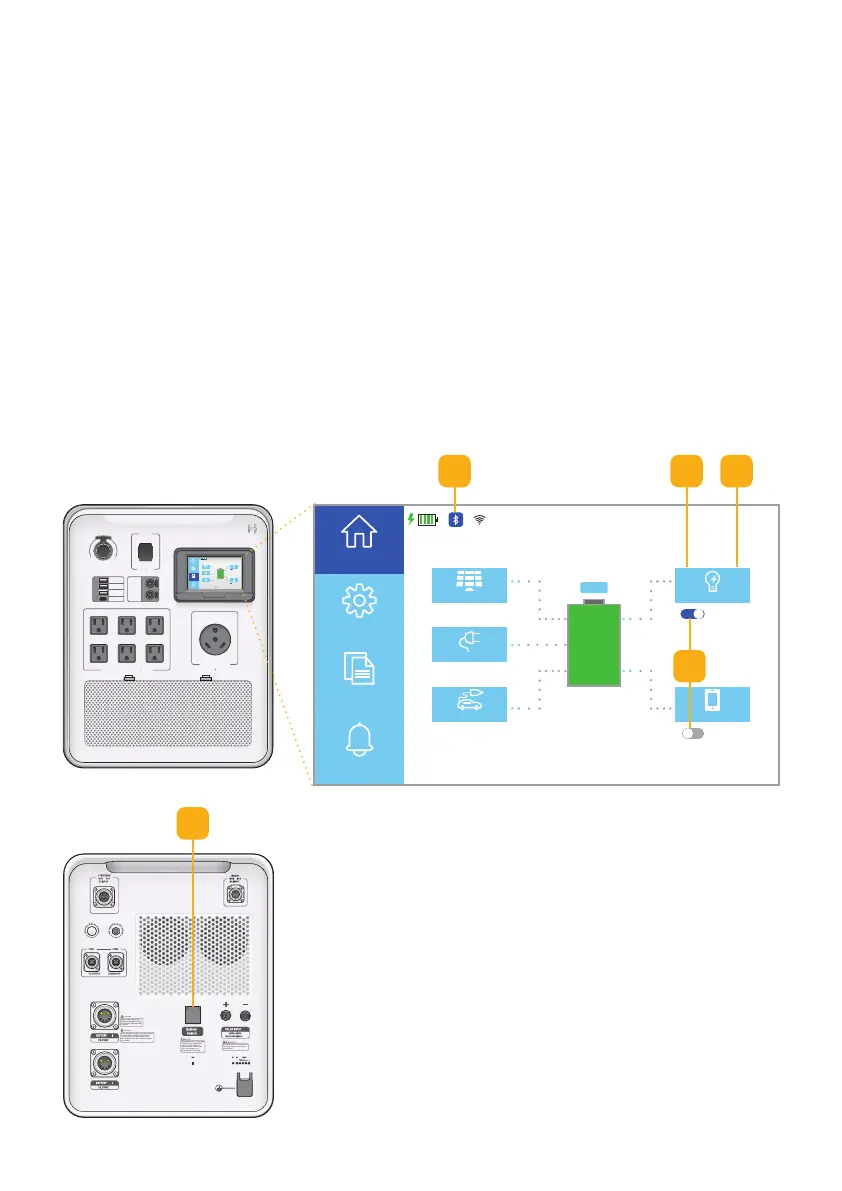
To enable battery power, press the Battery Switch on the back of unit.
Note: Make sure all cables are disconnected first.
6.1.1 Battery Power
Note: Switch o the battery for long periods of inactivity, for shipping, or for
storage. Important! Make sure all cables are disconnected before switching
the unit o.
1
2
V
D
C
M
A
X
3
0
A
12VDC
MAX 3 0A
PD60W
5V 2.4A
QC 3.0
PD60W
12VDC
2A
AC OUTPUT
25AMAX
AC OUTPUT M AX 15A
120VAC
PV
12VDC
AC Load
DC Load
11/15/XXXX 15:15
2560 W 2560 W
2500 W
120 W 330 W
AC ON
DC OFF
100%
ECO
Home
Settings
Information
Alerts
120VAC
PV
Home
Data
12VDC
AC Load
DC Load
11/15/XXXX 15:15
2560 W 2560 W
2500 W
120 W 330 W
AC ON
DC OFF
INV. RESTART
100%
1. With all cables disconnected, press the Battery
Switch to connect the battery. Touchscreen will
light up.
2. Wait until the Bluetooth signal is ready.
Note: Bluetooth icon is highlighted blue.
3a. Press AC Output once to turn on the Inverter.
Note: The AC switch will toggle to ON then OFF.
3b. Press AC Output again to turn on the Inverter.
Note: AC Output is now enabled.
4. Turn AC Output or DC Output on/o as needed.
Fig. 6.1 Battery power setup
4
2
1
3a 3b



 To Next Page