27
1
2
V
D
C
M
A
X
3
0
A
12VDC
MAX 3 0A
PD60W
5V 2.4A
QC 3.0
PD60W
12VDC
2A
AC OUTPUT
25AMAX
AC OUTPUT M AX 15A
120VAC
PV
Home
Data
12VDC
AC Load
DC Load
11/15/XXXX 15:15
2560 W 2560 W
2500 W
120 W 330 W
AC ON
DC OFF
100%
ONLY CONNECT HYSOLIS 5K BATTERIES.
DO NOT USE 3RD-PARTY BATTERIES.
CONNECTING THE WRONG BATTERY
MAY DAMAGE THE UNIT AND/OR HARM
VOLTAGE MAY BE PRESENT ON
PV INPUT WHEN INVERTER IS
1
120VAC
PV
12VDC
AC Load
DC Load
11/15/XXXX 15:15
2560 W 2560 W
2500 W
120 W 330 W
AC ON
DC OFF
100%
ECO
Home
Settings
Information
Alerts
3
4
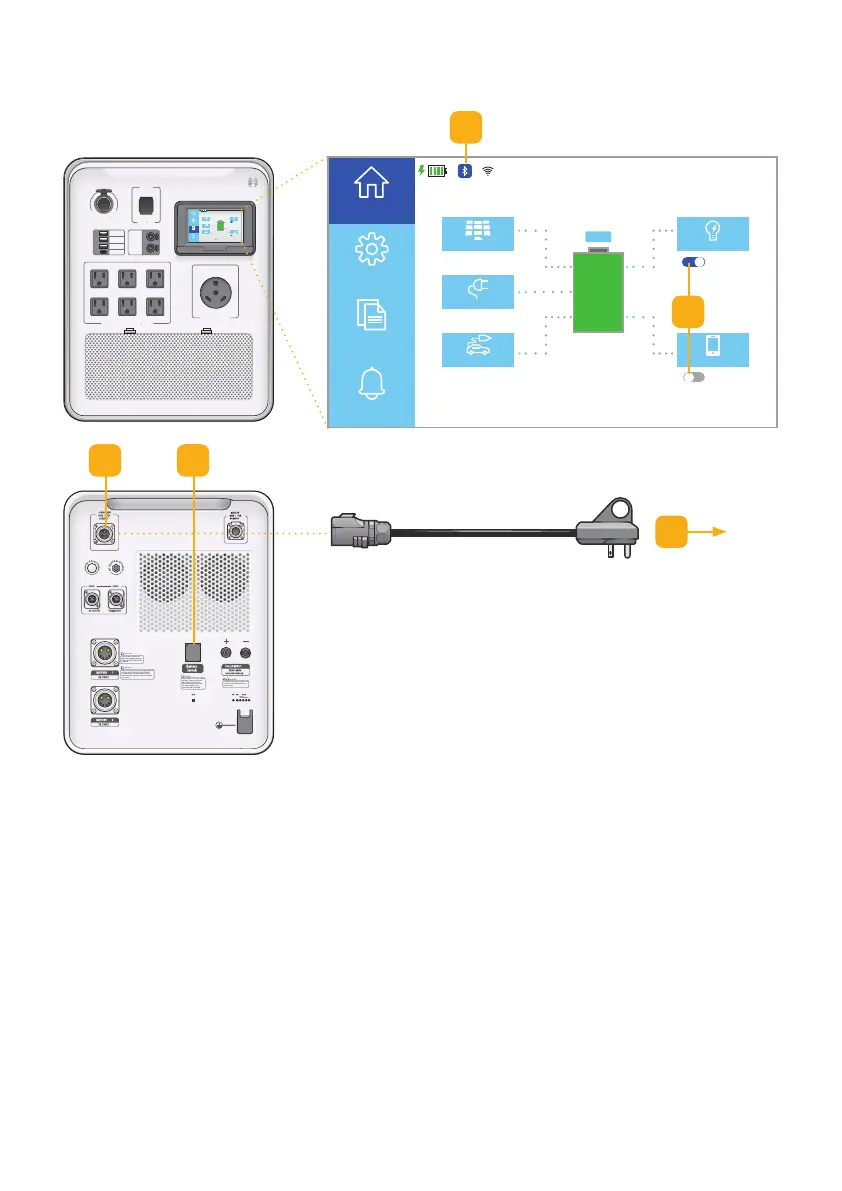
Fig. 6.2 AC power setup
6.1.2 AC Power
1. With all cables disconnected, press the
Battery Switch to connect the battery.
Touchscreen will light up.
2. Wait until the Bluetooth signal is ready.
Note: Bluetooth icon is highlighted blue.
3. Plug the AC charging cable into the AC Input
port.
4. Plug the AC charging cable to the 110V/120V
power source. Note: The inverter will be
started automatically.
5. Turn AC Output or DC Output on/o
as needed.
2
5



 To Next Page