2
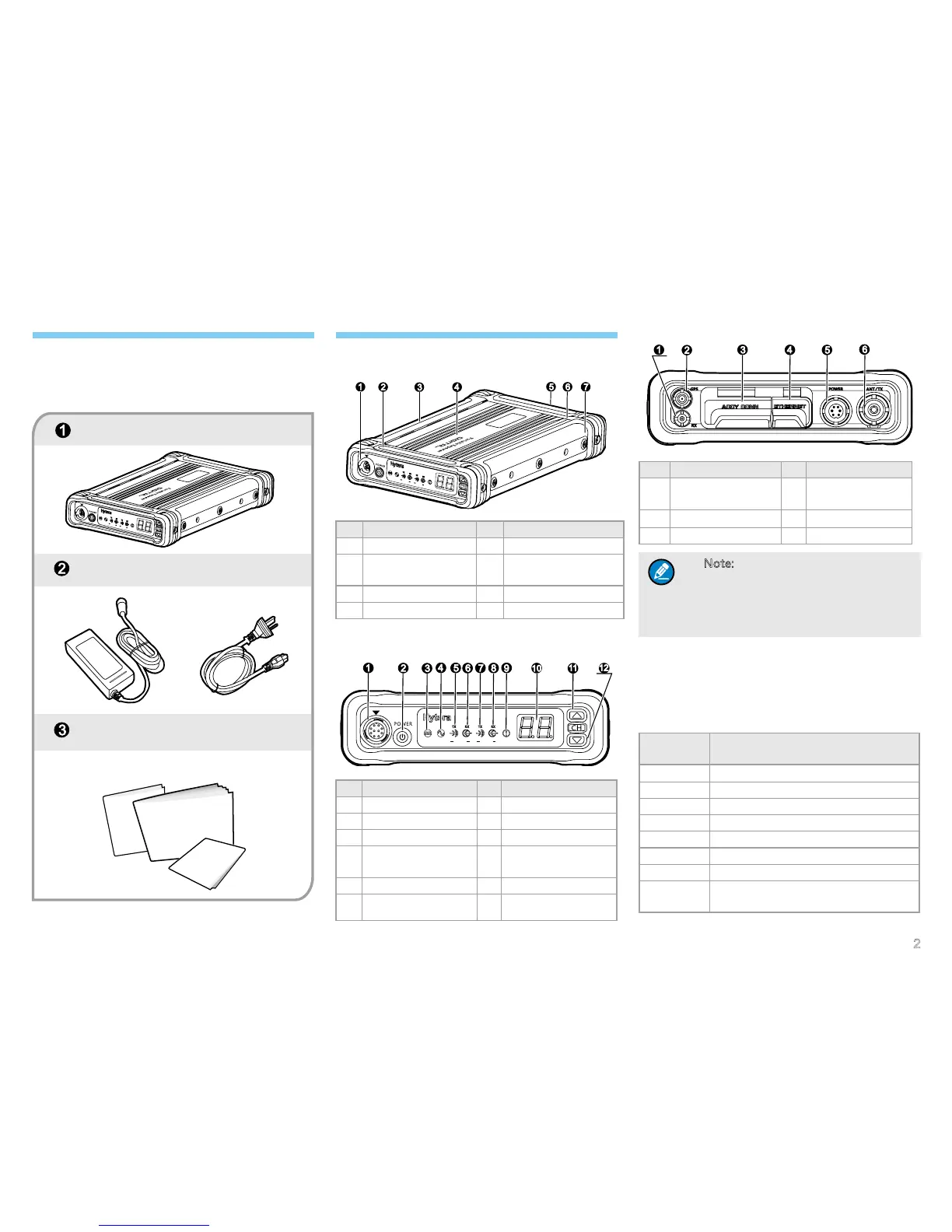
Repeater
Power Adapter
Documentation Kit
Checking Items in the Package
Please unpack carefully and check that all items listed
below are received. If any item is missing or damaged,
please contact your local dealer.
Owner’s Manual
Safety In
Quick Reference Guide
Product Overview
Parts
No. Part Name No. Part Name
1 Front Panel Cover 5 Rear Panel Cover
2
Protective Cover of
Front Panel
6
Protective Cover of
Rear Panel
3 Left Protective Cover 7 Right Protective Cover
4 Aluminum Chassis / /
Front Panel
No. Part Name No. Part Name
1 Microphone Jack 7 Slot B Tx Indicator
2 Power On/Off Key 8 Slot B Rx Indicator
3 Digital Mode Indicator 9 Alarm Indicator
4
Analog Mode
Indicator
10 LED Segment Display
5 Slot A Tx Indicator 11 Channel Up Key
6 Slot A Rx Indicator 12 Channel Down Key
Rear Panel
No. Part Name No. Part Name
1
External Duplexer
Jack/Rubber Stopple
4 Ethernet Port
2 GPS Antenna Port 5 Power Inlet
3 Accessory Jack 6 Antenna Connector
Note: If the repeater is manufactured
without internal duplexer, then part ①
will be an external duplexer port; if it is
produced with internal duplexer, then
part ① will be a rubber stopple.
Status Indication
LED Segment Display Indication
There will be different segments shown on the LED
segment display. See their indications listed below:
LED
Segment
Repeater Status
E1 Battery Mismatch
E2 Low Battery
E3 External Power Abnormal
E4 Tx Unlock
E5 Rx Unlock
E6 Over Temperature
E7 VSWR Alarm
N
Current Channel Number (e.g.: 1, 2,
…16)
D
A
SL
O
T
A
S
L
O
T
B
P
o
r
t
a
b
l
e
R
e
p
e
a
t
e
r
A
L
A
R
M
Portable Repeater
DA SLOT A
SLOT B
ALA
RM
D
A
S
L
O
T
A SLO
T
B
P
o
r
t
a
b
l
e
R
e
p
e
a
t
e
r
A
LA
R
M


 To Next Page