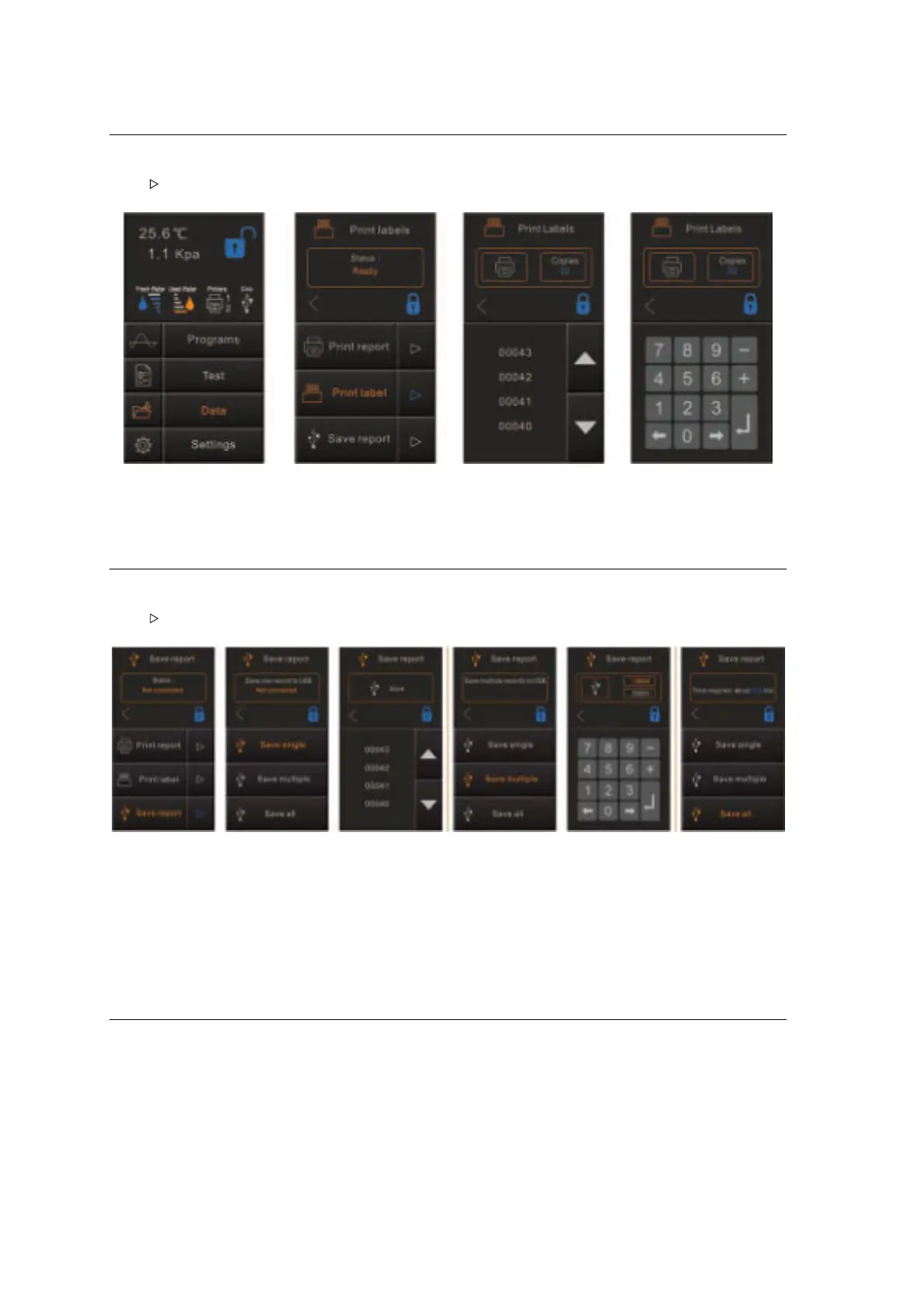
Print labels
Select Data from the main menu and tap “Print labels”, it will show the current status.
Tap “ ”to enter in the menu. Select the cycle number and select the number of copies, tap
printer icon to print the labels.
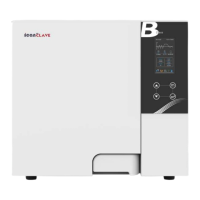
Save Report
Select Data from the main menu and tap “Save Report”, it will show the current status.
Tap “ ”to enter in the menu.
E.g.
If the serial number of the steam sterilizer is E00001 and the cycle number is 0012.
The file name of the file will be 01001200.log
The first two numbers represent machine number.
The middle four numbers represent cycle number.
The last two numbers represent error code.
00: no error; 01: error E01
6 Maintenance
To ensure proper operation and maximum steam sterilizer life, carefully follow all recommendations for
periodic maintenance.
One of the most important steps you can take to prevent problems with your sterilizer is to use only
distilled water.


 To Next Page