12
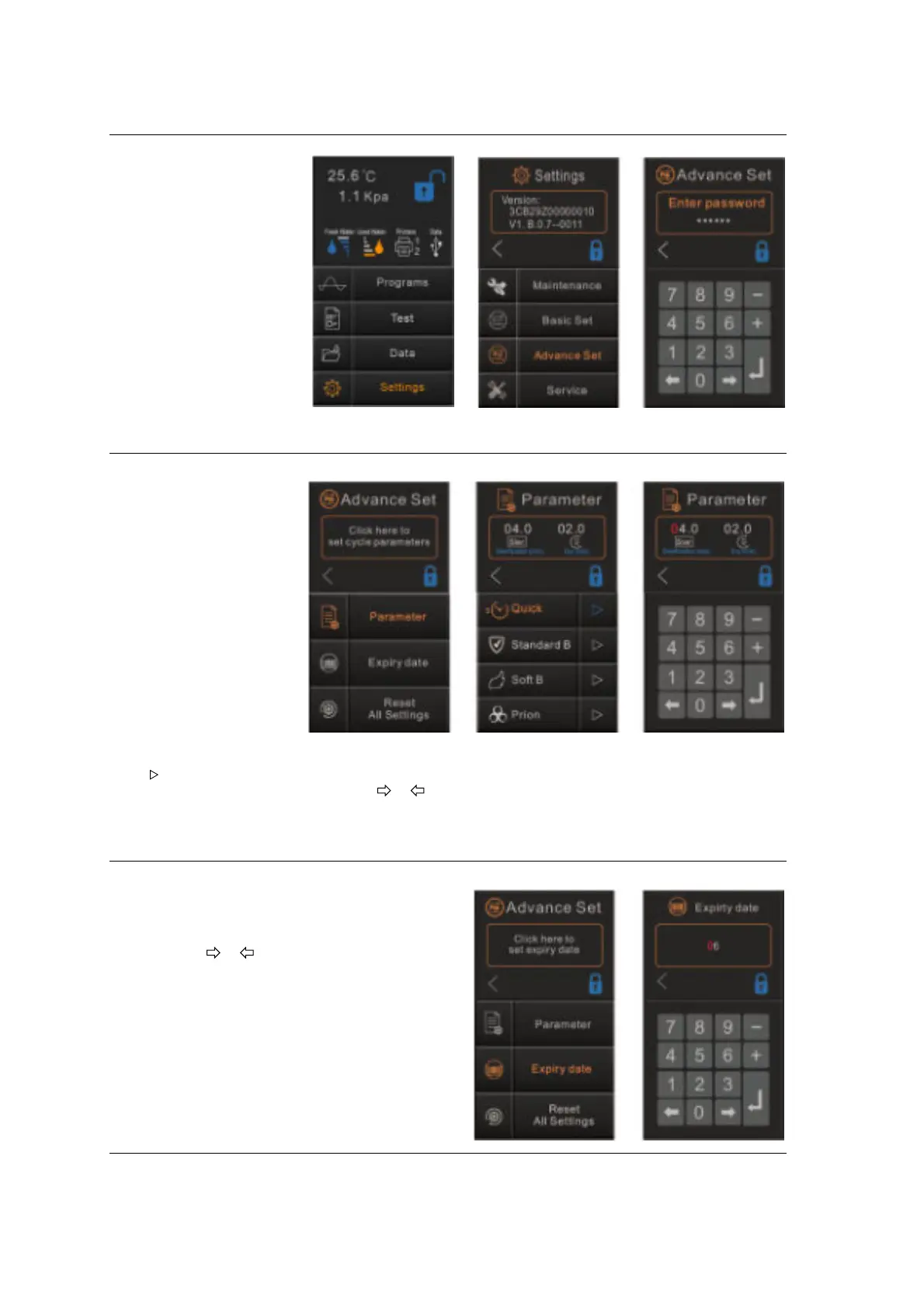
Advance Set
Tap “Settings”
then "Advance Set”.
Enter passwords
“ 111111”
and tap “↵”enter the
menu.
Parameter
Select “Parameter”.
Tap “Click here to set
cycle parameters” to
enter the menu.
The “Parameter” menu
permits to set the
following options:
“Sterilization time” and
“Dry time”.
Select the cycle name,
for example “Quick”.
The screen will show the
current configuration.
Tap “ ”to enter the menu.
Touch the parameter or by pressing “ ” “ ” select the number that needs to be changed, it
will light red, or by pressing the numbers adjust it. To save press “
↵”
Expiry date for label report
Select “Expiry date”
Tap “Click here to set expiry date” to enter the
menu.
By pressing “ ” “ ” select the number that to
be changed, it will light red, or by pressing the
numbers adjust it. To save press “↵”.


 To Next Page