10
3
BASIC OPERATION
■ Lock function
The lock function prevents accidental frequency changes and
accidental function activation.
q Push , then push [KEY LOCK] to turn the function ON.
w To turn the function OFF,repeat step q above.
•“ ”disappears.
■ Display backlighting
Push [LIGHT] to turn the display backlighting ON or OFF.
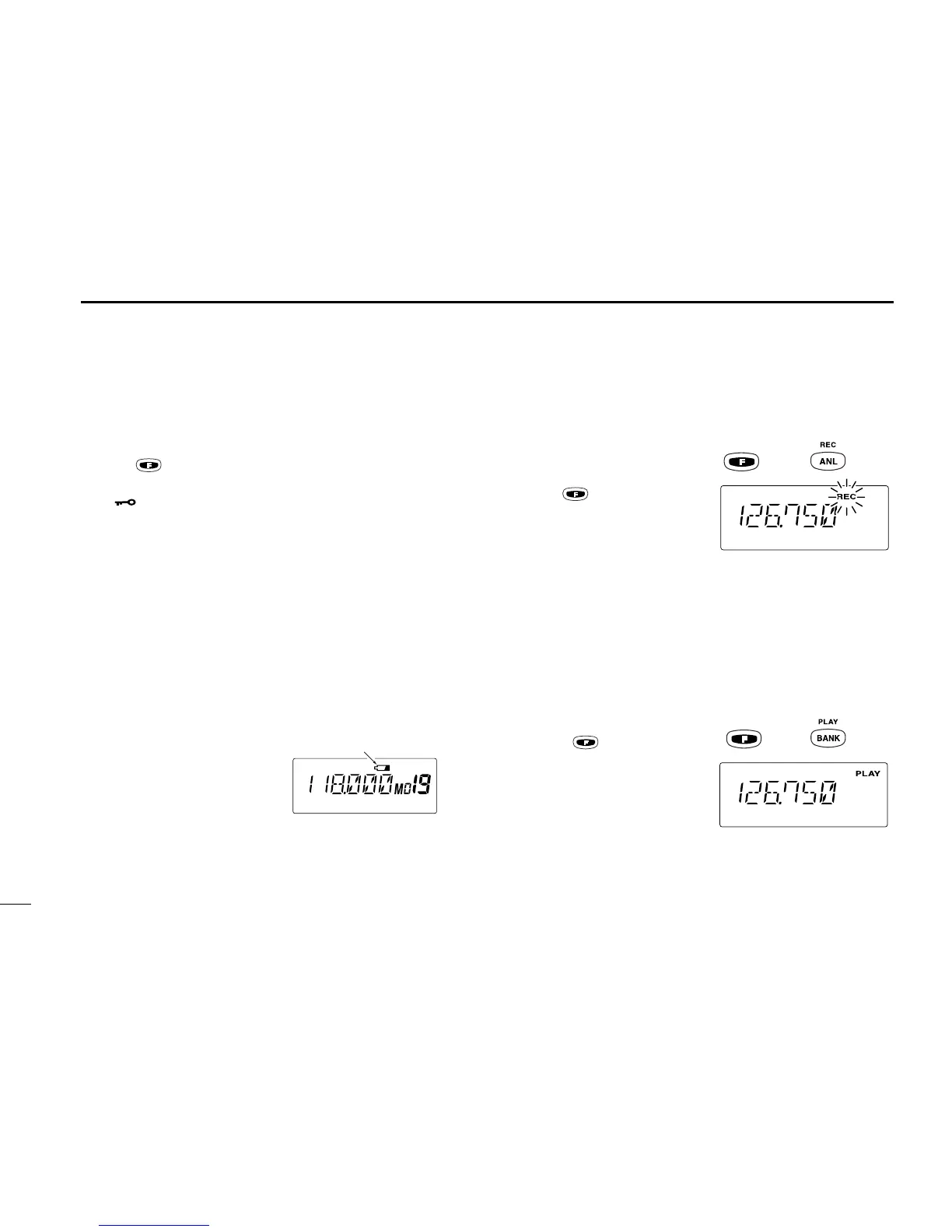
■ Low battery indicator
Low battery indicator appears when the battery power has
decreased to a specified level. The attached battery pack re-
quires recharging.
■ REC/PLAY the signals
/messages
D Recording a signal
/message
➥Push , then push [ANL
(REC)] to start to record the
message for 20 sec.
• ‘REC’ blinks on the display.
•Push [CLR] to cancel the recording.
•No message is recorded when no audio comes from the speaker.
(e.g.When the squelch is closed.)
•You can record your own message by pushing and holding [PTT]
during the recording mode. Frequency or memory CH display
disappears in this case.
• No transmission available during the recording mode.
• Only the latest message is remains.
D Play
➥Push , then push
[BANK (PLAY)] to play back
the message.
• ‘PLAY’ appears on the dis-
play.
• Push [CLR] to cancel the
play back.
• Play back the message during the transmit mode, you can trans-
mit the recorded message.



 To Next Page