iData 70 User Manual
- 17 -
4.2 Wi-Fi Network Connection
Find the following icon:
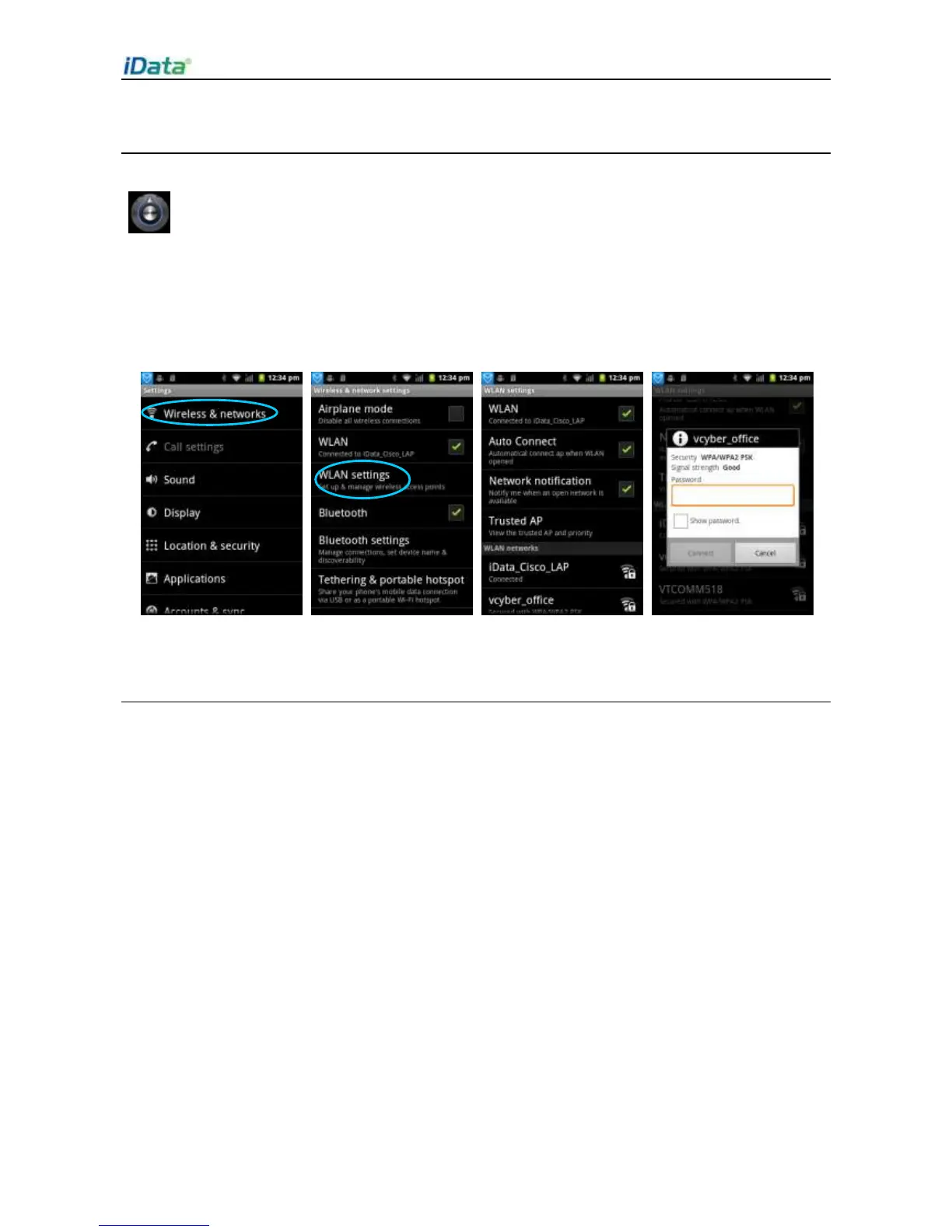
1. Select
Settings
>
Wireless & networks
>
WLAN
.
2. Click
WLAN
to enable or disable WLAN.
3. Click
WLAN settings
. In the WLAN list, select the network to be connected. In the
dialog box displayed, enter the password.
4. Click
Connect
to complete the Wi-Fi connection.
4.3 GPS
The iData 70 is equipped with a high-performance navigation chip and can obtain position
information quickly and accurately. The manufacturer of the iData 70, Wuxi iData
Technology Company Ltd., provides GPS Test, which is a GPS demonstration program.
Before using the GPS, install GPS Test. You can download GPS software (for the
information related to GPS software and HiMarket, see relevant description in 6.1 Installing
Software) from HiMarket and view position information.


 To Next Page