iData 70 User Manual
- 21 -
6 Managing iData 70
6.1 Installing Software
The iData 70 uses Google’s Android platform whose suffix is apk. To install software on the
iData 70, use the following methods:
1. Download and install software through the online software store provided by Google
(Google Play) or Android software download platform (HiMarket) used in China.
HiMarket is recommended.
2. Download software installation packages, store them on the SD card, and install the
software by using file manager.
3. Connect the iData 70 to a computer by using the USB cable and install software on the
computer. First of all, install software such as APK installer, pea, or 91 mobile assistant
on the computer so that software can be installed in batches.
6.2 Managing Applications
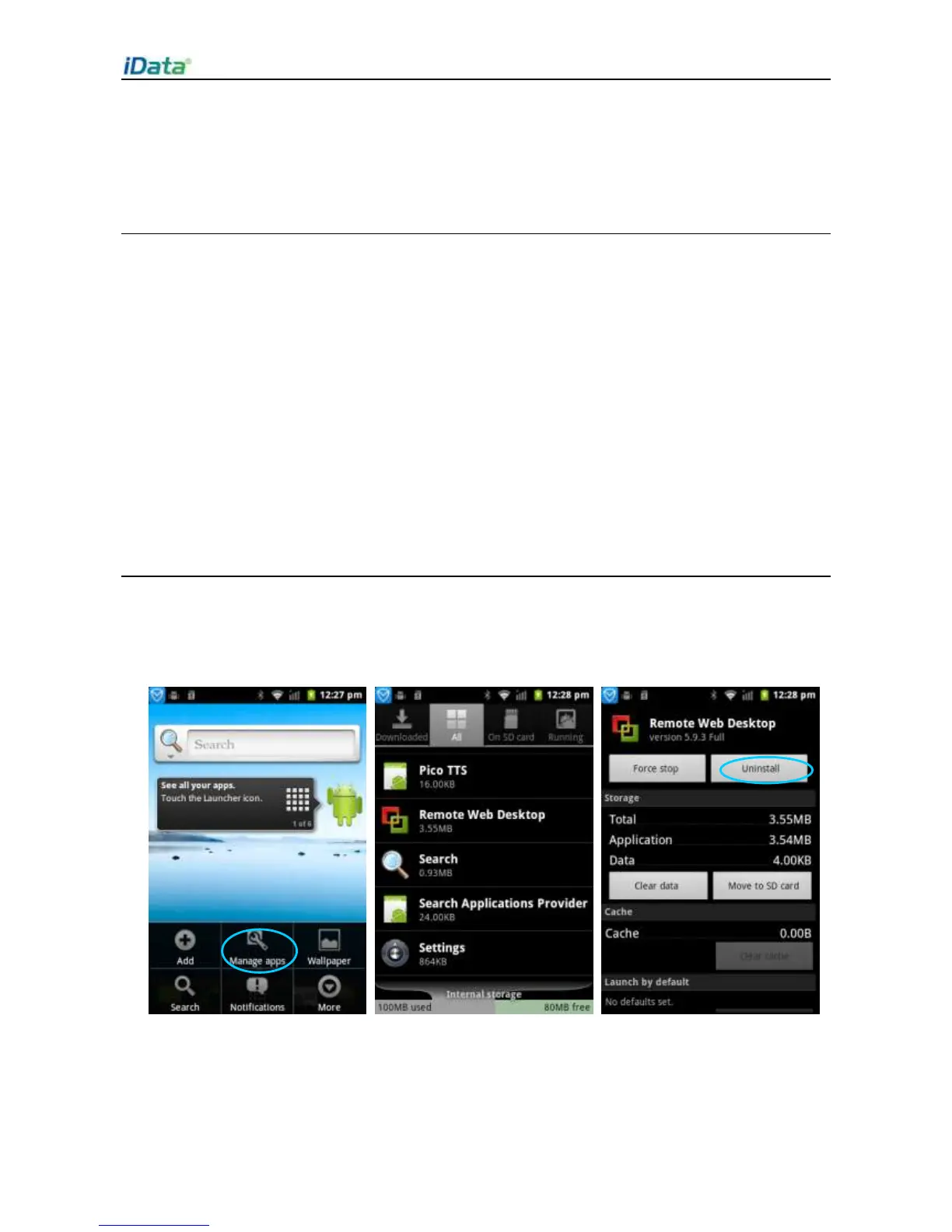
Press the menu key and click Manage apps. You can view the status of downloaded
applications, applications in the SD card, and running applications and click any application
to access the application information page where you can stop, uninstall, or suspend the
application.


 To Next Page