41
Installation and Servicing
Section 3 - Servicing
SERVICING
1
Close
1
Close
2
3
Vent
1
2
Open
3
Vent
1
Open
Close
Close
Open
Open
Vent
2
4
3
5
6
7
1
1
1
1
2
2
2
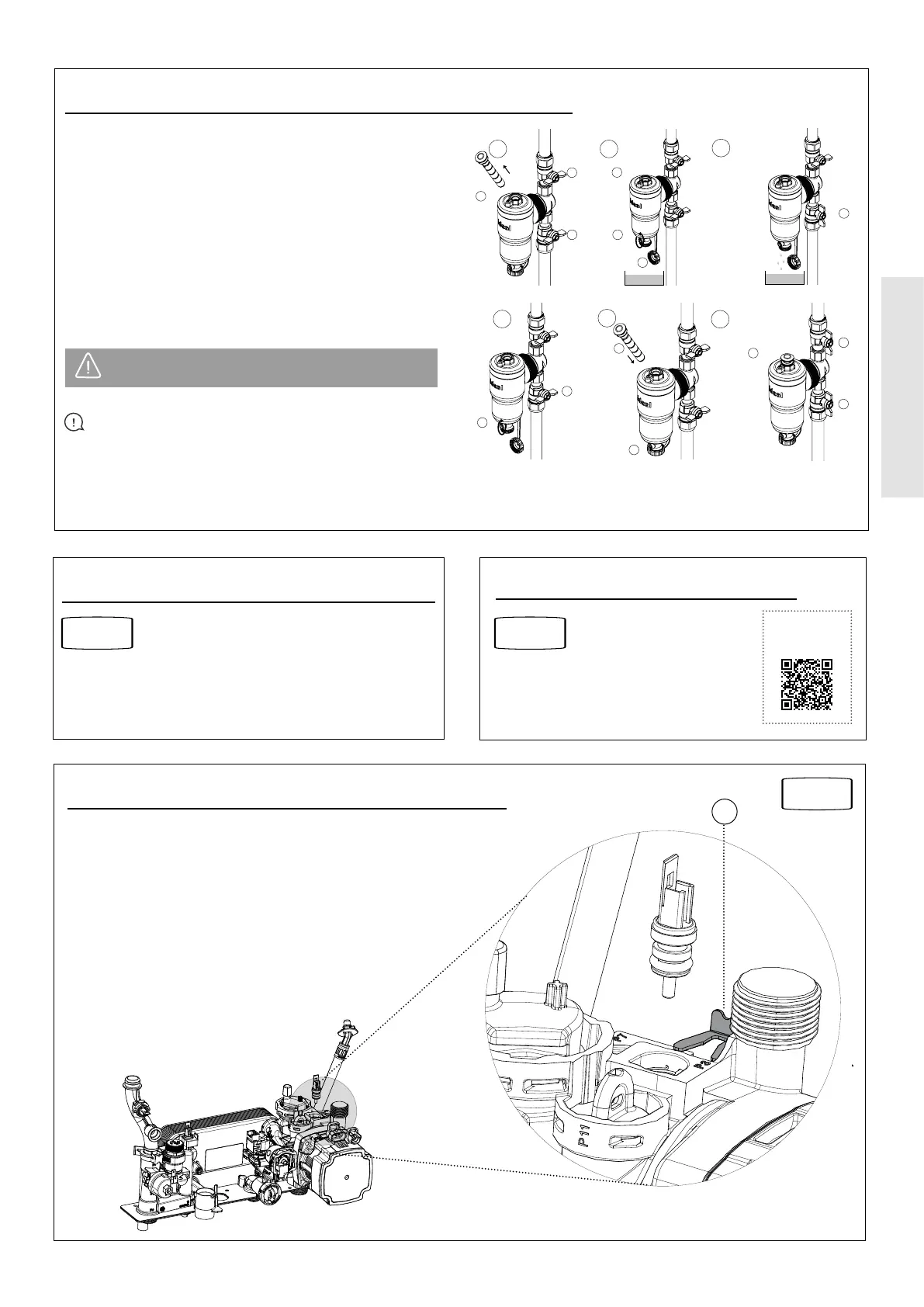
3.11 EXTERNAL SYSTEM FILTER CLEANING GUIDE
1. Switch o the boiler (isolate electrical supply).
2. Close the inlet/outlet valves. Remove magnet and vent.
3. Remove drain valve cap, open drain valve and vent.
4. Open inlet valve slowly and ush out lter until water
runs clear.
5. Close the inlet valve. Close the drain valve.
6. Reinsert the magnet and replace the drain valve cap.
7. Open inlet/outlet valves, rell system and vent.
8. Restart the boiler.
IMPORTANT: Repressurise the system after cleaning
the lter, as loss of pressure will occur.
CAUTION: Ensure that the magnet pocket is kept
dry.
Refer to Section
3.6
3.12 BURNER INJECTOR REPLACEMENT
SCAN
for video
3.13 BURNER REPLACEMENT
Refer to Section
3.2 & 3.7
2
3.14 RETURN THERMISTOR REPLACEMENT
1. Isolate and drain down the boiler.
2. Remove the clip from the pump housing and remove the
thermistor.
3. Disconnect the electrical lead from the thermistor.
4. Reconnect the electrical lead to the new thermistor and
reassemble, ensuring that the thermistor is fully engaged
and the clip is correctly located.
Refer to Section
3.2
2




 To Next Page