47
Installation and Servicing
Section 3 - Servicing
SERVICING
Refer to Section
3.2
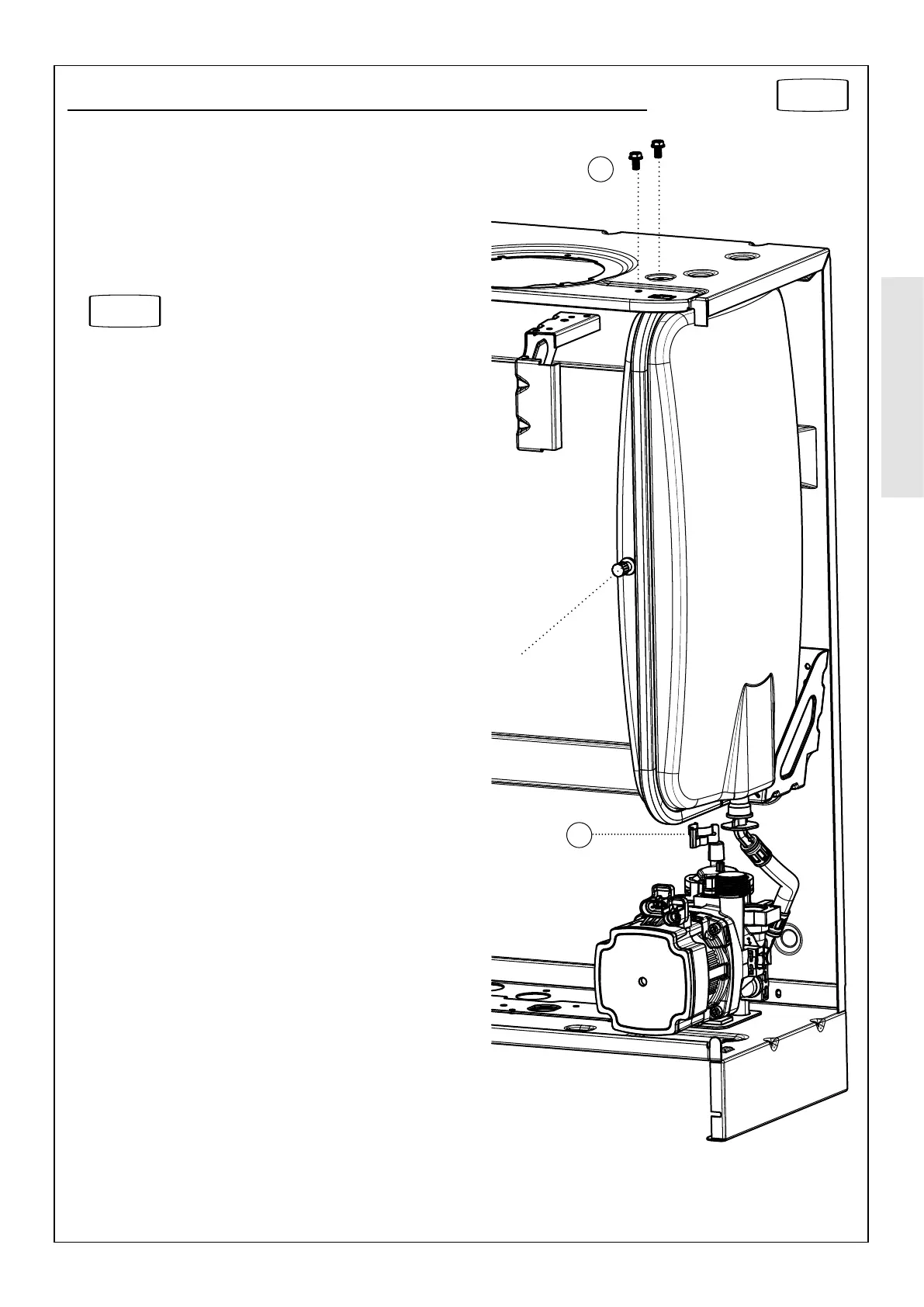
3.25 EXPANSION VESSEL RECHARGING & REPLACEMENT
RECHARGING
1. Remove the charge point cover.
2. Recharge the tank pressure to 0.75 bar.
3. Reassemble.
4. Check that the boiler operates.
REPLACEMENT
5.
Drain the boiler CH circuit.
6. Remove the retaining clip on the vessel water connection
pipe and remove the pipe.
7. Support the expansion vessel and unscrew the 2 screws
from the securing bracket, located on the top of the boiler,
and remove.
Note the position of the bracket on the vessel
8. Remove the expansion vessel.
9. Fit the new expansion vessel.
10. Reassemble ensuring the ‘O’ ring seal is in place and ret
the retaining clip.
11. Rell the boiler and check for leaks.
.
Refer to Section
3.3
Recharge
Point
7
6




 To Next Page