40
Installation and Servicing
SECTION 3 - SERVICING
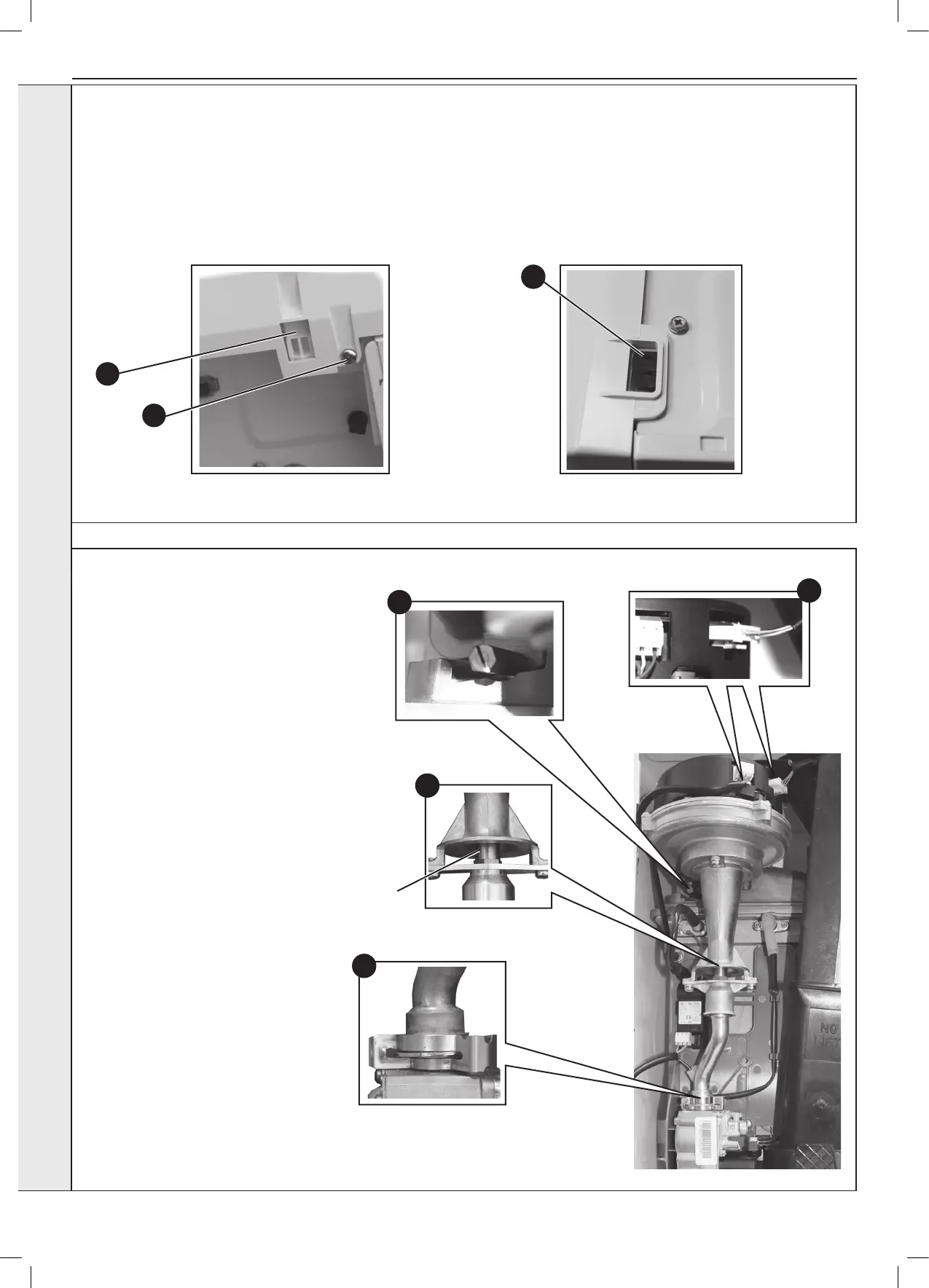
3.2 BOILER FRONT PANEL REMOVAL / REPLACEMENT
3.3 FAN AND VENTURI ASSEMBLY REMOVAL AND CLEANING
1. Disconnect the electrical leads from the fan.
2. Remove the clip from the gas control valve
outlet and ease the pipe upwards rotate and
then ease down to remove.
3. Remove the extended nut on the fan
mounting bracket.
4. Lift off fan and venturi assembly.
5. Undo the two M4 screws and release the
nozzle assembly.
6. Inspect the injector for blockage or damage.
7. Inspect fan outlet sealing gasket and replace
if necessary.
1
2
3
5
Injector
REMOVAL
1. Loosen the two screws retaining the front panel.
2. Pull the two clips down to disengage and pull panel forward
and upward and remove.
REPLACEMENT
3. Hook the panel onto the top retaining clips.
4. Push the panel until the 2 bottom spring clips engage
ensuring the 4 control knobs line up with the holes in the
front panel.
5. Re-tighten the two retaining screws.
view from bottom of boiler
view from top of boiler
3
1
2
SERVICING




 To Next Page