10
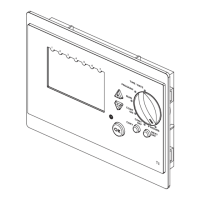
SETTING THE RF PROGRAMMABLE ROOM THERMOSTAT TO RUN IN AUTOMATIC MODE
(using the programmed on and off times)
1. Turn the Control Knob to the ‘RUN’ position
SETTING THE RF PROGRAMMABLE ROOM THERMOSTAT TO BE CONTINUOUSLY ON
1. Turn the Control Knob to the ‘CONT ON’ position
SETTING THE RF PROGRAMMABLE ROOM THERMOSTAT TO BE CONTINUOUSLY OFF
1. Turn the Control Knob to the ‘CONT OFF’ position




 To Next Page