11
SETTING + HOURS
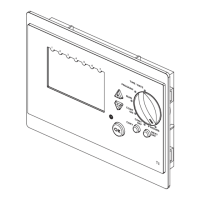
1. Turn the Control Knob to the “+ HOURS” position
2. Press the and keys to set the required + Hours time and to enter press the
key. Setting the time to 0 will disable this function.
3. Turn the Control Knob to the required operating condition: RUN or CONT OFF
Note.Useofthe‘+Hours’functionwillensuretheboileroperatescontinuouslyforupto5hours.
Ifusedduringanoffperiod,theboilerwillthenoperateforupto5hours.
Ifusedduringanonperiodlessthan5hourspriortoanoffperiod,itcanextendtheontime.




 To Next Page