Part 2 - Conguration
53
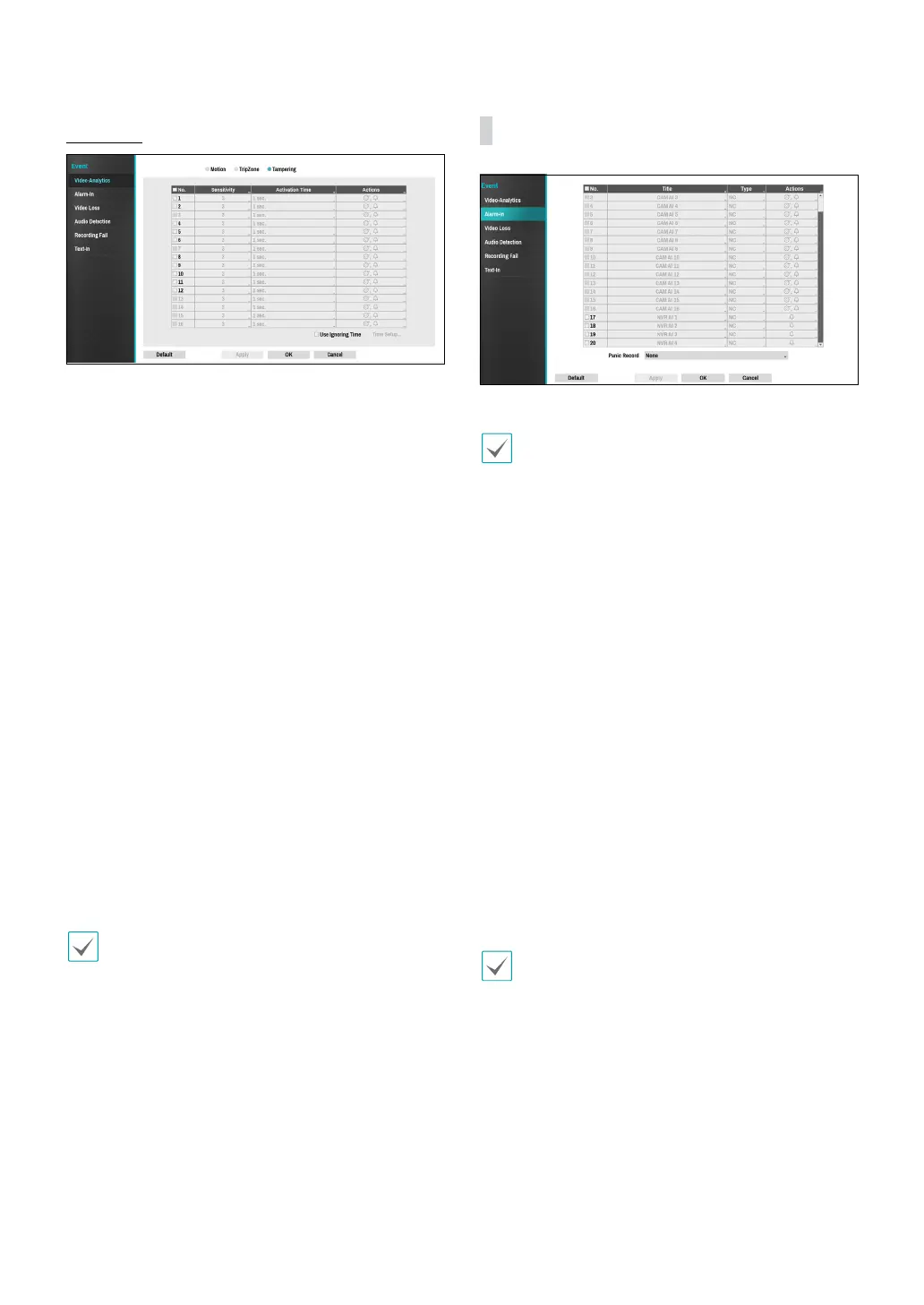
Tampering
● No.: Select which cameras to apply Tampering to.
● Sensitivity: Set to between 1 (Low) and 5 (High).
● Activation Time: Specify how long tampering
detection needs to last in order for it to be considered
an event. Tampering detections that do not last for
the specied duration of time will not be considered
as events.
● Actions: Specify which actions to take when
Tampering is detected.
– Record: Specify which cameras to begin linked
recording on when an event occurs. If the schedule
is set to Event or Time & Event mode, the selected
cameras will begin linked recording when an event
occurs.
– Alarm-Out: Designate event-triggered alarm-out
channels (each for the NVR and camera) and beeps.
– Notify: Congure to be notied of events by Mail,
LAN1 through 5, SNS, Push, and/or Alert Window.
– EventUpload: Uploads the video clips when an
event occurs.
– PTZ: Moves the PTZ camera to a specic preset
position when an event occurs.
– Event Monitoring: Selects the cameras to monitor
when an event occurs.
In order to use the Callback feature, the NVR must be
registered on the remote program.
● Use Ignoring Time: Select Time Setup to specify
the tampering detection ignore time. Tampering
detection will be disabled during the specied time
frame.
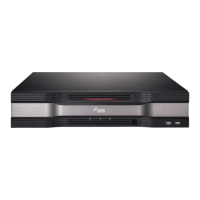
Alarm-In
● No.: Enable / disable alarm-ins.
This option includes both local and network camera
alarm-ins. 1 through 16 are network camera alarm-ins,
whereas 17 through 20 are local alarm-ins.
● Title: Use the virtual keyboard to enter titles.
● Type: Change the alarm-in type.
● Actions: Specify which actions to take when Alarm-In
is detected.
– Record: Specify which cameras to begin linked
recording on when an event occurs. If the schedule
is set to Event or Time & Event mode, the selected
cameras will begin linked recording when an event
occurs.
– Alarm-Out: Designate event-triggered alarm-out
channels (each for the NVR and camera) and beeps.
– Notify: Congure to be notied of events by Mail,
LAN1 through 5, SNS, Push, and/or Alert Window.
– EventUpload: Uploads the video clips when an
event occurs.
– PTZ: Moves the PTZ camera to a specic preset
position when an event occurs.
– Event Monitoring: Selects the cameras to monitor
when an event occurs.
• In order to use the Callback feature, the NVR must
be registered on the remote program.
• Select Panic Record to specify which alarm-in
channels to use. Panic Record commences when
the corresponding alarm-in occurs and terminates
when the alarm-in is deactivated.


 To Next Page