Part 4 - IDIS Web
85
Web Search Mode
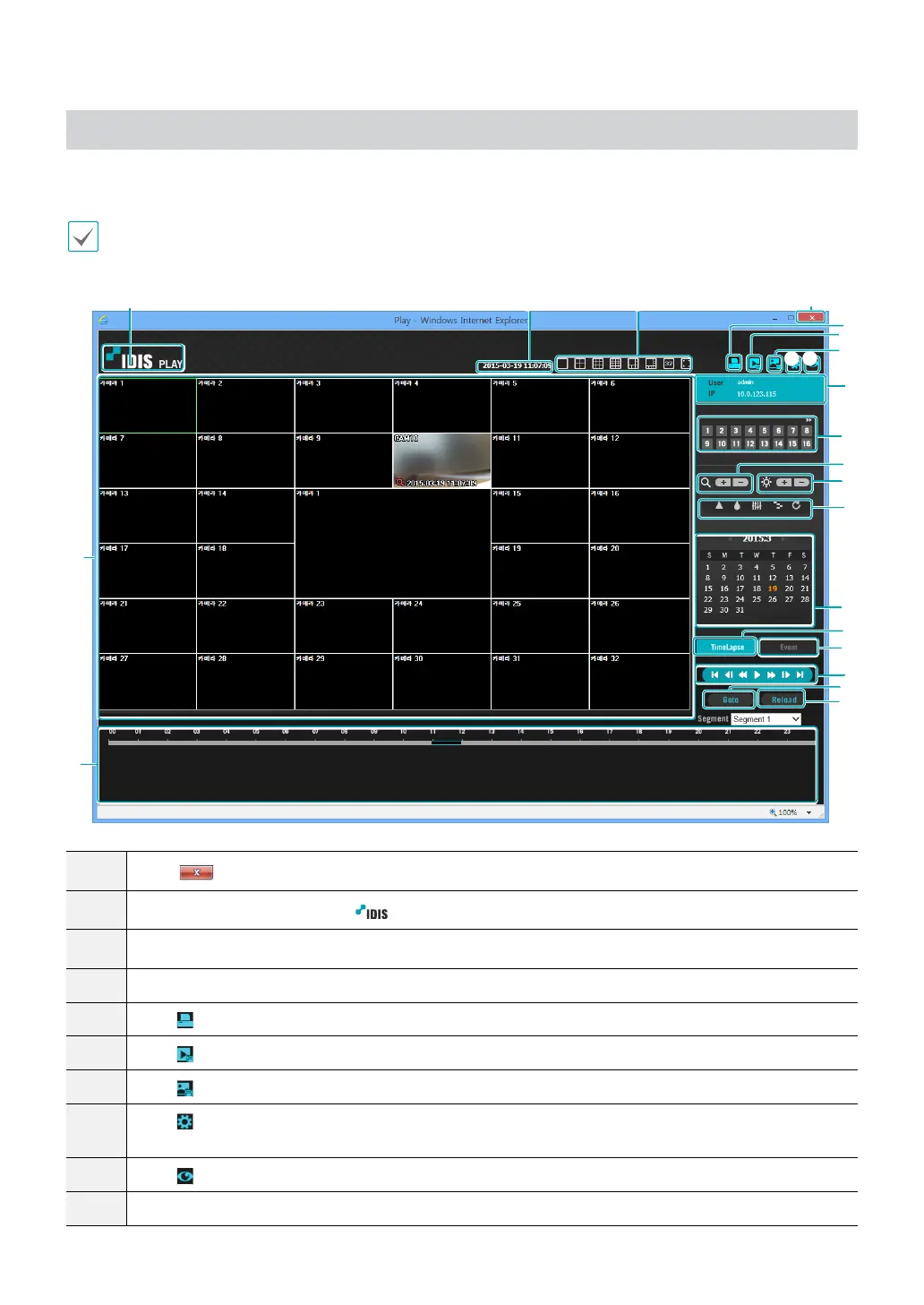
A remote web search program that allows you to search for recordings from remote locales in real-time.
While in Web Search mode, connection to remote locales will terminate automatically after 30 minutes of inactivity.
1
9
0
@
#
%
^
&
*
(
)
5
6
7
8
2
!
$
b
a
3
4
1
Press
to terminate IDIS Web.
2
Place the mouse pointer on the
logo to check IDIS Web's version.
3
Displays time information of the video recording from the remote NVR.
4
Select the desired mode.
5
Click
to print the current video screen using a printer connected to the computer.
6
Click
to save the video recording as an executable le.
7
Click
to save the current video screen as an image le.
8
Click
to congure rendering mode and OSD settings. Select rendering mode to adjust the video output
rate or select which OSD elements to display on the screen from the OSD list.
9
Click
to switch over to Web Live mode.
0
Shows login information.



 To Next Page