Part 4 - IDIS Web
83
Web Live Mode
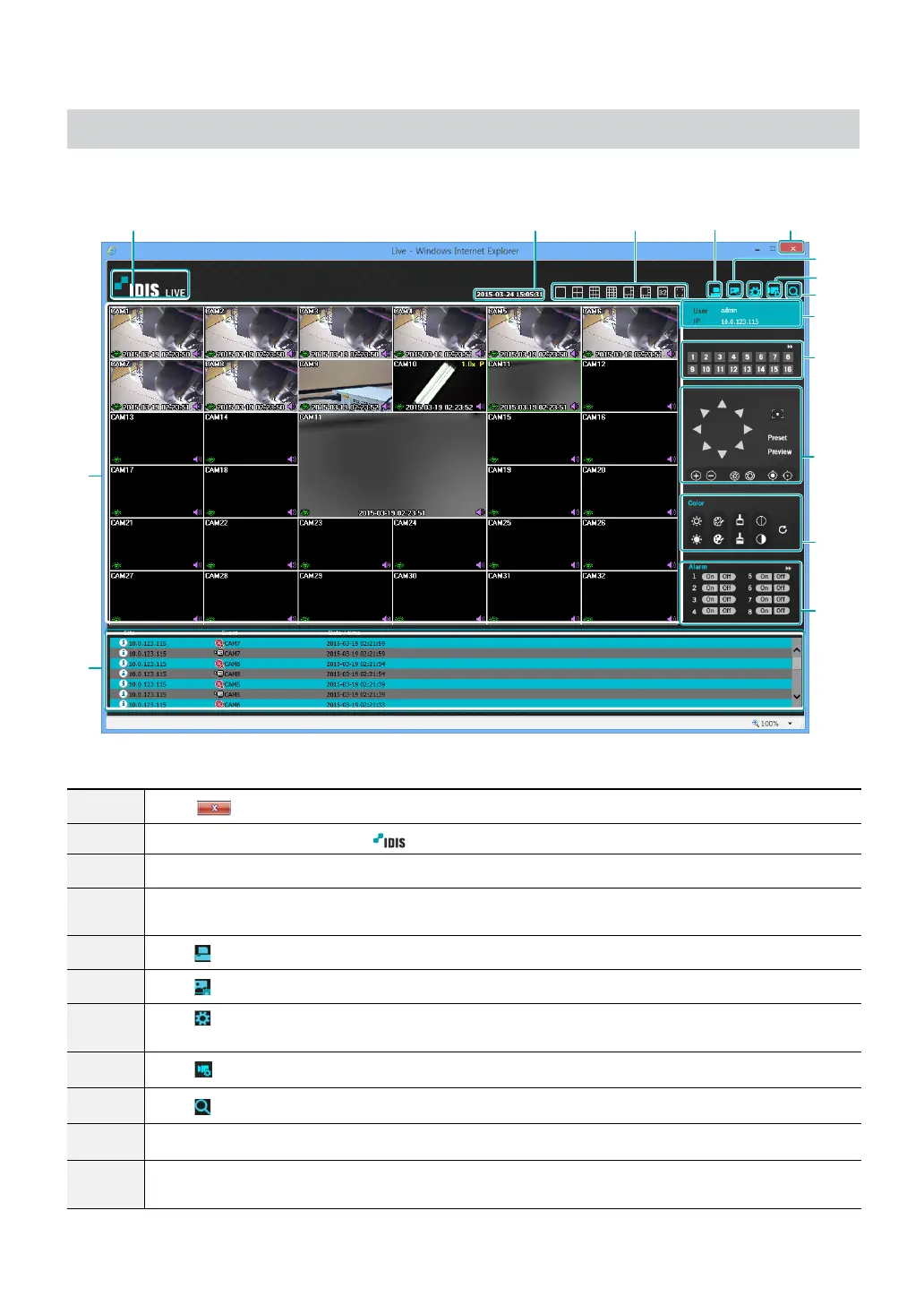
A remote web monitoring program that allows you to monitor images from remote locales in real-time.
0
!
@
#
$
7
8
9
13 42
^
%
5
1
Press
to terminate IDIS Web.
2
Place the mouse pointer on the
logo to check IDIS Web's version.
3
Displays the current time.
4
Select the desired mode. Changing the mode places the selected camera in the rst cell of the layout
that will be changed.
5
Click
to print the current video screen using a printer connected to the computer.
6
Click
to save the current video screen as an image le.
7
Click
to congure rendering mode and OSD settings. Select rendering mode to adjust the video
output rate or select which OSD elements to display on the screen from the OSD list.
8
Click
to congure event, camera, stream settings, etc of NVR at remote locales.
9
Click
to switch over to Web Search mode.
0
Shows login information.
!
Select the camera you wish to monitor. Use the arrow buttons to navigate to the previous/next camera
group.



 To Next Page