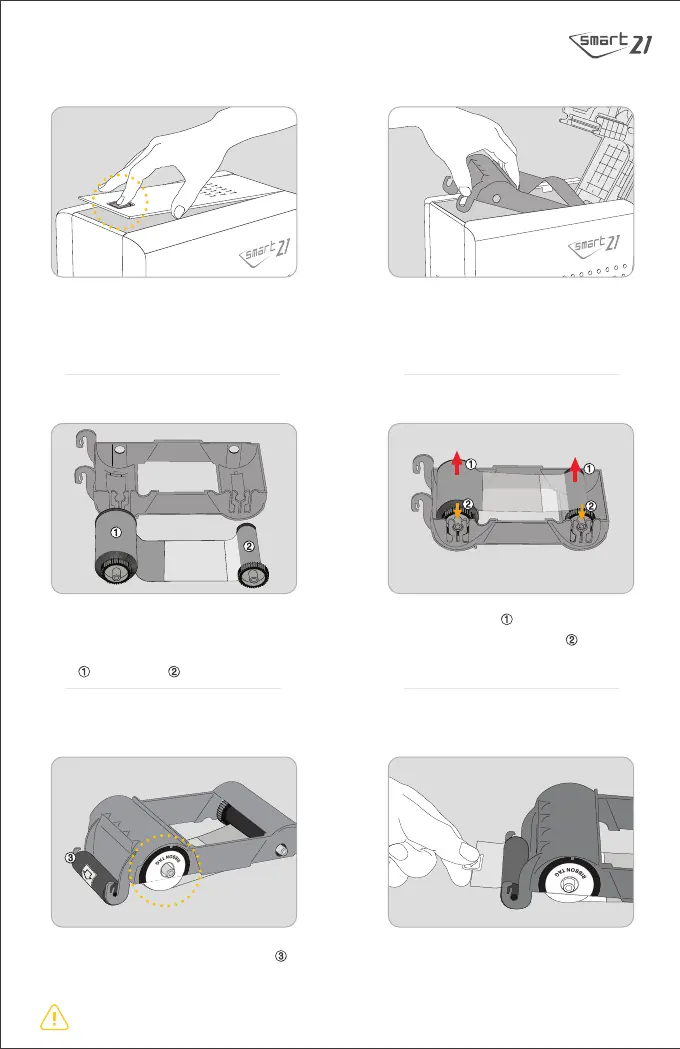
I. Printer Installation
1. Open the Top Cover of the Printer by
pressing indicated point.
2. Take out the empty Ribbon Cartridge.
3. Prepare the Ribbon and the Ribbon
Cartridge.
4. Insert the cores to the hole at first and
press the opposite open side until it click.
5. Install the disposable cleaning roller
in the ribbon cartridge.
6. Peel the protective film off on the
disposable cleaning roller.
The ribbon tag side of the supply core should be mounted in the direction of the ribbon tag marking on the cartridge.
※
Supply core | Tack-up core
※ Insert the supply core on the cleaning roller side.


 To Next Page