ID TECH SREDKey 2 Integration Manual
Page | 8
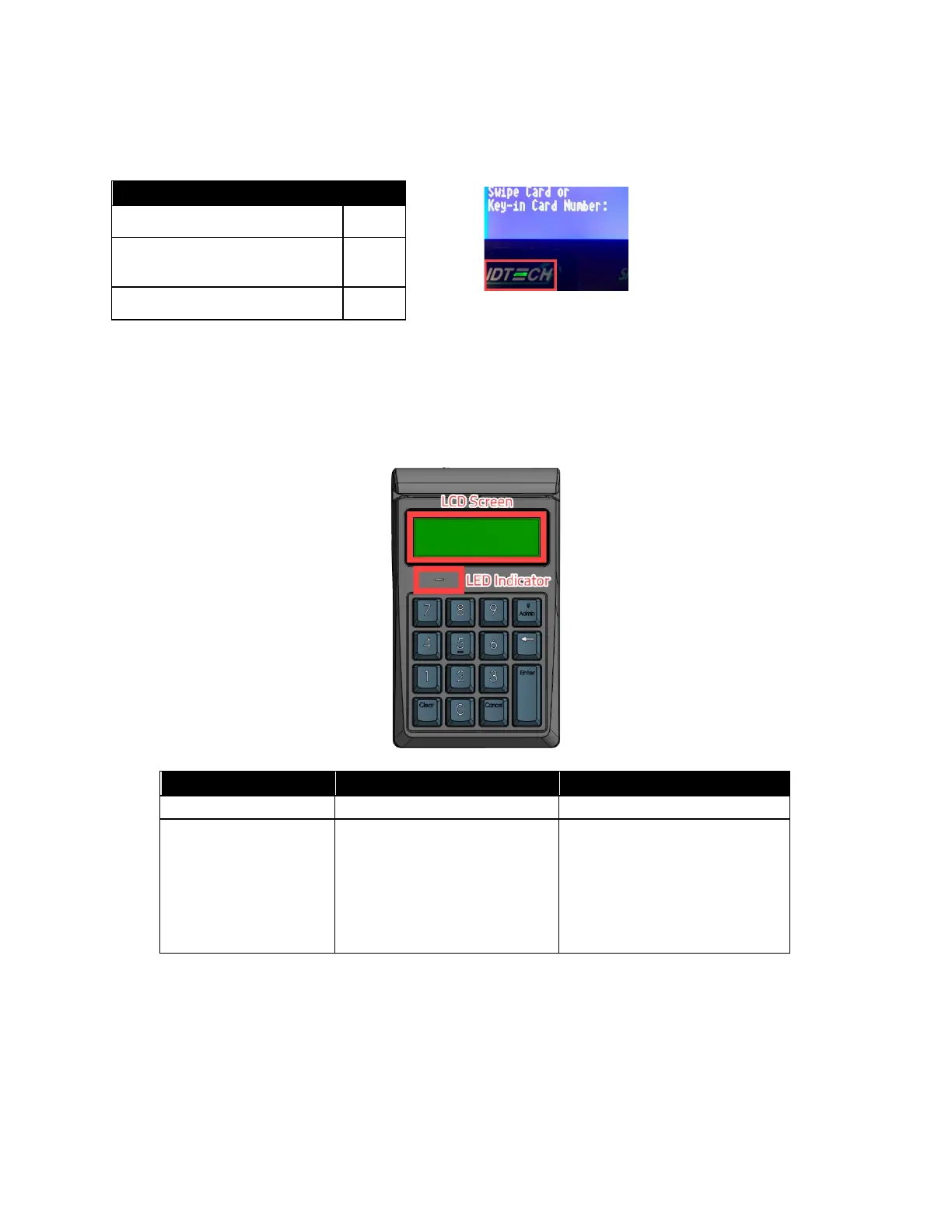
5.4. SREDKey 2 LED Behavior
SREDKey 2 units have an LED below the LCD screen that indicates device status.
Unit Ready
Unit Tampered
Unit Missing Transaction Key
5.5. Tamper and Failed Self-Check Indicators
The SREDKEY 2 displays the following indicators when it has been tampered or has any of the other
following internal issues, such as an expired certificate, missing key, or similar fault discovered during
a self-check.
LCD Display Message
The screen’s top line reads
“Tampered" and indicates the
source of the tampering on
the bottom line.
If FW is downloaded at first
time, show "Deactivated"
If device is activated, but no
LCL-KEK, show "Activated"
If LCL-KEK exist but no DEK,
The SREDKEY 2’s LCD display can indicate the following issues in the event of a failed self-check:
• "Deactivated" indicates the reader has firmware but is not activated.
• "Activated" indicates the reader is activated but does not have an LCL-KEK.
• "Need client key" indicates the reader has an LCL-KEK, but no DEK.


 To Next Page