6.1 Screening and grounding
The unit housing is connected to the cable screen via the connector�
If there are potential differences between the grounding points, a compensation
current can flow across the screen connected at both sides� In this case, lay an
additional cable for equalisation of the potential�
To avoid compensation currents the unit can also be installed as isolated� The
screen must then be connected to the functional earth of the plant�
Without isolated installation and without potential equalisation the maximum
interference voltage on the infrared temperature sensor may be 32 V�
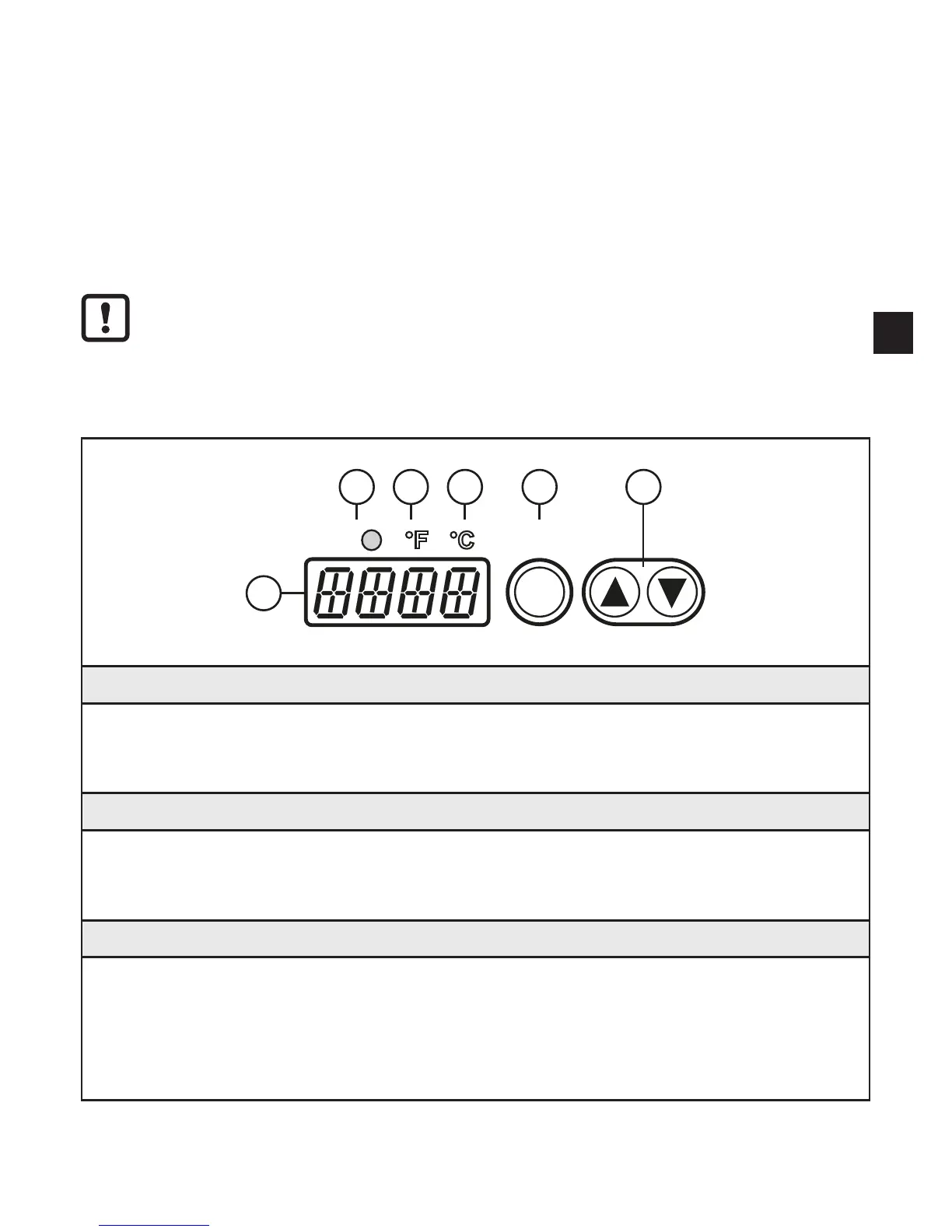
7 Operating and display elements
Out1 Enter
1
2
3
4
5
6
1 to 3: Indicator LEDs
LED 1 = switching status of the output
LED 2 = temperature indication in °F
LED 3 = temperature indication in °C
4: [Enter] button
• Selection of the parameters
• Reading the set values
• Confirmation of the parameter values
5: Set buttons [▲] and [▼]
• Selection of the parameters
• Activation of the setting functions
• Changing the parameter values
• Change of the display unit in the normal operating mode (RUN mode)
• Locking / unlocking


 To Next Page