10.1 Parameter setting in general
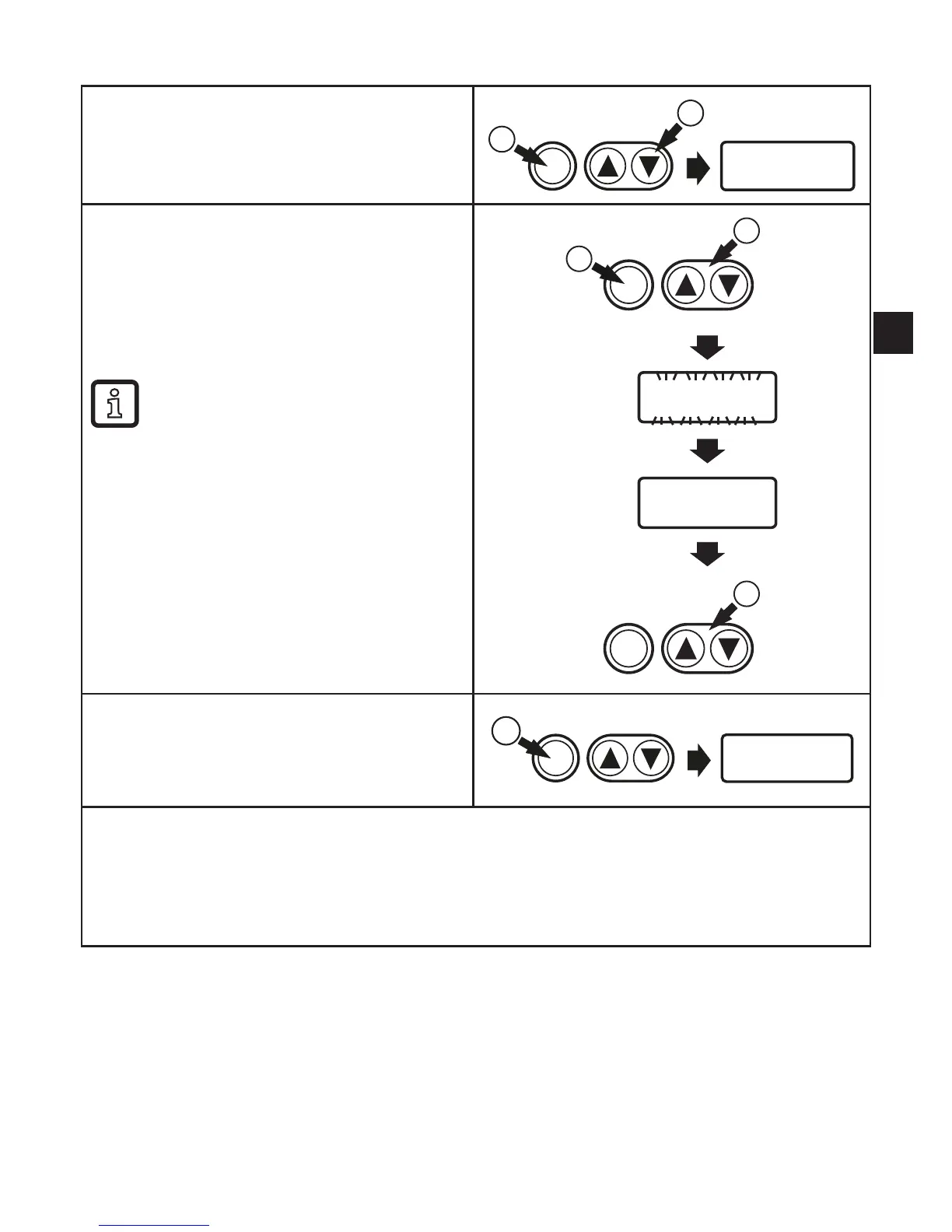
Select parameter
1� Briefly press [Enter]�
2� Press [▲] or [▼] until the requested
parameter is displayed.
Enter
2
1
Changing the parameter value
3� Briefly press [Enter]�
> The currently set value is displayed�
4� Keep [▲] or [▼] pressed for 1 s._>
Display flashes first, then permanent�
5� Change value by pressing [▲] or [▼].
Keep [▲] or [▼] pressed.
> Faster cycle of the numerical
values�
4
5
3
Enter
Enter
Acknowledge parameter value
6� Briefly press [Enter]�
> The parameter is displayed again� The
new setting value is saved�
Enter
6
Finish parameter setting and change to the process value display:
► wait for 30 seconds
or
► change from the submenu to the main menu, from the main menu to the process value
display with [▲] or [▼].


 To Next Page