45
ifm Device Manual SmartSPS AC14 with EtherNet/IP interface (AC1421, AC1422), Firmware 3.1.2 2015-11-30
Menu Start screen
>
5.1 Start screen
14439
When starting the device, the start screen of the graphical user interface appears (special case:
system start after initial commissioning or firmware update: → Start screen 'Basic settings'
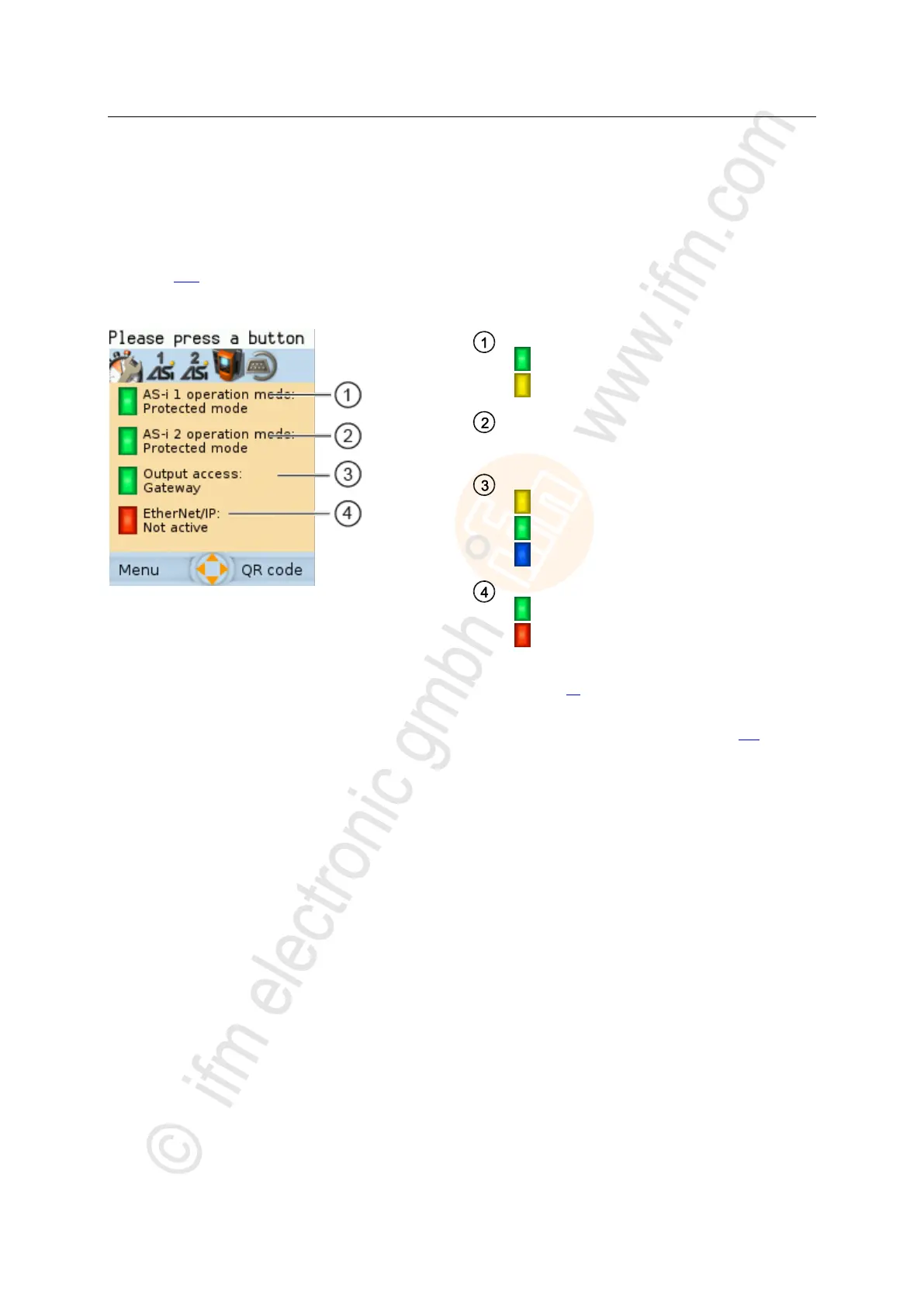
(→ page 111)). The start screen displays the status information of important system components.
Moreover, the graphical user interface is accessed and operated from the start screen.
AS-i master 1 operation mode
= Protected mode
= Projection mode
AS-i master 2 operation mode
→ AS-i master 1 operation mode
only available for devices with 2 AS-i masters
Control instance of the AS-i slave outputs
= Manual | Manual with PLC
= Gateway | Gateway with PLC
= PLC
Status of the EtherNet/IP connection
=active
=inactive
► Press [Menu] function key to go to the menu (→ Menu functions (→ page 46))
OR:
► Press [OSC] function key to go to the Online Support Center (→ Online Support Center (OSC) (→ page 123))



 To Next Page