EasyManua.ls Logo

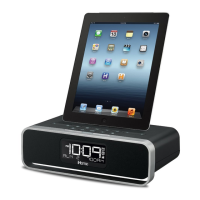
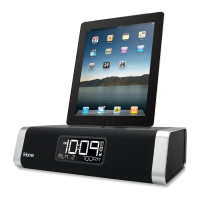
iHome iD50 - User Manual

iHome iD50
17 pages
Print Icon
To Next Page IconTo Next Page
Loading...
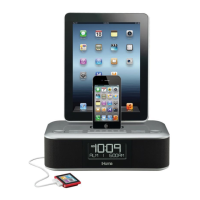
Model iD50
The Home System
for Your iPad,
iPhone or iPod
Questions? For latest instructions, visit www.ihomeaudio.com/support
iD50 IB_US version
Size: 178 x 178 mm (16 pages)
Printing color: Black
Mat’l: 90gsm book paper
Dec. 5, 11.
Note: Apps are not covered in detail in this booklet. To learn more about how iHome apps can enhance your
experience, please visit the App Store.
iHome Sleep
FREE alarm clock app
iHome Set
FREE device control app
iHome Radio
Internet radio app
works with
available on the App Store
P1

Other manuals for iHome iD50

Questions and Answers

  • F
    Frederick VaughanSep 3, 2025
    Why can’t I play Bluetooth music from my cellphone or other Bluetooth devices on iHome Docking Station?
    • T
      Thomas RiosSep 4, 2025
      This issue can occur if your device does not support the A2DP and AVRCP Bluetooth profiles. While these profiles are needed to stream music, you can still use the hands-free speakerphone functionality. Also, ensure your device and the unit are properly paired and linked. The unit defaults to the last linked device, so a new device may need to be linked from the device itself.
  • M
    Michelle BurtonSep 18, 2025
    Why did the time sync not work on my iHome Docking Station?
    • A
      Ashley MeyersSep 18, 2025
      Time sync may not work if you are using older iPod models such as the iPod mini, which do not support this function. Ensure you are using an iPhone or newer iPod such as touch, nano, or classic. If time sync is unavailable, set the time manually.
  • J
    Jonathan PhillipsSep 16, 2025
    Why is the battery low icon always flashing on my iHome iD50 Docking Station?
    • R
      robinwrightSep 16, 2025
      If the battery low icon is always flashing, the battery may be weak, requiring replacement with a new one. Also, ensure the battery is installed correctly with the + side facing outwards.
  • R
    Rebecca MitchellSep 14, 2025
    Why does my iHome Docking Station unit/adaptor get warm?
    • B
      Brittany RiveraSep 14, 2025
      It is normal for the unit/adapter to get warm after extended play at high volume. Turn the unit off for a while or lower the volume.
  • Y
    ymooreSep 13, 2025
    Why is there no sound from my iHome Docking Station?
    • A
      Ana HernandezSep 13, 2025
      If there is no sound from the unit, ensure that the volume is turned up.
  • J
    jonesstephenSep 12, 2025
    Why is there no AM band radio sound on my iHome Docking Station?
    • B
      Brent MurphySep 12, 2025
      If there's no AM band radio sound, the AM loop antenna might not be connected to the unit. Plug the AM loop antenna connector into the jack on the back of the unit.
  • D
    David AvilaSep 9, 2025
    Why does my iHome iD50 Docking Station unit not turn on?
    • J
      Jack HoldenSep 9, 2025
      Ensure the AC adapter is correctly plugged into a working wall socket and that the connector is securely plugged into the supply jack on the unit.
  • P
    Paul RobinsonSep 7, 2025
    What to do if my iHome Docking Station performance is erratic?
    • R
      Renee HaleySep 7, 2025
      If the unit's performance is erratic, it might be reacting to external interference. Try moving the unit away from potential sources of interference such as computers, modems, wireless devices (routers), or fluorescent lights.
  • W
    Willie JonesSep 5, 2025
    Why can’t I hear the caller’s voice on my iHome iD50 Docking Station?
    • J
      Jeffrey ChurchSep 5, 2025
      If you can't hear the caller's voice, the Bluetooth device may be out of range of the unit; try moving your cell phone closer. Also, check that the volume on the unit isn't too low and increase it if necessary.
  • C
    Charles MillerAug 20, 2025
    What to do if my iHome iD50 iPhone/iPod didn’t charge up?
    • J
      Joseph MartinAug 21, 2025
      If your iPhone/iPod isn't charging, first, remove the iPhone/iPod from the dock and check for any obstructions on the connectors, then reseat it firmly. Also, ensure that your iPhone/iPod is working properly before docking it into the unit.

Summary

Product Overview and Setup

Maintenance Instructions

FCC and IC Information

FCC & IC Radiation Exposure Statement

Statement on compliance with radiation exposure limits.

Getting Started

Product Setup and App Information

Overview of initial setup and available iHome applications.

Controls and Indicators

Top Panel Controls

Describes controls on the top surface of the unit.

Rear Panel Connections

Details the ports and connections on the back of the unit.

Display Indicators

Explains the various indicators and time display elements.

iD50 Quick Start Guide

Power Connection and Setup

Instructions for connecting the unit to a power source.

Antenna Setup

Guidance on setting up the AM and FM antennas for optimal reception.

Device Docking and Playback

Steps for connecting and playing an Apple device.

Firmware Updates

How to update the unit's firmware using the iHome Set app.

iD50 Quick Start Operations

AutoSync Clock Setting

Explains automatic time synchronization from a docked Apple device.

Alarm Setup Procedure

Steps to set up dual alarm times, sources, and schedules.

Mode and Radio Operation

How to switch between audio modes and operate the radio.

iD50 Connectivity and Calls

Bluetooth Phone Pairing

Guide to pairing a mobile phone via Bluetooth for wireless connectivity.

Call Handling with Bluetooth

Instructions for using the unit for answering and making phone calls.

Using the iD50 Features

Power Source Connection

Details on how to connect the unit to the AC power source.

Firmware Update Process

Instructions for updating the unit's firmware via the iHome Set app.

Powering On and Off

How to power the unit on and off using the designated button.

AutoSync Clock Setting

Automatic time setting via docked Apple device.

Manual Clock Setting

Steps for manual adjustment of the clock and calendar.

Using the Alarms

Setting Dual Alarms

Comprehensive guide to setting dual alarms, wake sources, and schedules.

Alarm Management

How to review, arm, and disarm active alarms.

Resetting Alarms

Procedure to reset a sounding alarm for the next scheduled day.

Snooze Functionality

Instructions for setting and using the snooze function.

Audio Playback Modes

Sure Alarm Feature

Ensures alarm sounds even during power failure.

Listening to Apple Devices

How to play audio from docked Apple devices.

Sound Adjustments

How to adjust volume, treble, bass, and SRS settings.

Radio Tuning and Presets

Instructions for setting up antennas, tuning, and saving radio stations.

Advanced Unit Operations

Radio Frequency Selection

How to select region-specific radio frequency settings.

Line-in Port Usage

Connect and play audio from external devices via the aux-in port.

Bluetooth Music Streaming

How to stream music wirelessly from a paired device.

Phone and Sleep;Nap Functions

Answering and Dialing Calls

Instructions for answering and making phone calls via Bluetooth.

Sleep Mode Settings

How to set the unit to gradually lower volume and shut off.

Nap Timer Settings

How to set a separate alarm for short naps.

Display and Battery

LCD Brightness Control

How to adjust the brightness of the LCD display.

Clock Backup Battery Replacement

Instructions for replacing the battery that maintains clock settings.

A Consumer Guide to Product Safety

Product Safety Instructions

Comprehensive safety guidelines for proper unit installation and usage.

Troubleshooting Common Issues

Unit Power and Response Problems

Solutions for issues like the unit not turning on or responding.

Battery and Docking Issues

Troubleshooting battery status and device docking problems.

iPhone;iPod Connectivity Problems

Resolving issues with device response, sound output, and charging.

Audio and Radio Performance

Fixes for sound distortion, no AM radio, or noisy AM reception.

Time Sync and General Performance

Addressing time synchronization errors and erratic unit performance.

Advanced Troubleshooting

Sound Distortion and Warmth

Solutions for distorted sound, high volume warmth, and EQ settings.

Snooze and Alarm Malfunctions

Fixes for incorrect snooze times and non-working alarms.

Bluetooth Connectivity Issues

Resolving problems with Bluetooth music playback and pairing.

Call Audio Problems

Troubleshooting issues with hearing the caller or being heard.

Warranty Information

Warranty Service Process

Steps for returning the product for warranty service.

Warranty Limitations and Rights

Explains warranty validity, exclusions, and user legal rights.

iHome iD50 Specifications

General IconGeneral
BrandiHome
ModeliD50
CategoryDocking Station
LanguageEnglish

Related product manuals