7
VIDEO-OUT
Your iHome is capable of outputting video stored on your
iPod/iPhone to your television via the jacks on the rear.
Depending on your model of iPod/iPhone, the supported
video-out characteristics vary. See below.
iPod classic, 3G iPod nano, 4G iPod nano, 2G iPod touch,
iPhone 3GS: These iPod models can output progressive scan
component video.
1G iPod touch, iPhone, iPhone 3G: These models can output
interlaced scan component video.
All iPod/iPhone models also output composite video. To switch to
composite video, turn your iHome on, hold Bongiovi DPS button (on
front) and press volume down (-) button. To switch back to component
video, hold Bongiovi DPS button and press volume up (+) button.
These steps will be necessary each time you dock your iPod/iPhone.
5G iPod: Only composite video is supported.
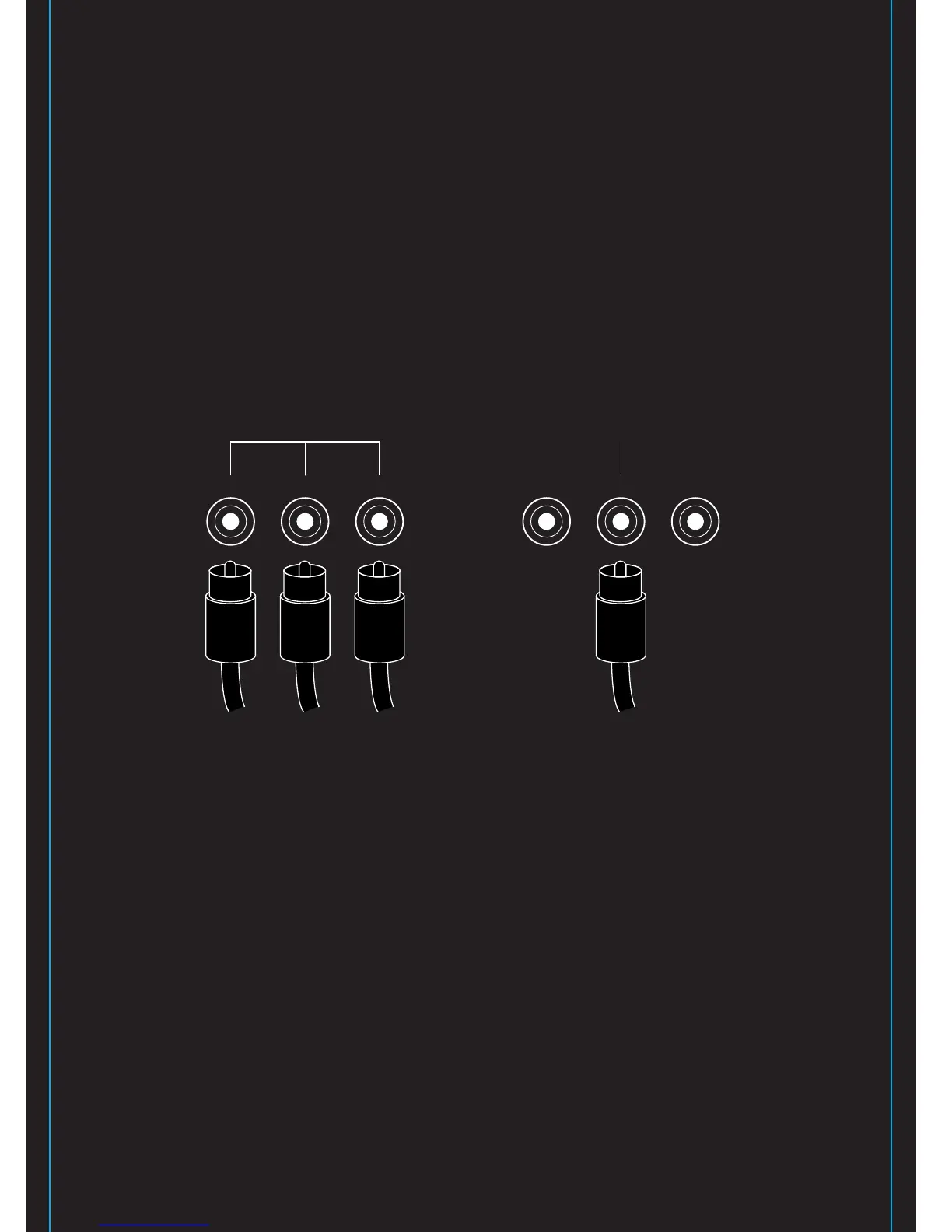
Y
P
B PR
For component video,
use the three jacks on rear
Y
P
B PR
For composite video,
use only the center jack
Changed Date: Jul. 6, 09.


 To Next Page