iP37 Quick Start
P4
1
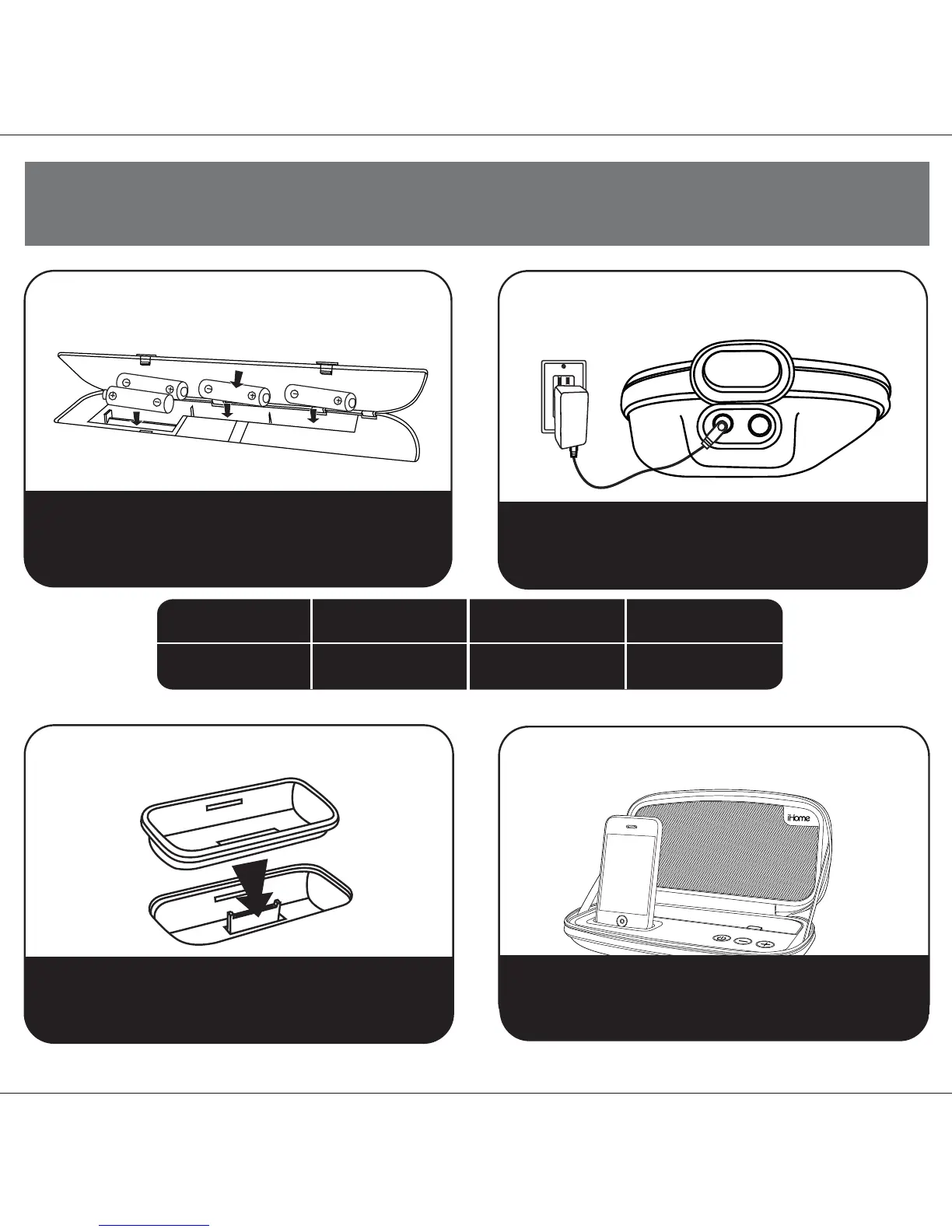
1:batteries
2:AC adaptor
Open battery compartment located inside unit. Insert 4
“AA” batteries (not included) as indicated on diagram.
Unit can now play iPod/iPhone. Batteries will not charge
iPod/iPhone.
4:iPod/iPhone
NOTE: If you do not have an insert for your iPhone/iPod, please visit
www.ihomeaudio.com or call iHome toll free at 800-288-2792 to purchase one
3:inserts
Connect AC adaptor to the DC jack (left of iP37) and plug
the other end into a working wall socket to charge and play
iPod/iPhone. Does not charge batteries.
Gently place iPod/iPhone on the connector plug in dock.
Press the Power Button. Unit and iPod/iPhone will turn
on. Adjust volume by pressing the
+ or – Button.
Select the dock insert for your iPod/iPhone model from the
table above and place insert in dock.
Never dock an iPod/iPhone without an insert in place.
iPod touch 2G
insert 16
iPod touch 2G
For this
iPhone/iPod
Use this insert
iPhone 3G
iPhone 3G
insert 15
iPod nano 5G
insert 18
iPod nano 5G
RESET
RESET
TEST
TEST


 To Next Page