3
Setting Up the Unit
Connect Unit to Power Source
Plug the AC adaptor cable into the AC Adaptor Jack and the other end into a standard 120V AC wall socket. Adaptor must
be plugged in to operate unit. The unit does not operate on batteries (a battery back up system maintains clock settings
during power failures).
This unit has a preset clock: the clock is preset at the factory. It’s simple to match the Time Zone setting to your location (US
only).
1. Depending on your location and whether or not Daylight Saving Time (DST) is in effect, manually set the DST Switch located
at the back of the unit to +1 to add an hour or to -1 to subtract an hour. A DST adjust screen appears briefly.
2. Press and hold the Time Zone Button located on the back of the unit until the Time Zone flashes on the lower part of the
display. Press the << or >> Button to select your time zone. Note: Time Zone is disabled when clock display is set to 24
hours (see step 5 under Setting Time).
3. Press the Time Zone Button again (or no button within 10 seconds) to exit the time zone setting mode.
4. If the displayed time is not correct, please see “Setting Time and Calendar manually” section below.
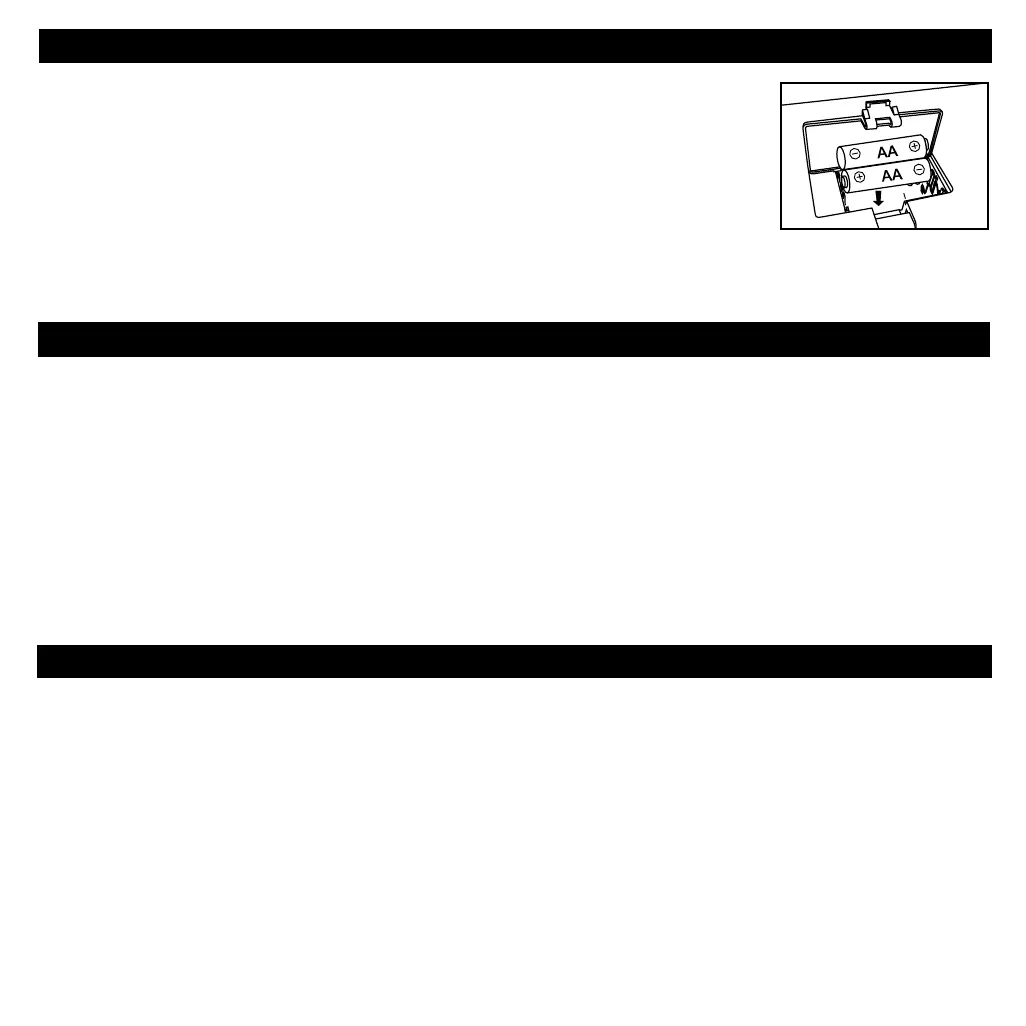
This unit uses “AA” LR06 batteries (pre-installed) for backup battery system to provide continuous
alarm operation and clock settings in the event of a power failure. If the Battery Low Icon
located on the right of the display is flashing, it is time to replace the backup batteries. Please
make sure the AC adaptor is connected, otherwise all settings may be lost during battery
replacement.
1. Open the battery compartment cover located on the bottom of the unit
2. Insert 2 “AA” (LR06) batteries as indicated, making sure that the + and – polarities match
the diagram inside.
3. Replace battery compartment cover.
We recommend alkaline batteries for longer battery life.
Installing/Replacing the Backup Batteries
Battery Warning
For models that require more than one battery
• Do not mix with used or other battery types/brands
• Replace all batteries at the same time
• Do not open batteries
• Do not dispose of in fire
• Do not heat above 75ºC (167ºF)
• Do not expose contents to water
• Do not charge or recharge
• Do not install backwards



 To Next Page