ENGLISH
28 OPERATING THE MONITOR
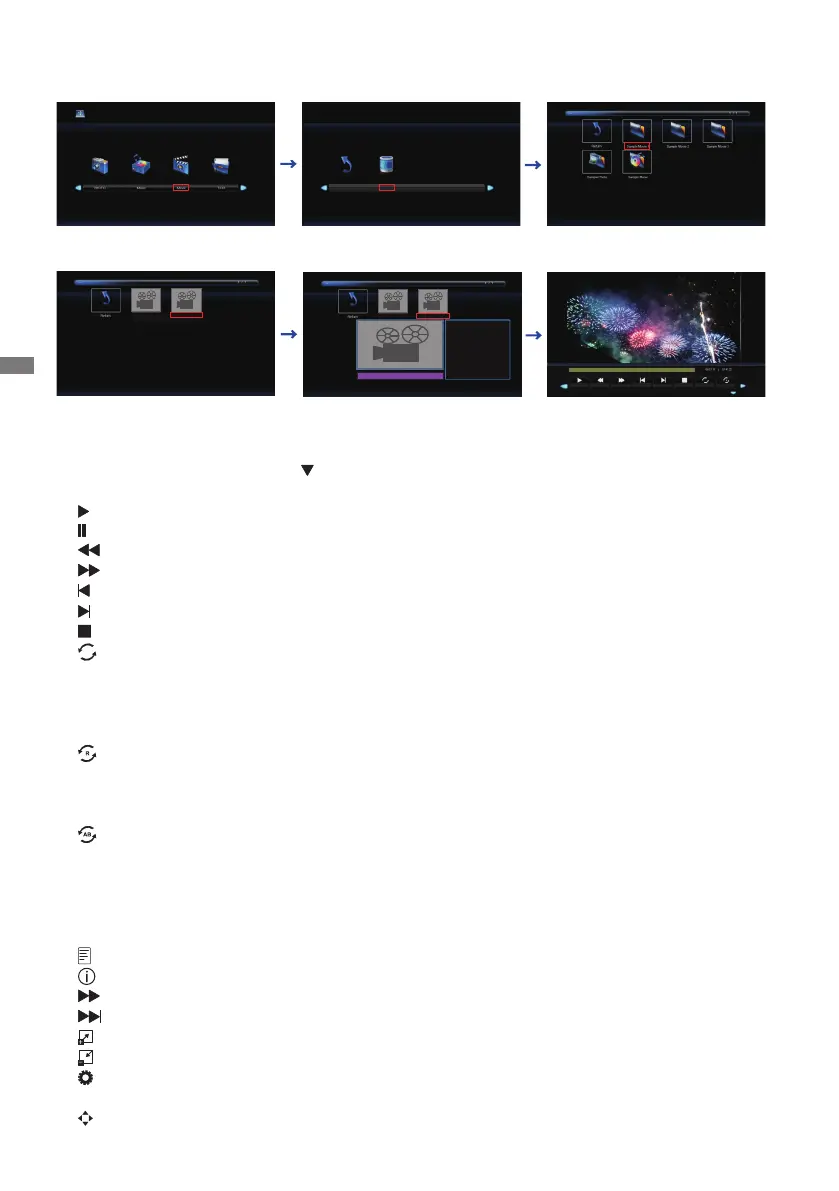
Playing Movie les
1.Select "Movie" and press the OK button, then select "C" and press the OK button.
2.SelecttheMovieleandpresstheOKbutton.
<Operation Menu>
• Menu Display : Press the OK button on the remote control.
• Menu non-Display : Press the
/ EXIT button on the remote control.
• Return : Previous screen
•
Play : Plays Movie (All movie or Choice movie)
•
Pause : Pauses Movie
•
FB : Fast Backward
•
FF : Fast Forward
•
Prev. : Previous Movie
•
Next : Next Movie
•
Stop : Stops Movie
•
Repeat : Set number of times to repeat Movie. (Repeat is switched as following by pressing
the OK Button successively.)
Repeat All : Repeat the whole section continuously.
Repeat None : Do not repeat.
Repeat 1 : Repeat entire section 1 time.
•
Random : Set the Random Movie (Random is switched as following by pressing the OK
Button successively.)
Random o : Proceed in order
Random on : Progress randomly
•
Set : Section Repeat (Section Repeat is switched as following by pressing the OK Button
successively.)
None : Do not use.
Set A : Start of repeat section.
Set B : End of repeat section.
(AB Set : Repeat endlessly the section set with A - B.)
•
Playlist : Displays the Movie list
•
Info:Displaysthecurrentlestatusinformation.
•
Slow Forward : Slow Forward
•
Step Forward : Step Forward
•
Zoom In : Zoom in the image.
•
Zoom Out : Zoom out the image.
•
Aspect Ratio : Auto / 4:3 /16:9 (Aspect Ratio is switched by pressing the OK Button
successively.)
•
Move View : Move focus in Zoom In state
C
Return
Movie sample1.mkv
Movie sample2.mkv
Movie sample1.mkv
Movie sample2.mkv
Movie sample2.mkv
Resolution :
Audio Track :
Subtitle :
Program :
Size :
1920 x 808
1 / 1
OFF
-- / 0
2314511 KBytes
Play
Prev.
Next
Stop
Repeat
FB
FF
Random off




 To Next Page