2 - Getting started
21
StealthPedal
™
CS
2.10 Mac Control Panel
On the Mac you can conveniently control your StealthPedal from the
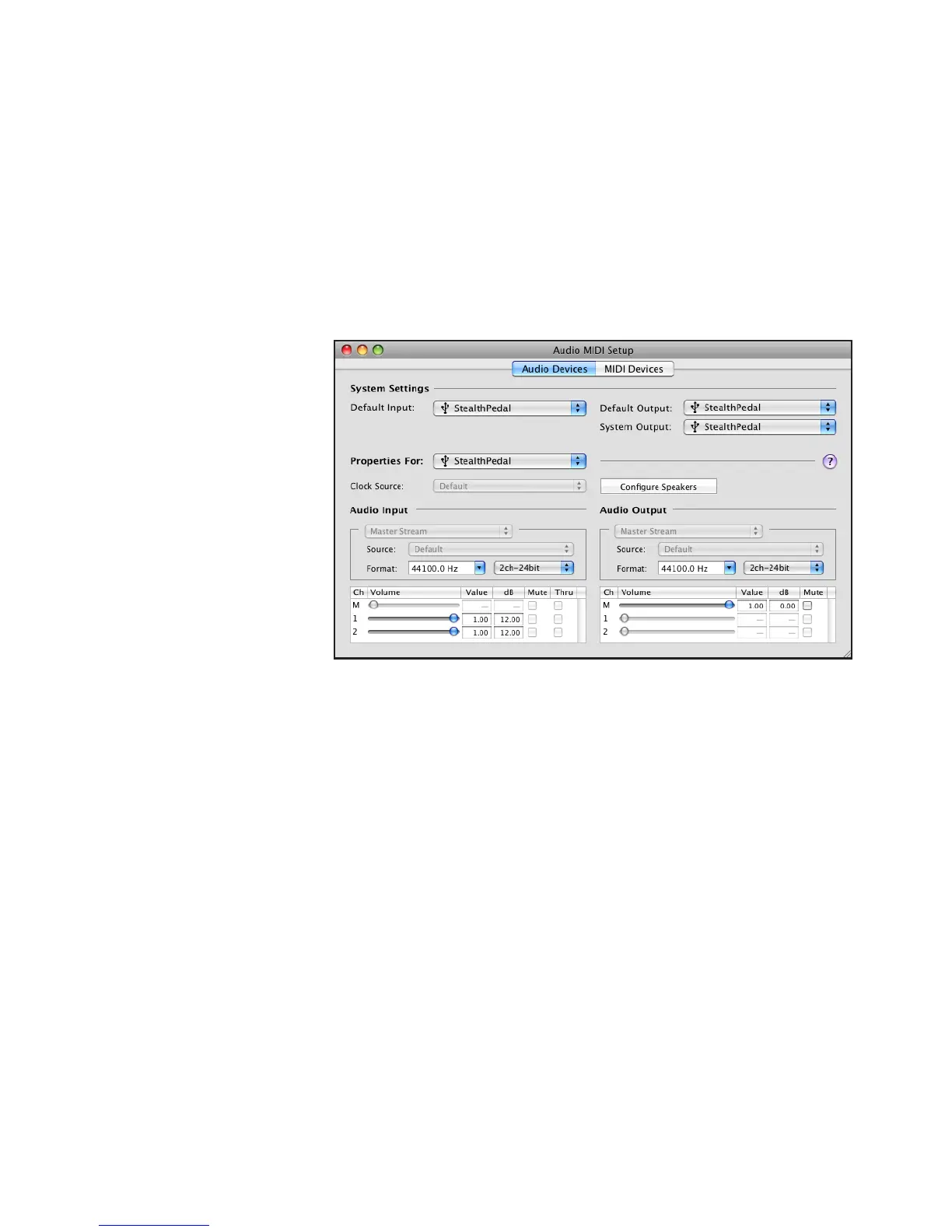
“Sound” System Preferences. Open the “Audio MIDI Setup” (Applications >
Utilities) and select the StealthPedal device to adjust the its audio settings
and parameters (figure 2.6).
figure 2.6
Control Panel description:
Audio Input Volume: these sliders set the input gain for inputs 1 and 2 (L
and R). Values between 0 and 6 dB will give a fixed gain of 0dB, values
between 7 and 12 dB will result in a fixed gain of +12 dB.
Audio Output Volume: this slider sets the audio output volume for outputs 1
& 2 (L / R) and headphones.
Audio Output Format: sets the output frequency for StealthPedal. 32 kHz - 48
kHz are supported, all at 24 bit. Please note: the input and output frequency
controls are tied together-any changes to input frequency are ignored!
Note: latency Settings in Mac OS X are controlled by host applications.
Please make any latency adjustments within the chosen application.



 To Next Page