15
Menu (Details):
Stirring:
Torque trend measurement:
The torque trend measurement is used to deduce the
change in viscosity of the reaction medium. The device is
not designed to measure absolute viscosity. It only measure
and display the relative change in the viscosity of the me-
dium from a starting point specified by the user.
The value can always be reset to 0% by pressing the “Back”
(T, see Fig. 12) membrane key.
Note: Torque trend measurement only works for a con-
stant set speed for the duration of the measurement.
As a result, intermittent mode cannot be used in conjunction
with torque trend measurement.
The current control variable is saved as the reference 0%,
ΔP and shown on the digital display. The change in the vis-
cosity is then shown in %. Depending on whether the vis-
cosity increases or decreases, the percentage rises or falls
above or below 0% respectively.
Intermittent mode:
The menu allows the user to activate the “Run/Stop“ func-
tion. The run time and stop time can be set separately.
Speed limit:
The menu allows the user to set the desired maximum up-
per speed limit for the reactor system. The initial setting is
the maximum permissible speed of the stirrer. If the user
changes this setting, control system of the reactor saves the
new value for future stirring tasks.
If the “Speed Limit” has been changed, then the speed can
be adjusted only within the new range.
Heating:
Control mode:
In the menu, the user is allowed to select “Accurate” or
“Fast” control mode by rotating and pressing knob (A). The
selected control mode is indicated by a tick.
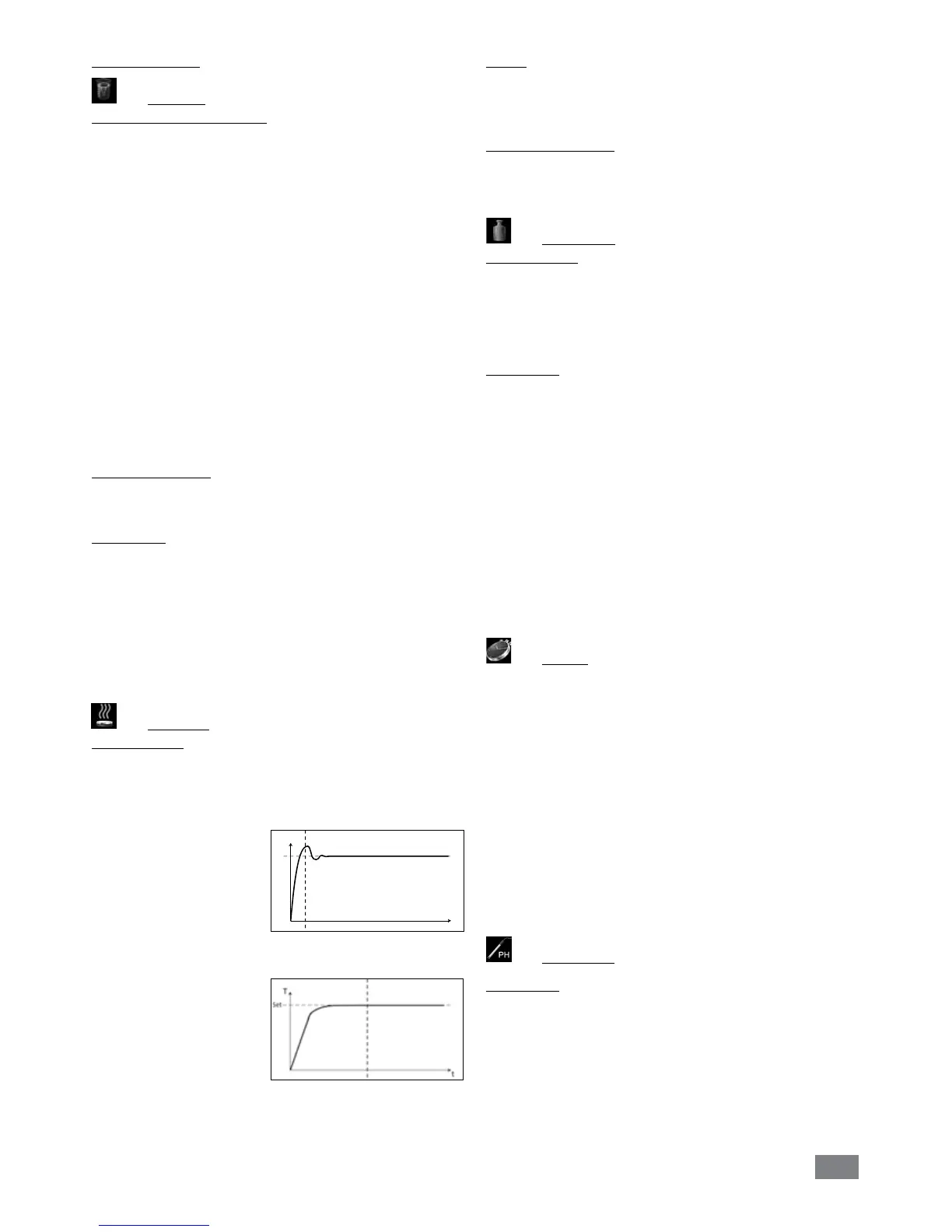
Fast: reach target temperature quickly but with big over-
shoot and large hysteresis
at the beginning.
Accurate: Reach the target temperature takes somewhat
longer, but for this reason,
the initial overshoot and
the hysteresis are signifi-
cantly smaller.
Limits:
In “External (ext)“ option, the user is allowed to set the max-
imum and minimum temperature for external temperature
control. Confirm and store the setting by pressing on “OK“.
Temperature sensor:
In “Calibration“ option, the user is allowed to calibrate the
external temperature sensor.
Weighing:
Measurement:
With the weighing function, the user can perform simple
weighing tasks.
Note: The heating and stirring functions must be deacti-
vated.
Calibration:
• Open the “Calibration” submenu and confirm by press-
ing the rotary knob (A, see Fig. 12)
• Enter the calibration weight and conrm by pressing the
rotary knob (A, see Fig. 12).
• Place the calibration weight on the device and wait until
the device indicates that the calibration process has been
completed.
Depending on the selected calibration mode, 2-point or
3-point must follow these steps two or three times.
Once the calibration process has been completed success-
fully, the weighing module is ready for use.
Regularly re-calibrate the device.
Timer:
In the menu the user can specify that the timer is displayed
on the working screen. A tick shows that the option is acti-
vated. This setting allows the user to specify the actual time
for the heating procedure.
A default time can also be set for the timer. This setting al-
lows the user to start the heating task for a standard time.
The device stops automatically after expiry of the set time,
and the set time used for the heating procedure appears in
the display.
Note:
The user can stop the stirring function before expiry
of the set time. In this case the countdown of the timer is
interrupted.
pH Probe:
Calibration:
The pH Probe must be calibrated before being used to at-
tempt a pH measurement.
The calibration is used to adjust the pH probe and the de-
vice so that they work together correctly. As part of the
process, the neutral and pH gradient are specified for the
measurement chain. To complete the calibration, use buffer
solutions in accordance with DIN 19266.
T
Set
t


 To Next Page