7
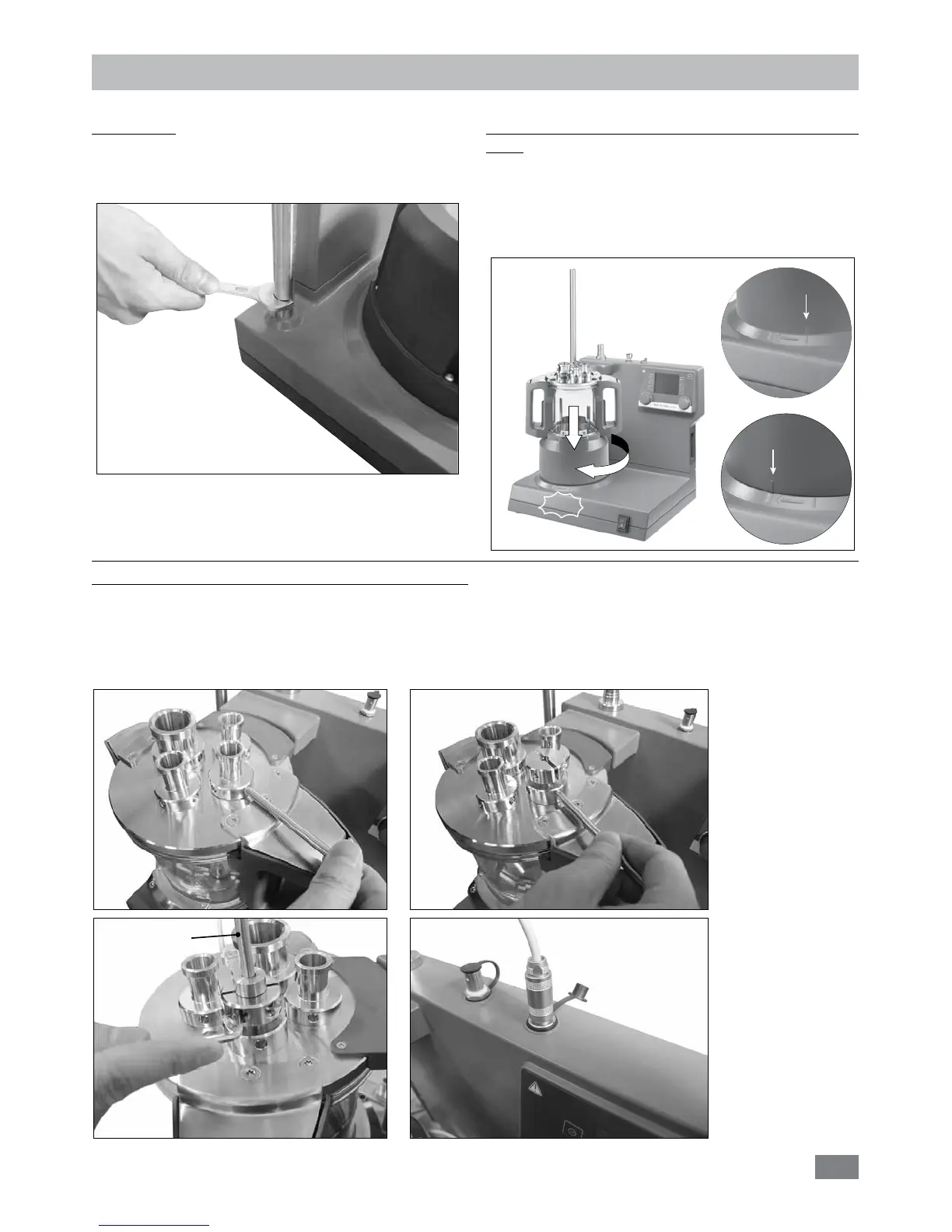
Attach the reactor vessel to the LR 1000 basic/control
base:
Ensure the LR 1000 basic/control is set up on an even,
stable, clean and non-slip working table.
Set the reactor vessel to the LR 1000 basic/control base
carefully and ensure it is properly attached as indicated in
following image.
Setting up
CLICK
Unlock
Lock
Fig. 7
Support rod:
Screw the support rod onto the LR 1000 basic/control
base with the double open end wrench included with the
device until the end stop is reached.
Fig. 6
Installation and connection Pt 100 temperature sensor:
Remove a standard connection NS 14/23 from the reactor cover for connection the temperature probe.
Screw the LR 1000.61 sensor receptacle with sealing in the reactor cover.
Plug in the probe and pay attention to the minimum immersion depth and freewheeling of the anchor mixer. Fix the position
in the housing with the two screws for sliding stop.
Connect the temperature probe with the appropriate socket.
Fig. 8
Pt 100


 To Next Page