9
A
B
F
O
L
C
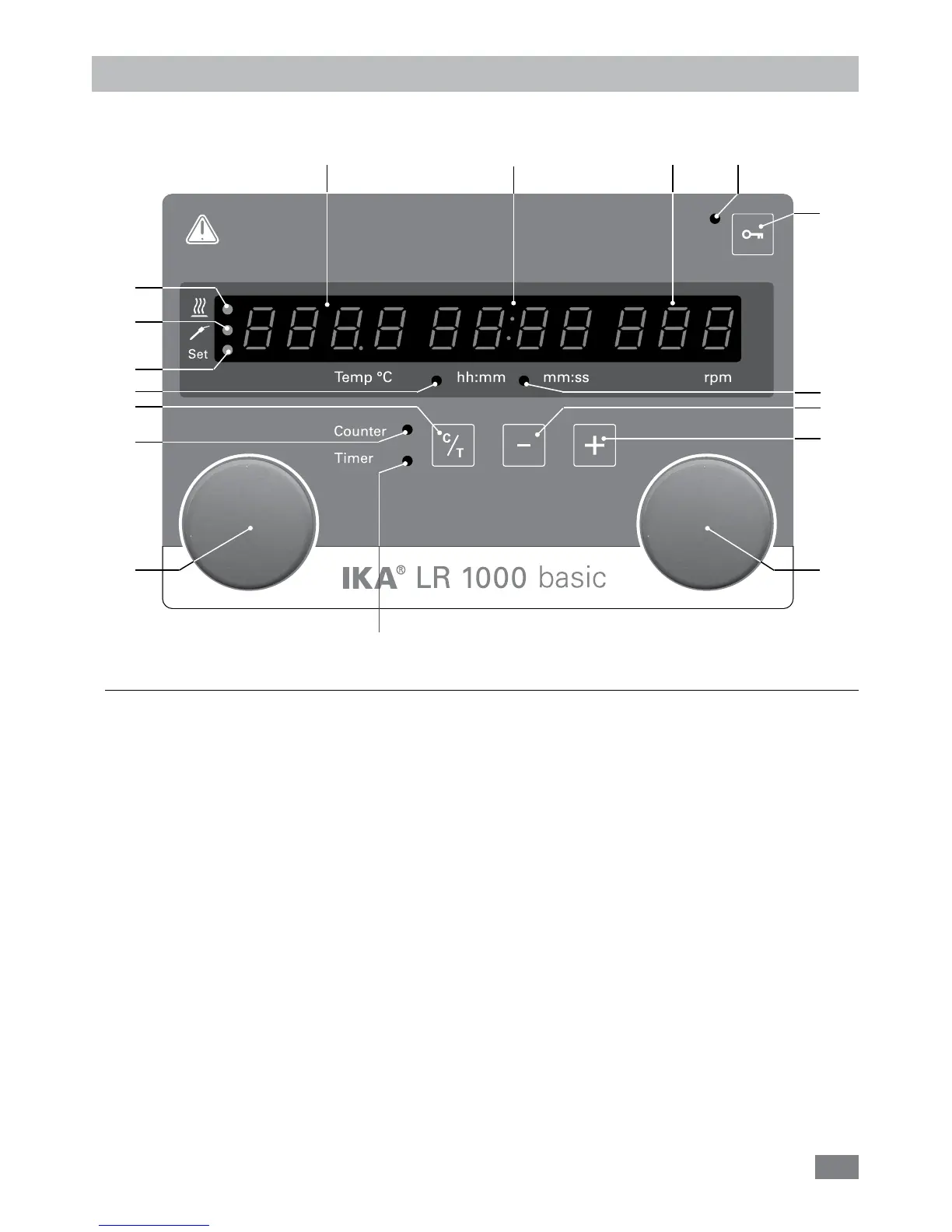
Fig. 11
D
E
G H I
J
K
M
N
P
R
Operator panel and display
•
LR 1000 basic:
Item Designation Function
A Rotating/pressing knob: Start/stop the stirring function
Change the settings of stirring speed
B Rotating/pressing knob: Start/stop the heating function
Change the settings of the temperature
C
Counter/Timer (C/T) button:
Switch between “Counter“ and “Timer“ function
D Timer (+): Increase the “Timer“ value
E Timer (-): Decrease the “Timer“ value
F Key button: Lock/unlock knobs and keys
G Display, temperature: Display the set and actual temperature
H Display, counter/timer: Display the counter and timer values
I Display, stirring speed Display the set and actual stirrer speed
J LED, timer The LED indicates the “Timer“ function is activated
K LED, counter The LED indicates the “Counter“ function is activated
L LED, hh:mm The LED indicates the “Timer“ or “Counter“ is working with unit hh:mm
M LED, mm:ss The LED indicates the “Timer“ or “Counter“ is working with unit mm:ss
N LED, key button Indicates that the function of key and knobs is deactivated
O LED, heating The LED indicates the heating function is activated
P LED, temperature sensor The LED indicates the external temperature sensor is connected
R LED, Set The LED lights simultaneously with the display of the set value for heating function.


 To Next Page