For more details, please visit www.iliferobot.com12
English
Product Operation
Turn on the robot
Note:
• After the robot finishes its work, please do not turn it off, and fully
recharge it for the next run.
• If the robot pauses working for more than ten minutes, it will enter
sleeping mode. If you need to wake up the robot again, you need to
press the AUTO button once.
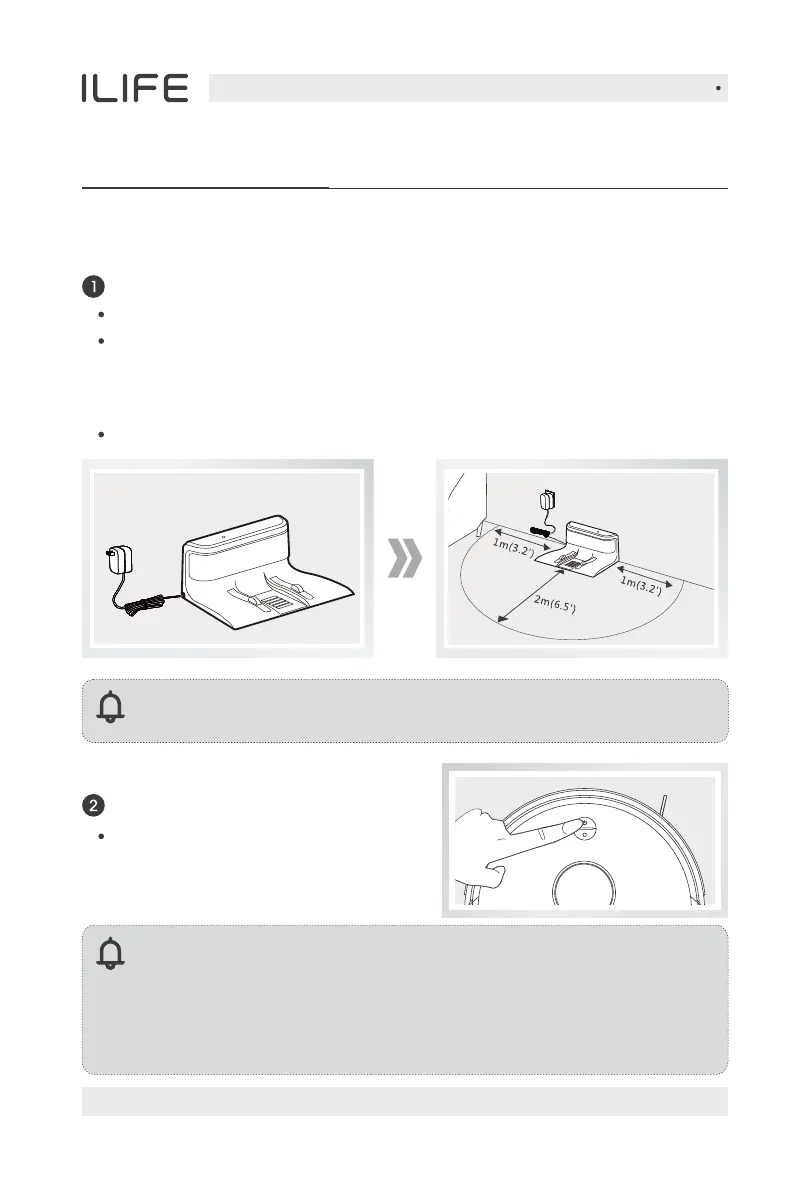
Charging dock
Placement of charging dock
Connect the adapter with the charging dock.
Connect the power.
Press and hold the AUTO button for
3 seconds to turn on, and press and
hold it for 5 seconds to turn off.
Placement of the charging dock: place the charging dock against the wall
horizontally and there must be no object on the left and right side within
one meter and in the front within two meters. There must also be no
reflective object such as a mirror around the dock.
Reminder: When the charging dock is connected to the adapter,
the signal light of the dock will light up.


 To Next Page