English
For more details, please visit www.iliferobot.com 19
APP Connection
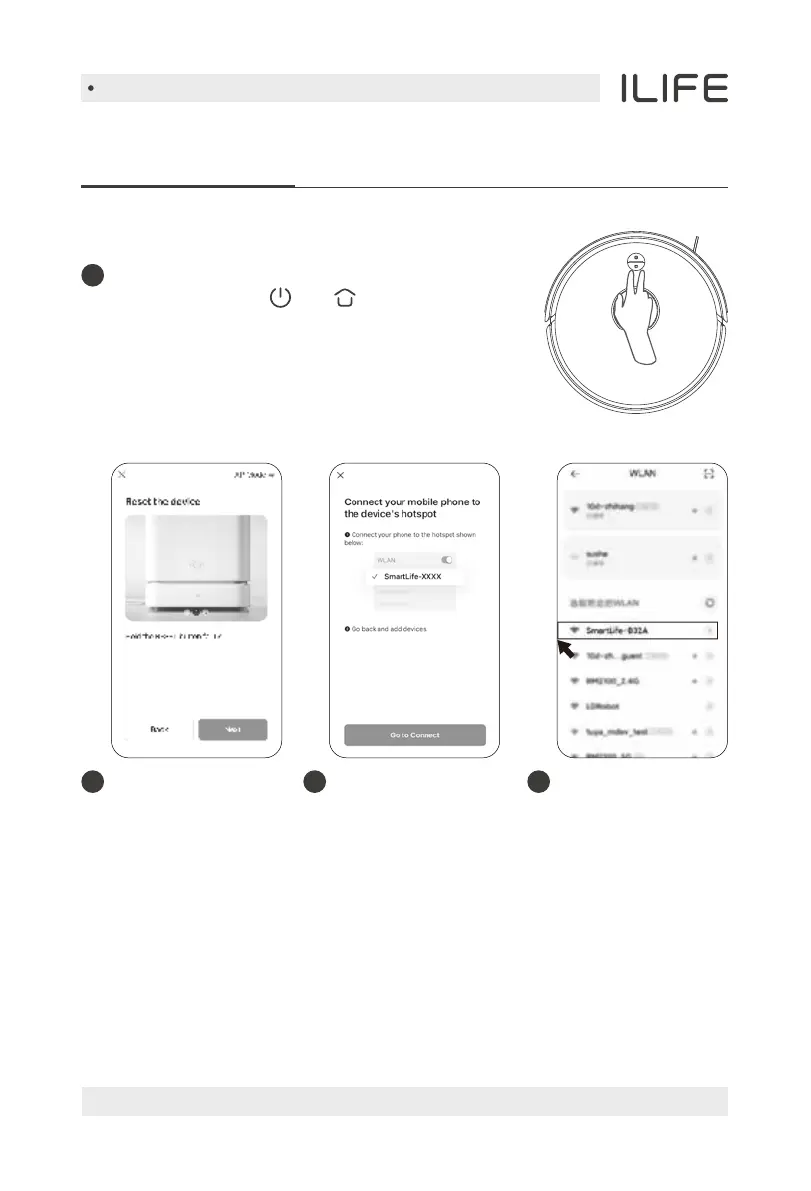
Hotspot networking (compatible mode)
Select hotspot
networking mode
and confirm that the
WiFi indicator light
on the robot vacuum
cleaner flashes slowly.
2
1
First start the robot vacuum cleaner,
press and hold the and keys on the
main unit at the same time for 3 seconds,
and when you hear the voice prompt of
“AP mode” and the WiFi indicator light
flashes slowly, it means that the machine
has entered the networking mode.
Read the instructions
for hotspot connection
carefully and select to
connect.
3
Select the robot
vacuum cleaner
hotspot with the
beginning of
SmartLife, and
after connecting
successfully,
return to the APP.
4


 To Next Page