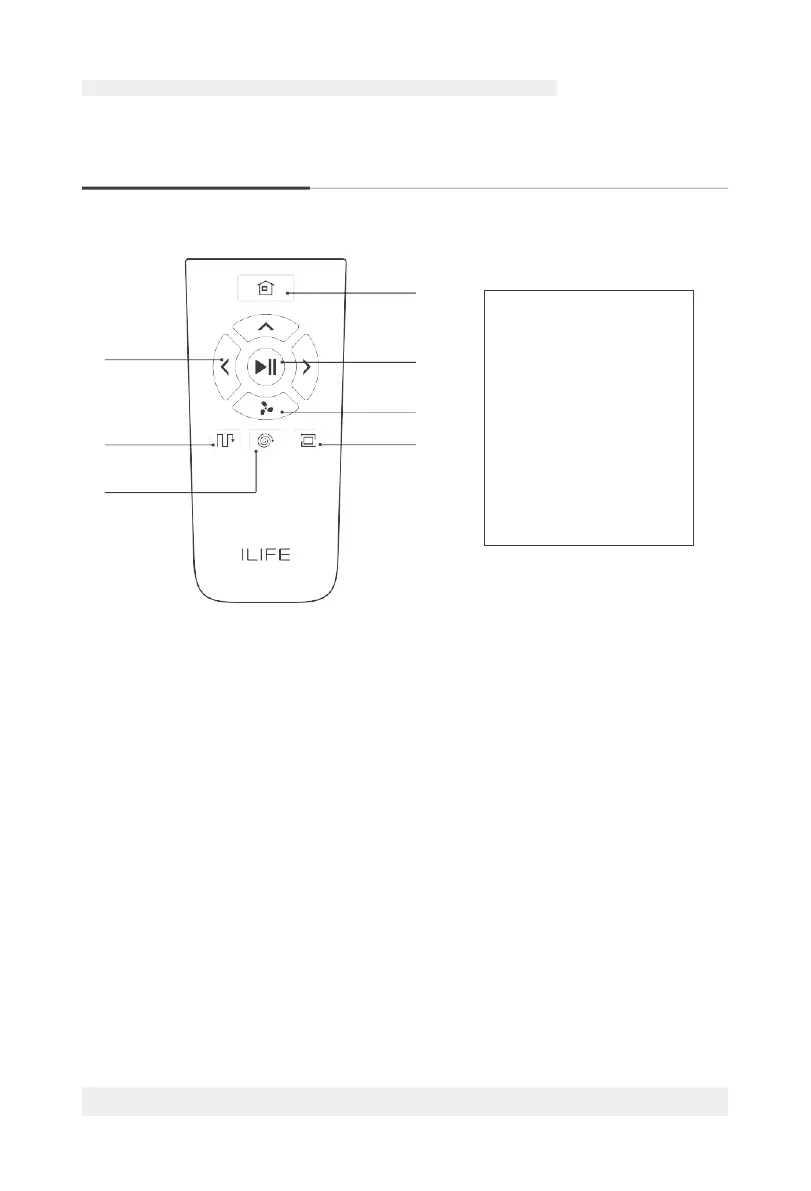
Remote Control Operation
4
1
5
6
2
7
3
0 Clean/Pause Button @)
•
Press the button to switch the robot from Sleep Mode to Select Mode .
•
Press the button when in Select Mode to start cleaning.
•
Press the button to Pause the robot during its operation.
f) Direction Buttons
A.
" C2v " Forward
• Press the button to move the robot forward.
Attention: The Forward button doesn't work during the operation of the robot.
B.
" CD " MAX Mode
• Under the Cleaning Mode, to clean dust traffic area, please press "CD " to
increase the suction level and then vacuum will go to deep cleaning mode,
"Hi" will be shown on the display panel. Press
"CD " again to switch back to
normal cleaning mode. "Lo" will be shown up on the display panel.
• Under the Mopping Mode, the speed of water dropping can be changed
according to the actual environment. Press
"CD " to change different levels
and each level will be shown on the display panel as l(low), 2(middle), 3(high).
The default level is middle.
1.
Direction Buttons
2.
Path Mode
3.
Point Mode
4.
Self-charge Button
5.
Clean/Pause Button
6.
Max Mode
7.
Border Mode
For more details information, please visit: www.ilifecare.in



 To Next Page